
Primary signal
Signups
More referrals turn into signups
More referred people sign up once the reminders recover invites that would otherwise be forgotten.
By clicking “Accept All Cookies”, you agree to the storing of cookies on your device to enhance site navigation, analyze site usage, and assist in our marketing efforts. View our Privacy Policy for more information.
We use cookies to understand how the workflow library is used and to improve it.
Pick how you want to build it.
 Build with the SuprSend Agent
Referral invites go unanswered. The referred person means to sign up later, then forgets and never does.
A referred person has no relationship with your product. Without the friend's name and the reward up front, the invite gets ignored.
Reminders keep chasing someone who already signed up. A referred person who joined still gets nudged to sign up.
Referral offers sit open with no reason to act now. Without a closing window and a final nudge, the referred person keeps putting it off.
Referral invite sent
The referred person gets the invite by email (REFERRAL_SENT).
Wait for signup
It waits three days for the referred person to sign up.
First reminder
If three days pass with no signup, a reminder email goes out.
Final reminder
Three days later, if there is still no signup, one last reminder goes out.
Signing up ends it
Signing up at any point (REFERRAL_SIGNUP_COMPLETED) cancels the remaining reminders.
"Sarah invited you to try Acme, $20 for both of you" gets opened far more than a generic invite, because the referred person trusts the friend, not your brand yet.
The workflow emails only the referred person. Add an Invoke Workflow step on the signup branch to tell the referrer their friend joined.
A second reminder that repeats the first gets ignored. Make it say something new, like the reward is still waiting.
The same person can be referred by two friends. Match the stop on the referral (referral_id), not the person, or one signup stops the other referral too and credits the wrong friend.
The invite gives a deadline to sign up. Time the reminders to arrive before it, or the final one points to an offer that already closed.
This workflow treats signup as the goal. If your reward unlocks only after a further step, point the stop at that action so the reminders keep going until it is done.
The actual notifications this workflow sends, on each channel.
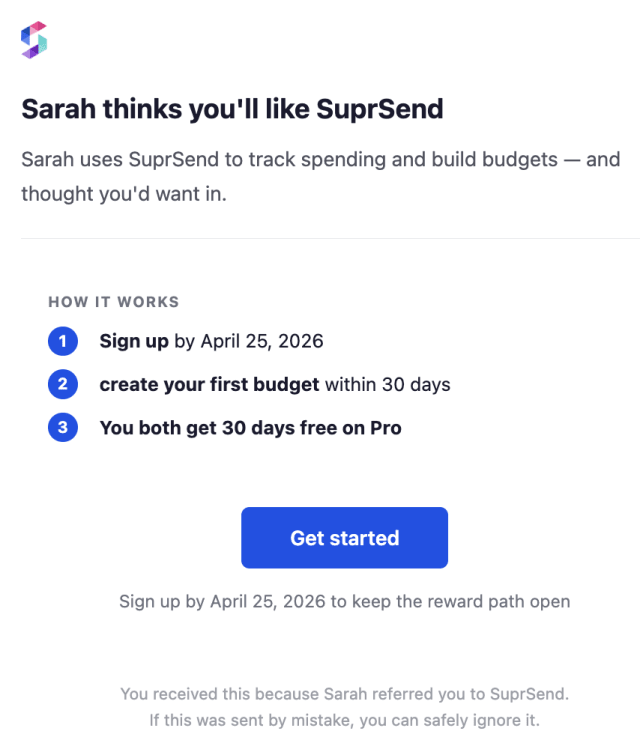
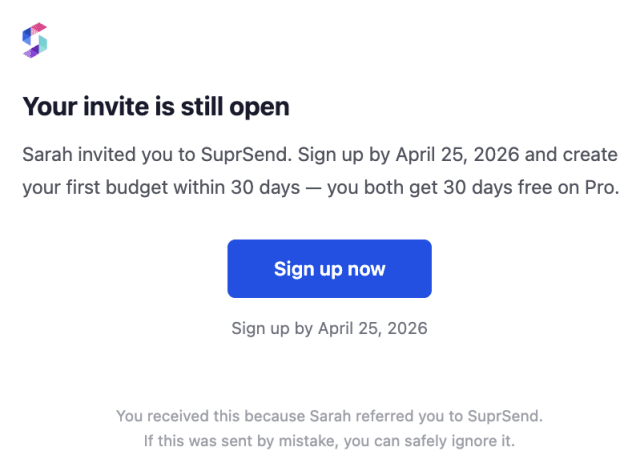
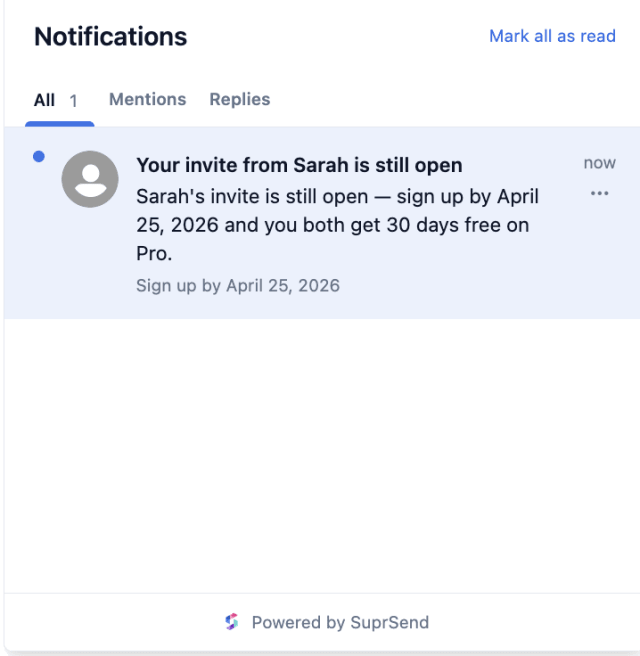
More referred people sign up once the reminders recover invites that would otherwise be forgotten.
When referred people mark the emails as spam or unsubscribe, the reminders are pushing too hard on someone who never asked to hear from you.
Quick answers about setting up and running this workflow.
No. Signing up (REFERRAL_SIGNUP_COMPLETED) at any point ends the workflow and cancels the remaining reminders, as long as it carries the same referral_id as the invite.
Email only. A referred person has no account yet, so email is the one channel sure to reach them.
Two, one after three days and one three days later. Adjust the Wait Until delays, or add more reminders, in the workflow editor or through the SuprSend MCP.
Trigger a payload shaped like REFERRAL_SENT with a referred person and a referral_id. To confirm the reminders stop, fire REFERRAL_SIGNUP_COMPLETED with the same referral_id. You can do this from the Test button in the workflow editor, by asking the SuprSend Agent in the dashboard, or through the API, CLI, or MCP.
After the final reminder the workflow stops, so someone who has not signed up is not emailed forever. To try again later, send a fresh referral or include them in a separate campaign.
Sign up and test the workflow directly in the dashboard.
Copy the prompt, paste it into the Agent in your SuprSend dashboard, and the workflow gets built for you.
Set up SuprSend MCP in Claude Code, Cursor or Windsurf, copy the prompt, and the workflow builds itself in your workspace.