
Primary signal
Accepted
More invitations accepted
More invited users accept and join once a reminder is recovering invitations that would otherwise be missed.
By clicking “Accept All Cookies”, you agree to the storing of cookies on your device to enhance site navigation, analyze site usage, and assist in our marketing efforts. View our Privacy Policy for more information.
We use cookies to understand how the workflow library is used and to improve it.
Pick how you want to build it.
 Build with the SuprSend Agent
Sent invitations go unanswered. The invitee misses or forgets the first email, and the invitation quietly expires.
A new invitee can only be reached by email. An external person has no app login, in-app inbox, or push set up to fall back on.
Reminders keep chasing invitations that are already settled. Someone who accepted or declined, or an invite the team revoked, still gets nudged to respond.
Tracking which invites are still pending is manual work. As you send more invitations, no one reliably notices which ones are still waiting and follows up in time.
Invitation sent
An invitation goes out and the invitee receives it by email (INVITE_SENT).
Wait for a response
It pauses for two days, watching for the invitee to accept or decline, or for the invite to be revoked.
A response ends it
If the invite is accepted, declined, or revoked (INVITE_ACCEPTED, INVITE_DECLINED, INVITE_REVOKED), no reminder is sent.
No response, one reminder
If two days pass with the invite still pending, the invitee gets one reminder by email.
An invited person never opted in, so repeated chasing reads as spam and can hurt your sender reputation. One reminder two days later recovers most missed invites.
"Sarah invited you to the Acme workspace" gets opened far more than "You have a pending invitation," because the invitee may not recognize your product yet.
The person who sent the invite usually wants to know the outcome. Add an Invoke Workflow step on the response branch to tell the inviter when the invite is accepted or declined.
Stop the reminder on acceptance, decline, and revocation, each matched to the same invitation (invite_id). Match on the user instead and accepting one invite cancels the reminder for another they still have open.
A reminder a few hours after the invitation assumes the invitee is ignoring it, when they may just not have checked email yet. Two days gives a real chance to respond first.
The reminder fires exactly two days after the invitation, so it can arrive in the middle of the invitee's night and be buried by morning. A Time Window keeps it within daytime hours.
The actual notifications this workflow sends, on each channel.
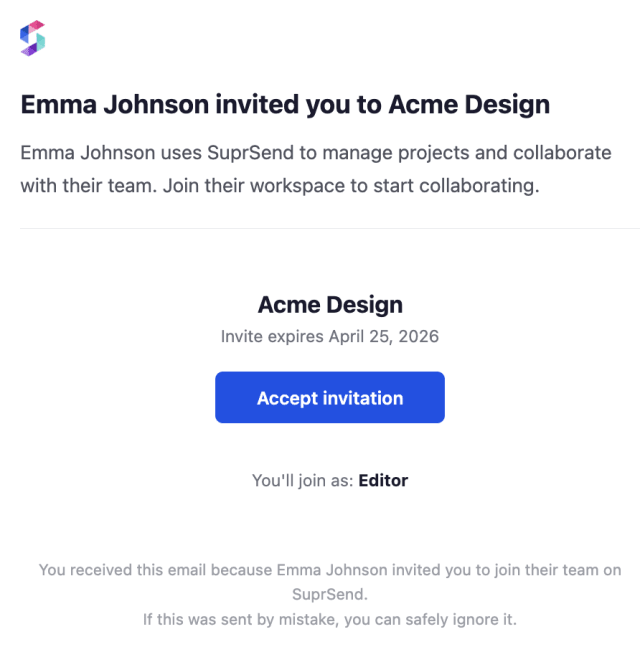
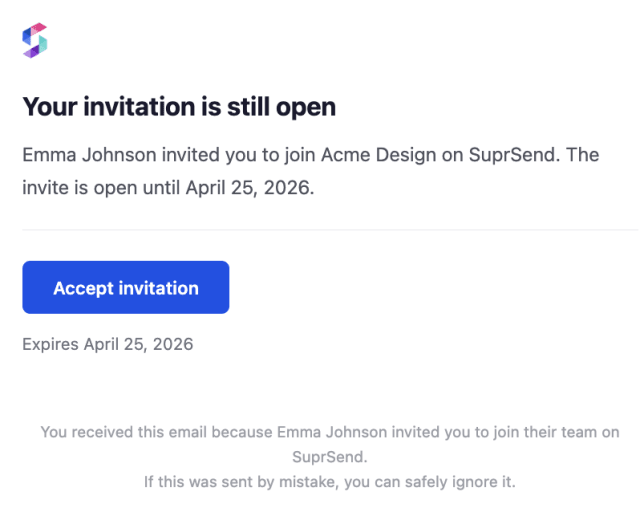
More invited users accept and join once a reminder is recovering invitations that would otherwise be missed.
When invitees mark the reminder as spam or unsubscribe, the follow-up is pushing harder than an external invite should.
Quick answers about setting up and running this workflow.
No. Any of those three responses ends the workflow and cancels the reminder, as long as it carries the same invite_id as the invitation.
Email only. It is the one channel sure to reach someone who is not a user yet and has no app login, in-app inbox, or push set up. Add other channels to the templates if your invitees already have them.
If you trigger by API or list, you can pass the invitee's email inline when you trigger the workflow, so no profile is needed first. If you trigger by event, create or upsert the invitee before the event fires, since events expect the recipient to already exist.
Trigger a payload shaped like INVITE_SENT with an invitee and an invite_id. To confirm the reminder stops, fire INVITE_ACCEPTED, INVITE_DECLINED, or INVITE_REVOKED with the same invite_id. You can do this from the Test button in the workflow editor, by asking the SuprSend Agent in the dashboard, or through the API, CLI, or MCP.
The workflow sends one reminder and then ends. One reminder suits most invitations, but if your product has seen low response to a single nudge, you can add another reminder.
Sign up and test the workflow directly in the dashboard.
Copy the prompt, paste it into the Agent in your SuprSend dashboard, and the workflow gets built for you.
Set up SuprSend MCP in Claude Code, Cursor or Windsurf, copy the prompt, and the workflow builds itself in your workspace.