
Primary signal
Recovered
Users get back in fast
More locked-out users return when the link arrives instantly and drops them straight into sign-in, compared with a slow or buried reset.
By clicking “Accept All Cookies”, you agree to the storing of cookies on your device to enhance site navigation, analyze site usage, and assist in our marketing efforts. View our Privacy Policy for more information.
We use cookies to understand how the workflow library is used and to improve it.
Pick how you want to build it.
 Build with the SuprSend Agent
A locked-out user needs the link now, not in a few minutes. Every second of delay is a user stuck at the door.
Passwords and codes add friction to getting back in. A user who forgot their password, or has to find and type a one-time code, often gives up before they sign in.
A link that never expires is a key left lying around. A forwarded or leaked reset email should not still work days later.
Separate flows for magic links and password resets double the work. Two near-identical builds drift apart and both need maintaining.
A link is requested
A user asks for a magic sign-in link or a password reset (MAGIC_LINK_REQUESTED, PASSWORD_RESET_REQUESTED).
The secure link is emailed at once
A single email with the one-time link goes out right away.
The run ends
Once the email is sent, the workflow ends; it does not wait for or track the click. The link handles sign-in in your app.
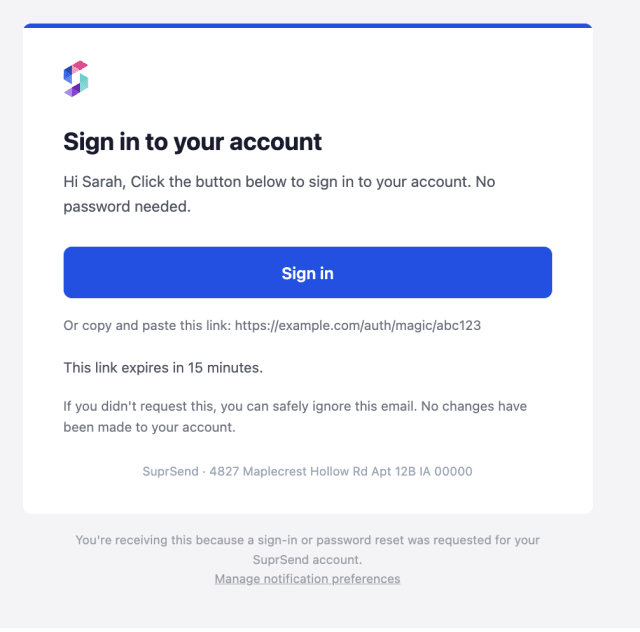
The email should be the link and little else competing with it. A single button gets the user back in faster than a wall of text and fine print.
A magic link is a key to the account, so set a short expiry and one-time use on the link. The email already states the expiry ({{expiry_time}}) so a user who opens it late knows to request a fresh one instead of hitting a dead link.
A reset email the user did not ask for should calm, not alarm: "ignore this if it wasn't you, your password has not changed." It heads off panic and a support ticket.
A reset link should open straight onto the reset or sign-in, not a homepage where the user starts over. The fewer steps from the email, the more get back in.
Most resets are routine forgetfulness, not a breach. Locking or alarming the account on every request creates work and worry where there is none.
If the locked-out user cannot reach their inbox, an email-only reset strands them. Give an alternative, like an SMS option or a support route, so recovery is not a dead end.
The actual notifications this workflow sends, on each channel.
More locked-out users return when the link arrives instantly and drops them straight into sign-in, compared with a slow or buried reset.
When users contact support to get back in, the link is arriving slowly, landing in spam, or sending them to the wrong page.
Quick answers about setting up and running this workflow.
Yes. Both MAGIC_LINK_REQUESTED and PASSWORD_RESET_REQUESTED run the same flow, so you maintain one workflow instead of two near-identical ones.
Immediately on request, since a locked-out user is waiting at the door, not browsing.
Email, where users expect a sign-in or reset link. If a locked-out user cannot reach their inbox, add an alternative recovery route.
Your auth system sets those on the link itself; the workflow only delivers it. Keep the expiry short and retire the link once it is used.
Fire MAGIC_LINK_REQUESTED or PASSWORD_RESET_REQUESTED for a test user and check the email. Trigger from the Test button, the SuprSend Agent, or the API, CLI, or MCP.
Sign up and test the workflow directly in the dashboard.
Copy the prompt, paste it into the Agent in your SuprSend dashboard, and the workflow gets built for you.
Set up SuprSend MCP in Claude Code, Cursor or Windsurf, copy the prompt, and the workflow builds itself in your workspace.