





8 best HubSpot Marketing Hub alternativesfor customer engagement (2026)

We compared eight HubSpot Marketing Hub alternatives on the messages they cover, who on your team can run them, what an agent can do in them, ease of setup and pricing.

By , SuprSendOct 4, 2026

HubSpot Marketing Hub is the marketing part of HubSpot’s customer platform: email, forms, landing pages, ads, social and automation, built on HubSpot’s CRM.

Teams look elsewhere when most of what they send comes from their product: receipts, alerts, reminders and in-app updates that need to reach users on every channel, with preferences and logs in one place. The alternatives below cover that need, from one platform for every message to marketing tools priced for smaller lists, and they differ in who on your team can run them and what an agent can change in them.

Quick guide: HubSpot Marketing Hub alternatives by use case

If you needChoose
An in-app bell and feed inside your product?HubSpot has no inbox. SuprSend's inbox syncs read state across devices and adds tabs, toasts and per-tenant feeds, with six client SDKs.SuprSendSuprSendNovuCustomer.io
Transactional and marketing messages in one platform, sharing users, preferences and logs?SuprSend runs transactional notifications and campaigns on the same users.SuprSendSuprSendCustomer.ioBrevo
Open source with free self-hosting?Novu
Workflows kept as code in your repository and reviewed in pull requests?SuprSendSuprSendNovu
Each of your customers needs its own branding, templates and preference settings inside your product?SuprSend handles this with multi-tenant notifications.SuprSendSuprSend
A full orchestration layer: digests, user preferences, throttling, retries and provider fallback?SuprSendSuprSend
An agent that builds and debugs workflows, or your own agent working over MCP?SuprSendSuprSendNovu
Product and growth teams changing messages without waiting for an engineer?SuprSendSuprSendCustomer.io
Marketing email, landing pages and lead scoring, run by marketers from a UI?Account Engagement fits when Salesforce is your CRM; Marketo Engage fits large marketing operations teams.ActiveCampaignBrevoMarketo EngageAEAccount Engagement
Notifications that run in your own cloud, with support from the vendor?SuprSendSuprSend
Journeys for a consumer app with tens of millions of users?Braze
HubSpot is your CRM, you mostly email leads, and it already works?See when to stay.HubSpot Marketing Hub

What HubSpot Marketing Hub does

Marketing Hub is HubSpot’s marketing automation product. Marketers build emails, forms, landing pages, ads and social posts, and run them through workflows that act on records in HubSpot’s CRM. It shares that CRM with Sales Hub and Service Hub, so a lead’s form fills, email clicks and deals sit on one record.

Sending to leads is the centre of the product. SMS, WhatsApp and transactional email are available on Professional and Enterprise, through add-ons or monthly limits. HubSpot’s agents (Customer Agent, Data Agent, Content Agent and others) run on HubSpot Credits, and a remote MCP server lets Claude, ChatGPT and other clients read and update CRM records and marketing content.

LicenceProprietary, cloud only.
ChannelsMarketing email, ads, social, live chat and forms on every paid plan; WhatsApp (up to 1,000 messages a month) on Professional and Enterprise; marketing and transactional SMS and transactional email through add-ons on Professional and Enterprise.
BackendREST APIs, a developer CLI for apps and CMS themes, and a remote MCP server.
FrontendForms, chat widget and tracking code for your website; the docs list no notification feed for your product's users.
ComplianceSOC 2 Type II and SOC 3 reports in HubSpot's Trust Center; its cloud providers hold ISO 27001.
Billing unitMarketing contacts plus seats; monthly email sends capped at 5, 10 or 20 times the contact tier.
Self-hostingNone.
G24.4 across 14,500+ reviews; ease of setup 8.1.

Where HubSpot Marketing Hub is strong

  • Marketing, sales and service share one CRM record, so a marketer can trigger a workflow on a deal stage or a support ticket.
  • The editors for emails, landing pages and forms are easy to pick up; G2 reviewers score its ease of use at 8.6.
  • Multi-touch revenue attribution and customer journey reports on Enterprise tie campaigns to closed deals.
  • A large partner and training ecosystem: HubSpot Academy, solutions partners and over 2,000 marketplace apps.
PlanPriceIncludedExtra costs
Free$0Up to 2 users, 2,000 email sends a month with HubSpot brandingNone
Starter$20 a seat a month paid monthly; new-customer offers from $71,000 marketing contacts, 500 HubSpot Credits, up to 10 automated actionsMore marketing contacts
Professional$800 a month on an annual commitment, $890 paid monthly3 core seats, 2,000 marketing contacts, 3,000 credits, 300 workflows$3,000 onboarding; seats from $45; SMS and transactional email add-ons
EnterpriseFrom $3,600 a month5 core seats, 10,000 marketing contacts, 5,000 credits, 1,000 workflows$7,000 onboarding; seats from $75

Why teams look elsewhere

  1. 01Messages need to reach users inside the product. Marketing Hub sends to contacts by email, SMS and WhatsApp. Marketing Hub's docs list no mobile push to your app's users and no notification feed you can embed in your product. On HubSpot's community forum, teams that need push to their app users describe routing it through an integration such as OneSignal, or a webhook that calls a service they built.
  2. 02Transactional messages need a home. Password resets, receipts and alerts go out regardless of marketing consent. In HubSpot, transactional email is an add-on for Professional and Enterprise that comes with its own dedicated IP and is bought through sales. Transactional SMS is a separate add-on. Teams on Starter, or teams that want these messages to share logic with their in-app updates, often send them from a second system.
  3. 03The bill grows with the list. Marketing Hub bills on marketing contacts, the people you are allowed to email or target with ads, plus seats. Monthly email sends are capped at 5, 10 or 20 times the contact tier, depending on the plan. HubSpot's pricing FAQ says you cannot move to a lower contact tier until the contract renews. Professional and Enterprise also add one-time onboarding fees of $3,000 and $7,000.
  4. 04The free plan is small for a product with real users. HubSpot's free tools include 2,000 marketing email sends a month with HubSpot branding. A product sending receipts and alerts to a few thousand users passes that in days. For comparison, SuprSend's free plan covers 10,000 notifications a month across every channel.
  5. 05Workflows are built for leads, and product events need more. HubSpot workflows branch, wait and act on CRM records, with up to 10 automated actions on Starter, 300 workflows on Professional and 1,000 on Enterprise. Custom behavioural events are an Enterprise feature. Marketing Hub's docs list no step that collects many events into one digest, no per-user channel order, and no fallback to a second provider when a send fails.
  6. 06Engineers want notification changes in code review. HubSpot's developer CLI deploys apps and CMS themes, and its MCP server works on CRM records and marketing content such as emails and landing pages. Its docs list no command that pushes marketing workflows from a repository or promotes them from staging to production, so workflow changes are made in the dashboard.

How we compared these tools

For each tool we read the product docs, the API reference, the pricing page, the trust or security page and its G2 reviews. What we compared on: feature depth, use cases covered, billing model, developer experience, AI authoring, and ease of use for technical and non-technical team members.

Three different kinds of product get called “HubSpot Marketing Hub alternatives,” and they solve different problems.

Layer 1: Delivery providers

Amazon SES, SendGrid, Twilio, Firebase Cloud Messaging and APNs move a message to an inbox, a phone or a device. Everyone pays one of these, including HubSpot, whose SMS add-ons run on Twilio. They have no audience, workflow or editor of their own.

Layer 2: Unified notification platforms

SuprSend and Novu sit on top of the providers and run the messages a product sends: workflows, templates, user preferences, an in-app feed and delivery logs, across channels. SuprSend covers transactional, product and marketing messages on one set of users. Novu centres on product notifications and keeps an open-source core you can self-host. Both have an MCP server, and they differ in how much of the platform an agent can operate end to end.

Layer 3: Customer engagement platforms

HubSpot Marketing Hub, Customer.io, ActiveCampaign, Brevo, Marketo Engage, Account Engagement and Braze run campaigns and journeys for marketers. Their agents mostly read data and help inside the campaign builder. Product notifications and preferences your customers’ admins control are usually left to you, and only some of them offer an embeddable inbox.

The best HubSpot Marketing Hub alternatives

ToolBuilt aroundStrongest atMeant forBilling unitFree planPaid fromG2
SuprSendSuprSendA notification engine for transactional, product and engagement messages on nine channelsWorkflows, in-app inbox, preferences and tenants; SuprSend agent, MCP server and CLIEngineering, product and growth teams sending from a productNotification per channel10,000 notifications a month$100 a month4.8 (129 reviews)Ease of setup: 9.4
Customer.ioBehavioural messaging on event and profile data, started from emailJourneys on product events; in-product agent, MCP server and CLILifecycle marketers at product-led companiesProfiles (people and objects)None$100 a month4.4 (953 reviews)Ease of setup: 7.9
ActiveCampaignEmail automation with a built-in sales CRMAutomation builder for small teams; MCP connector for reporting and contactsSmall businesses and agenciesContactsNone (14-day trial)$15 a month4.4 (14,617 reviews)Ease of setup: 8.0
BrevoEmail, SMS and WhatsApp campaigns with transactional email on the same accountLow cost per send to large lists; MCP server for contacts and campaignsSmall businesses and ecommerceEmails sent300 emails a day$9 a month4.5 (2,511 reviews)Ease of setup: 8.9
Adobe Marketo EngageB2B programs, lead scoring and CRM sync for large marketing teamsProgram and smart campaign depth; MCP server in betaEnterprise B2B marketing operationsDatabase size, quotedNoneQuote only4.1 (3,084 reviews)Ease of setup: 6.7
Account EngagementB2B marketing automation inside SalesforceScoring, grading and nurture programs on Salesforce recordsB2B teams whose CRM is SalesforceContactsNone$1,250 a month4.0 (2,403 reviews)Ease of setup: 7.3
BrazeJourneys for consumer apps across push, email, in-app and messaging appsCanvas journeys at consumer scale; BrazeAI Operator and an MCP serverConsumer brands with large app audiencesData points, quotedNoneQuote only4.4 (1,785 reviews)Ease of setup: 7.6
NovuOpen-source notification workflows defined in TypeScript, with an in-app inboxFree self-hosting and workflows in your codebase; MCP server with 23 toolsDevelopers who want to own the notification codeWorkflow runs per subscriber10,000 workflow runs a month$30 a month4.6 (22 reviews)Ease of setup: 8.8

1.SuprSendSuprSend

Best for running transactional, product and engagement notifications from one platform, operated by engineering, product, growth and their agents
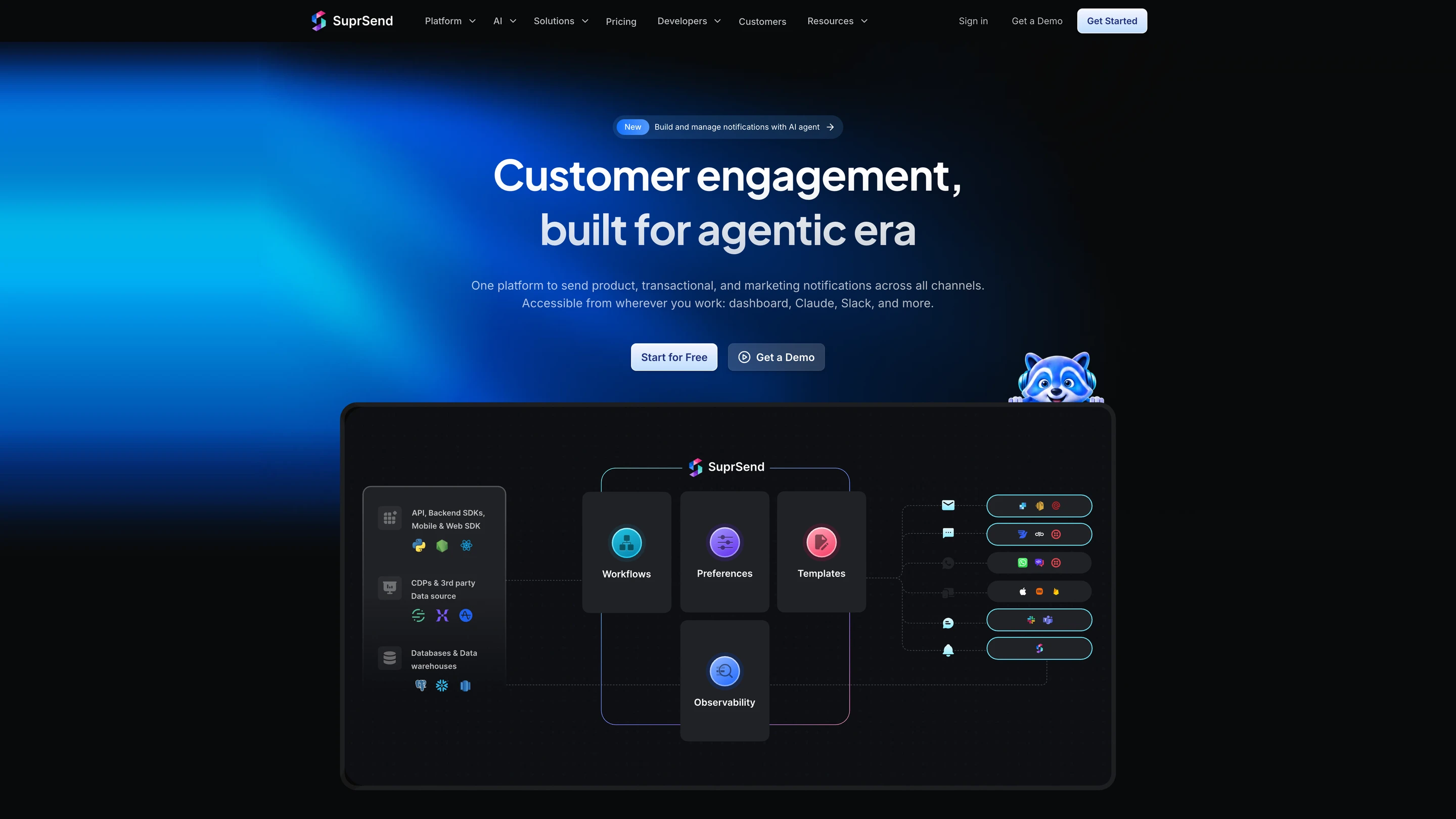
SuprSend's architecture: your API calls, SDKs, CDPs and data warehouses feed workflows, preferences, templates and observability, which send through email, SMS, WhatsApp, push, Slack and Microsoft Teams providers and the in-app inbox

What SuprSend is

SuprSend is a US company, founded in 2022, that runs every notification a product sends from one platform, from transactional alerts to engagement campaigns. Engineering, product and growth teams work in it alongside their agents.

A complete orchestration engine

WorkflowsA workflow engine with branches, conditions, delays, throttling, data fetch and webhook steps, and sends in each user's timezone. One send step reaches the user's channels in your order. Built visually, through the CLI or by an agent, with version history and rollback. Builder on every plan; throttling, fetch, webhook and timezone from Essentials.
In-app inboxA real-time bell and feed, read state synced across devices, tabs, toasts, per-tenant feeds and six client SDKs, embedded or headless. Every plan, Free included.
User preferencesUsers opt in or out per category and channel, in a preference centre you embed or host. Business.
TemplatingEditors for every channel, variants by tenant, user or language, version history with rollback and translation files. Every plan; translation files on Business.
Batching and digestsCollect events over a window and send one message, at a time the user picks, with batching and digests. Business.
Per-tenant setupsEach of your customers gets its own branding, templates, preferences and provider routing. Business add-on, Enterprise.
ObservabilityStep-by-step workflow logs and message logs with the provider's error, kept 30 days on Free and 90 on paid plans, with analytics and warehouse sync. Every plan; warehouse sync on Business.
Retries and fallbackBring your own providers; if one does not confirm delivery, the next one sends. Essentials.
DeploymentSuprSend cloud with 99.9% uptime, or your own VPC, on-prem or bring your own cloud with vendor support; SOC 2 Type II, ISO 27001, GDPR, HIPAA and CPRA. Self-hosted and BYOC on Enterprise.

How your team operates it

In the dashboard

The SuprSend agent builds a workflow from a description, drafts the copy for each channel and traces why a send failed. Product and growth work here and in Slack.

In your own agent

Connect the MCP server to Claude, ChatGPT, Cursor or any MCP client and build and change workflows, templates and tenants, test and send, and read the delivery log and analytics from there.

In your IDE or codebase

The CLI pushes and pulls workflows, templates, schemas and translation files, promotes staging to production and generates TypeScript types, so a bulk change is one command reviewed in a pull request.

Pricing. Free up to 10,000 notifications a month. Essentials starts at $100 a month for 50,000, then $2 per 1,000. Business starts at $250 a month for 50,000, then $5 per 1,000. Enterprise is custom.

Verdict. Choose SuprSend when the messages your product sends matter as much as your campaigns and you want them on one set of users, preferences and logs, run by your whole team and its agents. Keep HubSpot alongside it when your marketers live in HubSpot's CRM, landing pages and attribution reports. For the head-to-head, see how SuprSend differs from HubSpot Marketing Hub.
2.Customer.io

Best for lifecycle marketers at product-led companies who message users on what they do in the product

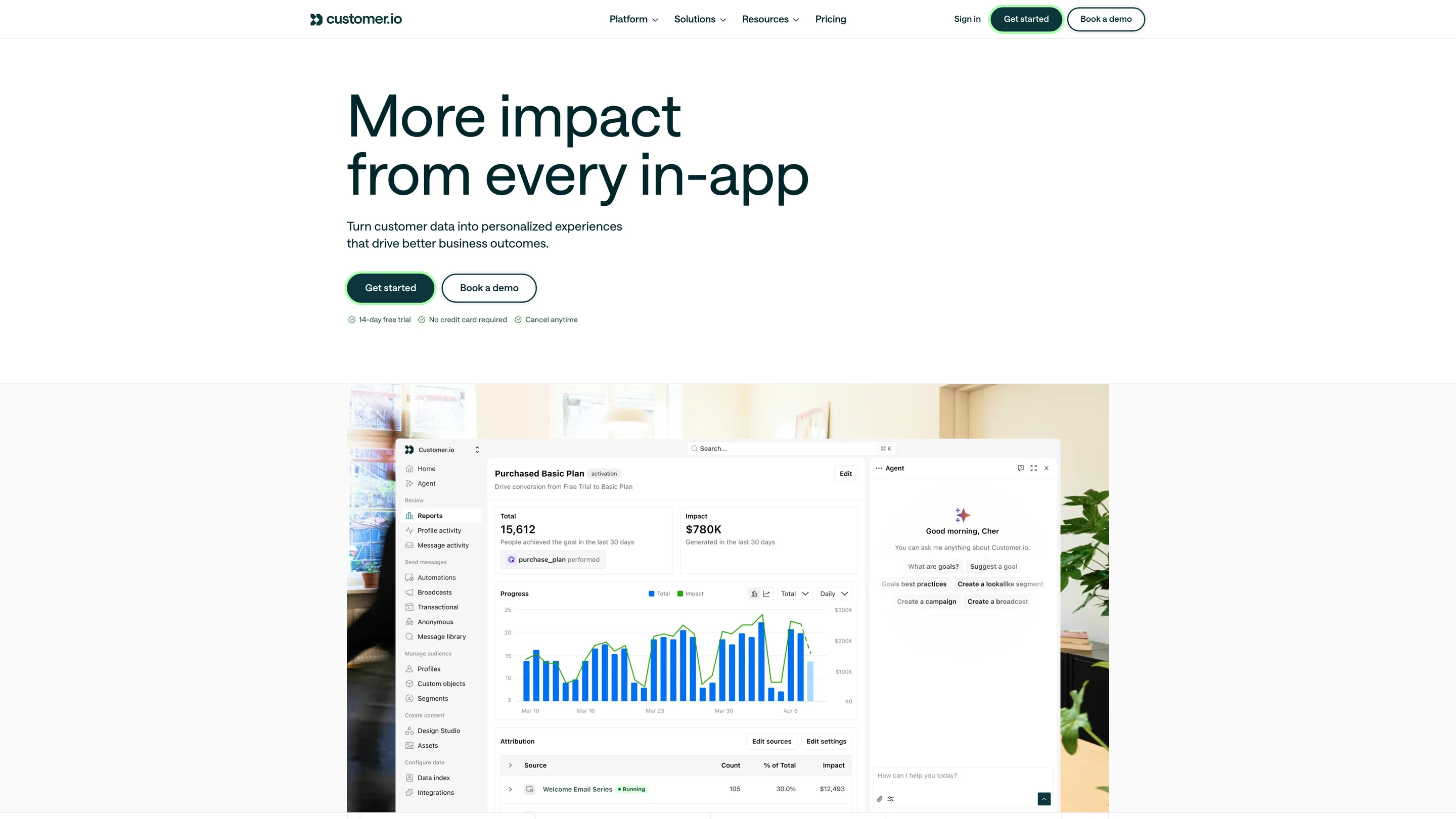
Customer.io's dashboard: a campaign goal report with conversions over time, attribution by message, and the agent panel

Where it goes deep. Customer.io started with email and added push, SMS, in-app messages, a notification inbox and webhooks. Journeys start from events your product sends and branch on profile and object data, so a trial reminder can depend on what the account has set up. A transactional API sends receipts and resets from the same workspace. Its in-product agent drafts messages, and its MCP server and CLI act under the signed-in user’s role, with writes held for approval where the client supports it.

Where it stops. There is no free plan, and every person and object stored counts toward the profile bill. Preferences that your customers’ admins control are left to you.

Pick it if your marketers want event-driven journeys and your engineers will keep sending product events.

Verdict. Customer.io is the closest match for a team leaving HubSpot because its messages depend on product behaviour. Look elsewhere if each of your customers needs its own branding, templates and preference settings.

3.ActiveCampaign

Best for small businesses that want email automation and a simple sales CRM at a lower price

Where it goes deep. ActiveCampaign began in 2003 as email software. Its automation builder handles branches, waits and goals, and a built-in CRM moves deals as contacts engage. SMS is a credit add-on, WhatsApp is a separate plan line, and transactional email runs through Postmark on a separate account. Its MCP connector for Claude and ChatGPT reports on campaigns, looks up contacts and adds a contact to an automation.

Where it stops. Starter caps at 25,000 contacts and five actions per automation. The docs list no official SDKs, staging environment, CLI or version history.

Pick it if you want HubSpot-style email automation for a small team and a smaller bill.

Verdict. ActiveCampaign is a like-for-like answer to Marketing Hub Starter and Professional for email-led teams. It does not cover in-product notifications.

4.Brevo

Best for small businesses and stores sending to large lists by email, SMS and WhatsApp

Where it goes deep. Brevo, formerly Sendinblue, bills on emails sent, so contacts you rarely email cost nothing. Campaigns, automation, SMS, WhatsApp and transactional email over SMTP or API share one account. Its MCP server manages contacts and email campaigns.

Where it stops. Automation on the lower plans is limited, and features such as contact scoring sit on the Professional plan. Brevo’s docs list no in-app feed or preference centre for your product’s users.

Pick it if your list is large, your sends are infrequent, and email is most of what you do.

Verdict. Brevo is the low-cost answer for teams leaving HubSpot over contact-based pricing. It stays a campaign tool, so product notifications need a second system.

5.Adobe Marketo Engage

Best for enterprise B2B marketing operations teams with complex programs and a dedicated admin

Where it goes deep. Marketo Engage organises work into programs and smart campaigns, with lead scoring, nurture streams and sync to Salesforce and Microsoft Dynamics. It started with email and sits in Adobe’s Experience Cloud. Its MCP server, in beta since April 2026, covers forms, programs, smart campaigns, leads and emails.

Where it stops. Pricing is quoted, and setup takes time: G2 reviewers score its ease of setup at 6.7. Product notifications and an in-app feed are outside its scope.

Pick it if you have outgrown HubSpot’s program structure and have people to run Marketo full time.

Verdict. Marketo is the step up for large B2B marketing teams. It asks more of your operations team than HubSpot does.

6.Salesforce Marketing Cloud Account Engagement

Best for B2B marketing teams whose sales team runs on Salesforce

Where it goes deep. Account Engagement, formerly Pardot, works on Salesforce leads, contacts and opportunities. Engagement programs nurture prospects, scoring and grading rank them, and sales sees every touch on the Salesforce record. Plans start with 10,000 contacts included.

Where it stops. It assumes Salesforce as your CRM and is sold on annual contracts. It is email-first, and product notifications are outside its scope.

Pick it if your company has standardised on Salesforce and marketing needs to work on the same records.

Verdict. Account Engagement is the natural move for teams consolidating on Salesforce. Teams without Salesforce gain little from it.

7.Braze

Best for consumer apps running journeys across push, email, in-app and messaging apps for millions of users

Braze's homepage: a customer engagement platform for marketers, with a loyalty push notification on a phone

Where it goes deep. Braze began as Appboy in 2011, a mobile engagement tool. Canvas builds journeys with experiment paths, decision splits and agent steps, with version history. Channels include WhatsApp, LINE and KakaoTalk, and Content Cards place messages inside the app. BrazeAI Operator works in the dashboard, and its remote MCP server reads analytics and creates templates and content blocks.

Where it stops. Contracts are quoted, and Braze states its own average time to value as six weeks. The docs list no CLI.

Pick it if you run a consumer app at a scale where predictive sends and segmentation on huge audiences pay off.

Verdict. Braze is the consumer-scale answer to Marketing Hub's B2B focus. It is more platform than most B2B teams need.

8.Novu

Best for developers who want open-source notification workflows they can self-host and keep in their codebase

Novu's homepage: open-source notification infrastructure for products and AI agents, with Slack, Teams, SMS, email, WhatsApp and Telegram channels

Where it goes deep. Novu’s core is MIT-licensed and free to self-host through its Community edition. With Novu Framework, workflows are written in TypeScript inside your app, and a GitHub Action syncs them. It ships an in-app inbox, digests and user-set quiet hours. Its MCP server has 23 tools covering subscribers, preferences, workflow changes, triggers, logs and integrations, and its Copilot arranges workflow steps.

Where it stops. Each workflow step sends to one channel, and the docs list no version history or automatic failover to a second provider. Tenants share one provider and template set, and the free plan keeps logs for 24 hours.

Pick it if open source and self-hosting matter more to you than a campaign builder for marketers.

Verdict. Novu suits engineering teams that want to own their notification code. Marketing-led teams moving off HubSpot will find its campaign tools lighter than HubSpot's.

When you should stay on HubSpot Marketing Hub

  • Your sales and service teams already work in HubSpot's CRM, and marketing needs to act on the same deals and tickets.
  • Most of what you send is marketing email to leads, and your product sends few notifications of its own.
  • Your marketing contact count is small enough that the contact tier is a minor cost.
  • Leadership reads multi-touch attribution reports in HubSpot to decide budget.
  • You rely on a HubSpot solutions partner, and switching tools would mean retraining the team and the agency.

Teams that stay while their product grows usually end up writing code around HubSpot: a job that copies product events into custom events, a service that sends password resets and push through another provider, and scripts that move people to non-marketing status to keep the contact tier down. That code is a hidden cost: your team builds it, maintains it and pays for it in engineering time on top of HubSpot’s price. What drives a switch is the moment product messages, more than campaigns, become most of what you send.

How to migrate off HubSpot Marketing Hub

  1. 01Record baselines. Export open, click, bounce and unsubscribe rates per email type for the last 90 days, so you can tell whether the new setup performs as well.
  2. 02Rebuild workflows. List each HubSpot workflow, its trigger and its steps, then rebuild it in the new platform; in SuprSend, keep the workflows in your repository with the CLI.
  3. 03Move contacts and identifiers. Export contacts with email addresses, phone numbers and the IDs your product uses, and map them to users in the new platform.
  4. 04Carry consent state. Export subscription types and opt-outs per contact and import them as preferences before the first send.
  5. 05Add the in-app layer. Embed the inbox and preference centre in your product, since HubSpot had no equivalent to move.
  6. 06Dual-send. Run one workflow on both systems for a week to a small segment and compare delivery and engagement against the baseline.
  7. 07Keep HubSpot for 30 days. Leave the old workflows paused, with exports saved, until the new numbers hold.

Conclusion

HubSpot Marketing Hub covers inbound marketing on a shared CRM: email, forms, landing pages, ads, social, lead scoring and attribution, priced on marketing contacts and seats. For B2B teams emailing leads, it does that job well.

Move when your product’s own messages become the main work: alerts, receipts, digests and in-app updates that need every channel, user preferences and one log. At that point you want every kind of message in one system, a complete orchestration engine, and a platform your whole team and its agents can operate. SuprSend’s free plan covers 10,000 notifications a month to test that on real traffic.

FAQ

Is HubSpot Marketing Hub free?

HubSpot's free tools include Marketing Hub features for up to 2 users and 2,000 marketing email sends a month, with HubSpot branding. Paid plans start with Starter at $20 a seat a month paid monthly, with new-customer offers from $7. Professional starts at $800 a month on an annual commitment, plus a $3,000 onboarding fee.

What is the cheapest HubSpot Marketing Hub alternative?

It depends on the unit each tool bills. Free plans: SuprSend covers 10,000 notifications a month, Novu 10,000 workflow runs, Brevo 300 emails a day, and HubSpot 2,000 email sends. At 50,000 messages a month, SuprSend Essentials is $100 with $2 per 1,000 after that, SuprSend Business is $250 with $5 per 1,000, and Novu Pro is $30 for 30,000 workflow runs, then $1.20 per 1,000. Novu counts workflow runs, and one run can send on several channels, so its unit differs from a per-message count. Brevo bills on emails sent and is the lowest-cost option for email-only campaigns. HubSpot and ActiveCampaign bill on contacts and Customer.io on profiles, so their cost depends on list size more than on how many messages you send.

Which HubSpot alternatives include an in-app inbox?

SuprSend and Novu ship an in-app inbox you embed in your product. SuprSend's inbox is on every plan, including Free, with six client SDKs, tabs, toasts and per-tenant feeds. Customer.io has a notification inbox with a bell and message panel. Braze places messages in the app with Content Cards. HubSpot, ActiveCampaign, Brevo, Marketo Engage and Account Engagement list no embeddable notification feed.

Which alternatives have an MCP server or an agent that builds messages?

SuprSend's agent and MCP server build and change workflows, templates and tenants, test and send, and read logs and analytics. Novu has an MCP server with 23 tools, and its Copilot arranges workflow steps. Customer.io has an in-product agent, an MCP server and a CLI. HubSpot's MCP server reads and updates CRM records and marketing content. Brevo, Braze and ActiveCampaign have MCP servers or connectors focused on contacts, campaigns and reporting, and Marketo Engage has one in beta.

Can one platform send transactional and marketing messages?

Yes. SuprSend runs both on the same users, preferences and logs, across email, SMS, WhatsApp, push, Slack, Microsoft Teams and in-app. Customer.io and Brevo send transactional email alongside campaigns. HubSpot offers transactional email as an add-on for Professional and Enterprise.

Does HubSpot Marketing Hub send mobile push notifications?

Marketing Hub's docs list no native mobile push to your app's users. HubSpot's mobile push sends internal alerts to HubSpot users, such as sales reps. Teams that need push to customers connect a push provider through an integration or webhook, or use a platform with push built in.

Which alternatives meet SOC 2, HIPAA and GDPR requirements?

SuprSend holds SOC 2 Type II and ISO 27001 and supports GDPR, HIPAA and CPRA, with a HIPAA BAA on Enterprise. HubSpot publishes SOC 2 Type II and SOC 3 reports, and ActiveCampaign lists SOC 2 and GDPR. Check each vendor's trust page for the certificate that matters to you, since HIPAA terms are usually limited to enterprise plans.

Can I self-host a HubSpot alternative?

HubSpot and the marketing platforms on this list are cloud only. SuprSend runs in your own VPC, on-prem or bring your own cloud on Enterprise, with vendor support. Novu's open-source core is free to self-host if you run it yourself.

Do I still pay email and SMS providers with these platforms?

With SuprSend and Novu you connect your own providers, such as SES, SendGrid or Twilio, and pay them directly. HubSpot, Brevo, ActiveCampaign and the other marketing platforms include sending in their price, with SMS usually billed as credits or add-ons.

Can I keep HubSpot's CRM and use another tool for product notifications?

Yes. Many teams keep HubSpot for the CRM, marketing email and landing pages, and send product notifications from their backend through a notification platform. Keep one source for opt-outs so both systems respect the same consent.

Related Resources

How does SuprSend compare with HubSpot Marketing Hub feature by feature?SuprSend vs HubSpot
What would 50,000 notifications a month cost on SuprSend?SuprSend pricing
Can marketers send campaigns from the same platform that sends product notifications?SuprSend broadcasts
What can an agent build and change in SuprSend?SuprSend for AI agents

There’s no better place for you
to build notifications

Join thousands of product & engineering teams using SuprSend to build and ship better notifications—faster.