9 best FCM alternativesfor push notifications (2026)

Nine tools compared on the messages they cover beyond a single push, who on your team can run them, what an agent can do in them, ease of setup and pricing.

By , SuprSendOct 2, 2026

Firebase Cloud Messaging (FCM) is Google’s free service for sending push notifications to Android, iOS and web apps.

Teams evaluating or already running FCM look elsewhere when a push has to be one step in a flow: sent at the right time, followed by an email if it goes unread, held back by the user’s preferences, and editable by someone other than the engineer who wrote the send call. The tools below add that layer, and the strongest let product, growth and your own agents run it alongside engineering.

Quick guide: FCM alternatives by use case

If you needChoose
Push only, free, with less token plumbing than raw FCM?EPExpo PushPBPusher Beams
Push is your whole requirement and FCM is already live?See when to stay.Stay on FCM
An in-app bell and feed next to push?Every platform with a feed ships a bell and a list. SuprSend's in-app inbox adds tabs, toasts, read state synced across devices and six client SDKs.SuprSendSuprSendKnockAirship
Transactional, product and marketing messages in one platform?SuprSendSuprSendKnock
Workflows and templates kept in your repo and reviewed in pull requests?SuprSendSuprSendKnock
A full orchestration layer: batching, digests, preferences and fallback to email or SMS when a push goes unopened?SuprSendSuprSend
Each of your customers gets its own branding, templates, preferences and providers?SuprSendSuprSend
An agent that builds and debugs notifications, or your own agent over MCP?SuprSendSuprSendKnock
Product and growth changing messages without waiting for an engineer?SuprSendSuprSendOneSignal
Purely marketing campaigns and journeys, run from a console?OneSignalPushwooshMoEngageBraze
Open source and free to self-host?None of the nine. Novu is open source and sends push through FCM; it is not covered below.Novu
Self-hosted in your own cloud, with vendor support?SuprSendSuprSend

What FCM does

FCM is the messaging service inside Google’s Firebase platform. It delivers notification and data messages to Android apps directly, to Apple devices through APNs, and to browsers through web push. You send to one device registration, to a topic that devices subscribe to, or to a condition that combines topics.

Servers call the HTTP v1 API with a Google service account, usually through the Firebase Admin SDK. FCM has no user object. Your server stores which tokens belong to which person and removes the ones FCM rejects. The Firebase console has a composer for push campaigns to topics and Analytics audiences, with A/B tests through Firebase A/B Testing. Firebase’s MCP server includes a tool that sends an FCM message.

The Firebase Cloud Messaging product page: send notifications across platforms to drive re-engagement and retention
LicenceProprietary Google service, Google Cloud only.
ChannelsAndroid push, iOS push through APNs, web push.
Backend SDKsFirebase Admin SDK for Node.js, Java, Python, Go and C#; the HTTP v1 API from any language.
Frontend SDKsAndroid, Apple platforms, web, C++, Unity and Flutter.
ComplianceISO 27001 and SOC 1, 2 and 3, through Firebase's certifications.
Billing unitNone; FCM is free at any volume.
Self-hostingNot available.
G24.5 across 307 reviews, rated as Firebase as a whole.

Where FCM is strong

  • It costs nothing at any volume, on both the Spark and Blaze plans.
  • The default quota is 600,000 messages a minute per project, with a request process for up to 25% more.
  • Topics fan one message out to every subscribed device without you storing the device list.
  • It is the native Android push path, and every tool on this list delivers Android push through it.
  • It shares a project with Analytics, Remote Config, Crashlytics and A/B Testing.
Firebase planFCM priceWhat costs money
SparkFree, any volumeNothing for FCM; no card required
Blaze (pay as you go)Free, any volumeServices you pair with FCM, such as a BigQuery export of delivery data or Cloud Functions that send messages

Why teams look for an FCM alternative

  1. 01A push needs to be one step in a sequence. FCM sends one message to a token, topic or condition when your server calls it. Its docs describe no delays, branches on user data, batching, digests or fallback to email or SMS when a push goes unopened. Those live in your code as cron jobs, queues and retry logic, and every new flow adds to that code.
  2. 02You message people, and FCM knows devices. Your server maps each user to a phone, a tablet and a browser, refreshes tokens and deletes the ones FCM rejects. On Android, FCM expires a registration after 270 days of inactivity. For iOS, the docs ask you to remove stale tokens yourself.
  3. 03Notifications have to reach more than a phone. Email, SMS, WhatsApp, Slack and an in-app feed each need another vendor, another template format and another log. Nothing in FCM connects a push to the email that should follow it.
  4. 04Product and growth need to change a message without a release. The console composer covers campaigns to topics and audiences. Transactional pushes, such as "your order shipped" or "your payment failed", are built in code, so a copy change or a new trigger waits for an engineer and a deploy.
  5. 05Users, and your customers, need control. FCM has no preference store. Opting out of one category, choosing channels, or an unsubscribe that also stops the matching email is yours to build. In a B2B product, per-customer branding and templates are yours to build too.
  6. 06Support needs to see what happened to one user's notification. The Firebase console reports delivery in aggregate, and per-message detail comes through a BigQuery export. There is no log that follows one person's notification from the push to the email or SMS after it.
  7. 07Teams want to change notifications from the repo or with an agent. FCM has no templates, workflows, environments or version history to review in a pull request. Firebase's MCP server can send a message, and there is nothing for an agent to build, test in staging and promote.

How we compared these tools

We read each tool’s documentation, API reference, pricing page, trust or security page and G2 reviews in September 2026. The FCM side also draws on a hands-on comparison of FCM and SuprSend across 115 line items, with the same Android, iOS and web push sent through both.

What we compared on: feature depth, use cases covered, billing model, developer experience, AI authoring, and ease of use for technical and non-technical team members.

Three different kinds of product get called “FCM alternatives,” and they solve different problems.

Layer 1: Delivery providers

FCM, APNs, Amazon SNS mobile push, Expo Push and Pusher Beams take a message and a device address and hand it to the phone or browser. Every app uses one of these: Android push ends at FCM and iOS push ends at APNs, whichever tool sits above them. Expo Push and Pusher Beams run on top of FCM and APNs and take some of the token work off your hands. If token plumbing is your only problem with FCM, the answer is in this layer.

Layer 2: Unified notification platforms

SuprSend and Knock hold users, preferences, templates and workflows, and send through the layer 1 providers across push, email, SMS, chat and an in-app feed. Both cover transactional, product and broadcast messages. Both can be run from outside the dashboard: SuprSend through its agent, an MCP server and a CLI that moves workflows and templates between environments; Knock through its agents, an MCP server and a CLI.

Layer 3: Customer engagement platforms

OneSignal, Pushwoosh, MoEngage, Braze and Airship run campaigns and journeys to large consumer audiences, and most of them started with mobile push. Their agents mostly read data, build segments and draft campaigns; OneSignal, MoEngage, Braze and Airship also publish MCP servers. Product notifications with per-user history and an embeddable inbox are usually left to you, with Airship’s Message Center the exception here.

The best FCM alternatives

ToolBuilt aroundStrongest atMeant forBilling unitFree planPaid fromG2
FCMA free Google service that delivers push to Android, iOS and webFree at any volume, topics, 600,000 messages a minute; an MCP server that sends a messageEngineeringNoneUnlimitedNo paid tier4.5 (307 reviews)
SuprSendSuprSendA workflow engine that sends every product notification across nine channelsTransactional, product and engagement messages in one system; the SuprSend agent, MCP server and CLIEngineering, product and growth teamsNotification per channel10,000 notifications/mo$100/mo for 50,000, then $2 per 1,000; Business $250/mo, then $5 per 1,0004.8 (129 reviews)Ease of setup: 9.4
OneSignalA push-first engagement console with journeysPush at consumer scale, Live Activities; an agent and MCP server on every planMarketing and growth teamsMonthly active user on mobile; web push subscriberPush and in-app to 1,000 users a month$19 a month plus $0.012 per mobile user (Growth)4.7 (1,237 reviews)Ease of setup: 8.9
PushwooshMobile push campaigns with a journey builderLow per-user price for push; messengers such as Kakao Talk, LINE and TelegramMobile marketing teamsMonthly active user1,000 users a month$7 per 1,000 users (Push only)4.4 (50 reviews)Ease of setup: 8.7
MoEngageCustomer analytics and journeys for consumer brandsSegmentation and journeys at consumer scale; Merlin AI agents and an MCP serverLifecycle and CRM teams at B2C companiesQuoted by tracked usersNot published on its siteCustom quote4.5 (524 reviews)Ease of setup: 8.8
BrazeCross-channel journeys for large consumer brands, built on streaming customer dataCanvas journeys with experiment paths and version history; BrazeAI Operator and a remote MCP serverLifecycle and CRM teams at large consumer brandsData points, under a quoted contractNone publishedCustom quote4.5 (1,491 reviews)Ease of setup: 7.6
KnockWorkflows and in-app components for product notificationsAgents in the dashboard, Slack and coding tools; MCP server and CLI; Guides for in-product bannersEngineering and product teamsMessage10,000 messages a month$250 a month for 50,000 (Starter)4.6 (148 reviews)Ease of setup: 8.7
AirshipMobile app engagement: push, in-app, Message Center and wallet passesEnterprise mobile programmes; an MCP server for building and testing integrationsEnterprise mobile teamsQuoted per contractNone publishedCustom quote4.0 (83 reviews)Ease of setup: 7.0
Expo PushA free push API for React Native apps built with ExpoOne token and one API for Android and iOS, at no costReact Native developersNone; freeFree, up to 600 notifications a second per projectNo paid plan-
Pusher BeamsA push API with SDKs that manage device tokens for youFlat plans by device count; pushes addressed to your own user IDsDevelopers who want push onlySubscribed device1,000 devices$29 a month for 10,000 devices-

1.SuprSendSuprSend

Best for running transactional, product and engagement notifications, push included, from one platform

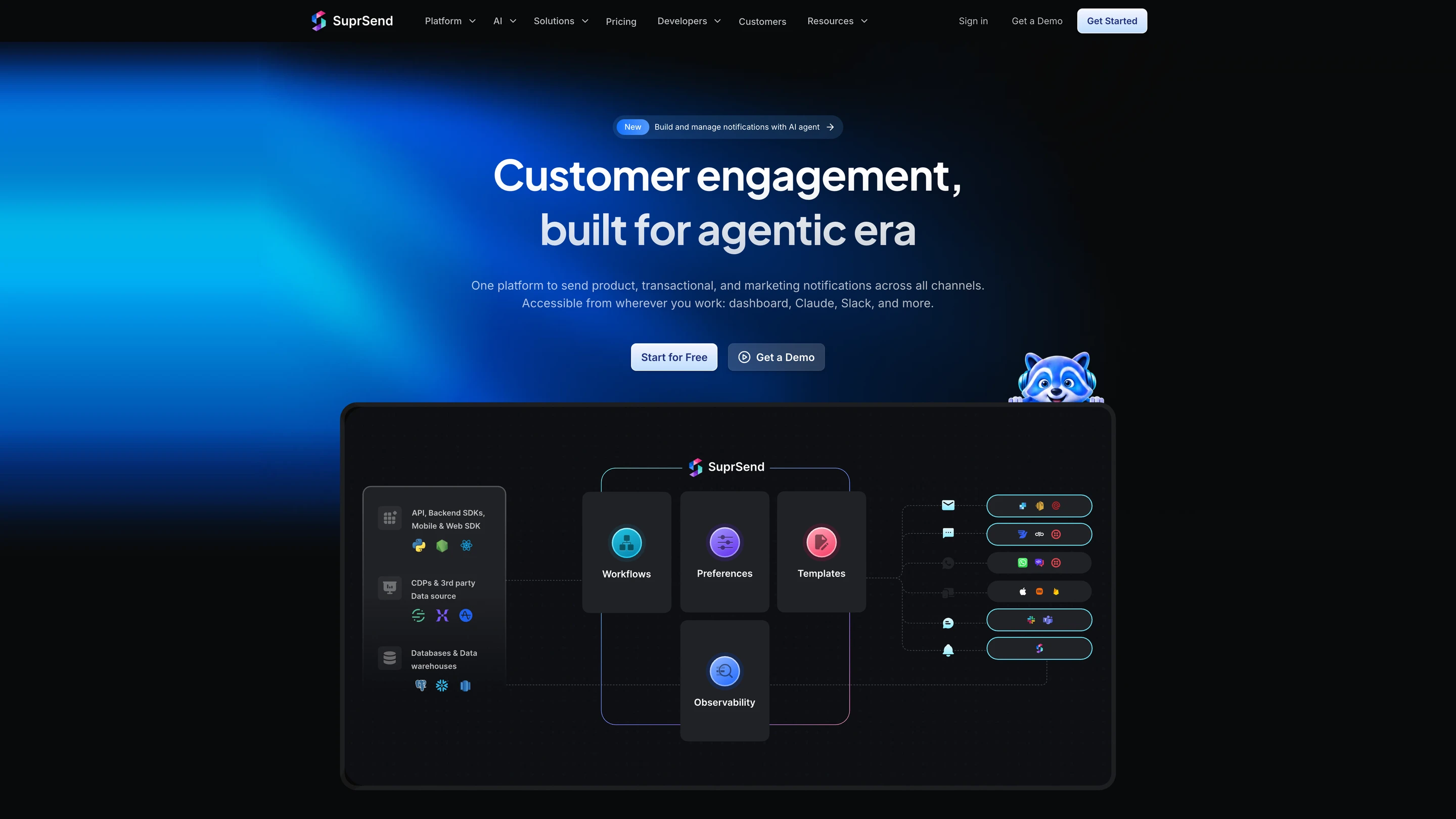
SuprSend's architecture: your API calls, SDKs, CDPs and data warehouses feed workflows, preferences, templates and observability, which send through email, SMS, WhatsApp, push, Slack and Microsoft Teams providers and the in-app inbox

What SuprSend is. SuprSend is a US company, founded in 2022, that runs every notification a product sends from one platform, from transactional alerts to engagement campaigns. Engineering, product and growth teams work in it alongside their agents.

A complete orchestration engine

WorkflowsA workflow engine with branches, conditions, delays, throttling, data fetch and webhook steps, and sends in each user's timezone. One send step reaches the user's channels in your order, so an unread push can become an email. Built visually, through the CLI or by an agent, with version history and rollback. Builder on every plan; throttling, fetch, webhook and timezone from Essentials.
Retries and fallbackBring your own providers, with FCM and Xiaomi for Android push; if one does not confirm delivery, the next one sends. Essentials.
User preferencesUsers opt in or out per category and channel, in a preference centre you embed or host. Business.
In-app inboxReal-time bell and feed, read state synced across devices, tabs, toasts, per-tenant feeds and six client SDKs, embedded or headless. Every plan, Free included.
TemplatingEditors for every channel, variants by tenant, user or language, version history with rollback, and translation files. Every plan; translation files on Business.
Batching and digestsCollect events over a window and send one message, at a time the user picks. Business.
Per-tenant setupsEach of your customers gets its own branding, templates, preferences and provider routing. Business add-on and Enterprise.
ObservabilityStep-by-step workflow logs and message logs with the provider's error; 30 days on Free, 90 on paid plans, and warehouse sync on Business.
DeploymentSuprSend cloud with 99.9% uptime, or your own VPC, on-prem or bring your own cloud with vendor support on Enterprise. SOC 2 Type II, ISO 27001, GDPR, HIPAA and CPRA.

How your team operates it

In the dashboard

The SuprSend agent builds a workflow from a description, drafts the copy for each channel and traces why a send failed. Product and growth work here and in Slack.

In your own agent

Connect the MCP server to Claude, ChatGPT, Cursor or any MCP client and build and change workflows, templates and tenants, test and send, and read the delivery log and analytics from there.

In your IDE or codebase

The CLI pushes and pulls workflows, templates, schemas and translation files, promotes staging to production and generates TypeScript types, so a bulk change is one command reviewed in a pull request.

Pricing. SuprSend is free up to 10,000 notifications a month. Essentials starts at $100 a month for 50,000, then $2 per 1,000; Business starts at $250 a month for 50,000, then $5 per 1,000; Enterprise is custom.

Verdict. Choose SuprSend when push is one of several channels and product, growth and your agents all need to change what gets sent without new code. Stay on FCM alone when push is the only channel and a few engineers own every message. For the head-to-head, see how SuprSend differs from FCM.

2.OneSignal

Best for marketing and growth teams sending push, in-app and email campaigns to a large consumer audience from one console

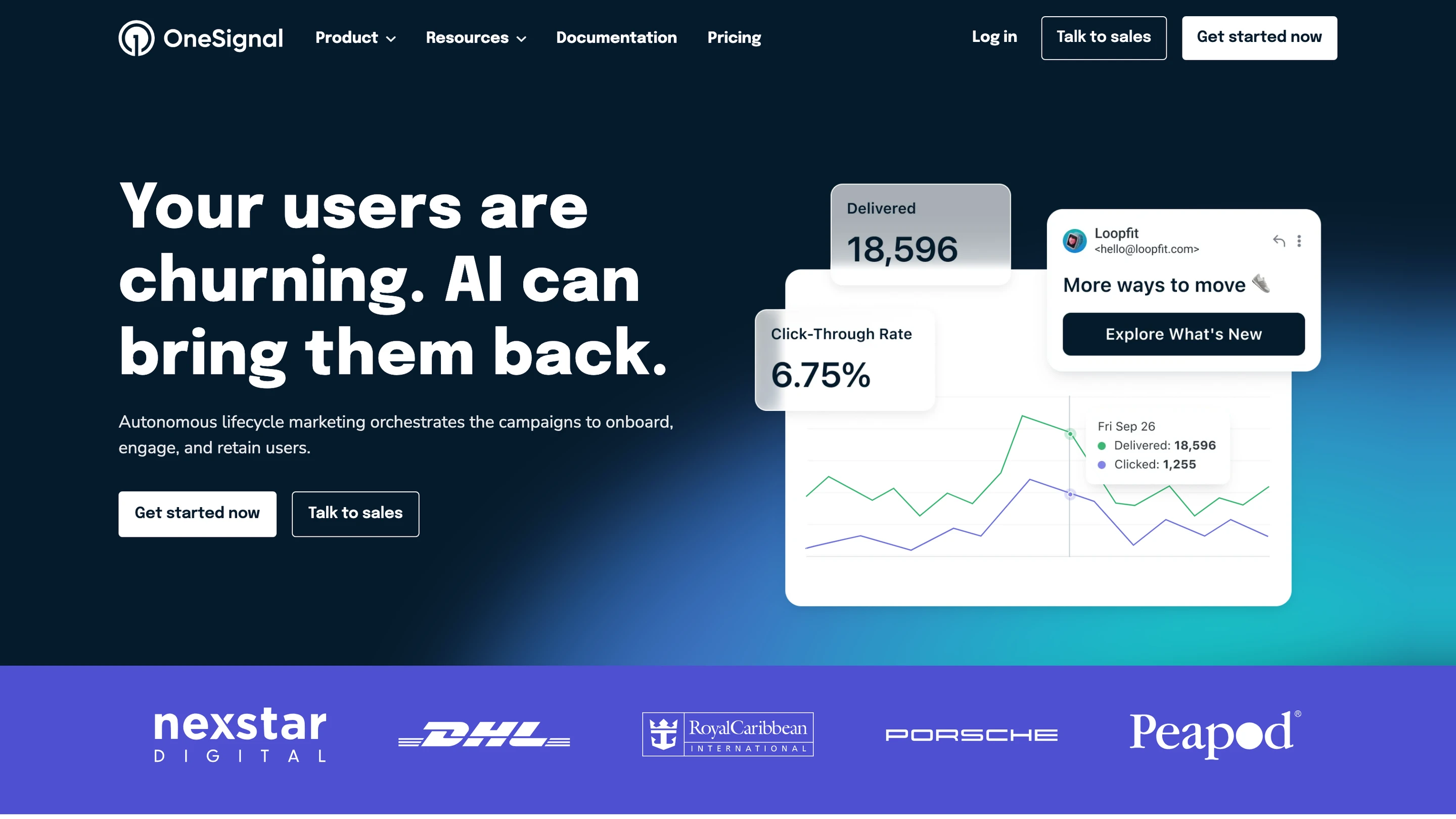
OneSignal's homepage: lifecycle marketing campaigns with a delivered and click-through-rate chart and an email preview

OneSignal started as a push service and added in-app messages, email and SMS. It is the closest thing to “FCM with a console” on this list: the client SDKs register devices for you, and marketers target segments built on tags and behaviour without touching your backend.

Where it goes deep. Push is the core. OneSignal covers mobile push, web push and iOS Live Activities, with SDKs for native iOS and Android, React Native, Flutter, Unity and several web and hybrid frameworks. Journeys branch across push, email, SMS and in-app messages on user behaviour. The dashboard runs A/B tests, and its agent and MCP server are on every plan. An agent in Claude or another MCP client can look up users, build segments, write templates, send messages and export data.

Where it stops. OneSignal keeps no per-user message history, so there is no lasting in-app feed a user can scroll back through. Preferences are push categories. WhatsApp is not a channel. Each environment is a separate app with no CLI to move changes between them. Journeys are capped at 3, 5 or 20 active below Enterprise, and the webhook step is on annual plans only. From September 2026, the free plan covers mobile push and in-app for up to 1,000 monthly active users, and the paid unit counts users who have not opted in to push.

Pick it if marketers will run most of your push, and the product notifications your backend sends are simple enough to live alongside campaigns.

Verdict. OneSignal fits consumer apps where push is a marketing channel and fast setup matters. Teams whose notifications are part of the product experience, with history, preferences and several authors, tend to outgrow its per-app model.

3.Pushwoosh

Best for mobile marketing teams that want push campaigns and journeys at a low price per user

Where it goes deep. Pushwoosh covers mobile push, in-app messages and web push, then email, SMS, WhatsApp and messengers such as Kakao Talk, LINE and Telegram. Every plan includes the Customer Journey Builder, segmentation, A/B testing and analytics. On the Push only plan, one person reached on mobile and web push in a month counts once, deduplicated by user ID. ManyMoneyAI, its campaign copilot, adjusts content, timing and channel toward revenue goals.

Where it stops. SMS, WhatsApp and messenger sends are billed by the third-party provider on top of the user price. G2 reviewers most often raise reporting issues.

Pick it if you want FCM plus a campaign console, and price per active user decides it.

Verdict. Pushwoosh is the budget answer for push-led marketing with a full journey builder. It suits campaign work better than product notifications that need per-user history and preferences.

4.MoEngage

Best for lifecycle and CRM teams at consumer brands that need analytics, segments and journeys across push, email, SMS, in-app and WhatsApp

MoEngage's homepage: an agentic customer engagement platform, with agent cards for in-app templates and per-user decisioning

Where it goes deep. MoEngage combines customer analytics with journeys, so the segment that triggers a campaign is built on the same event data the team reports on. Merlin AI custom agents run campaign work inside guardrails a marketer sets (audiences, channels, content rules and budget) and log every step. Since June 2026, an MCP server lets Claude, ChatGPT and your own agents read MoEngage data and use its tools.

Where it stops. Prices are quoted. It is built for B2C marketing teams, so a B2B product that needs per-customer tenants and an embeddable in-product feed will build those itself.

Pick it if push is one channel in a large lifecycle programme run by marketers.

Verdict. MoEngage is the heavier engagement platform here, with analytics and agents a marketing team can run at consumer scale. For a team replacing FCM to send product notifications, it is a large platform to adopt.

5.Braze

Best for large consumer brands running cross-channel lifecycle programmes, with push as one channel among many

Braze's homepage: a customer engagement platform for marketers, with a loyalty push notification on a phone

Braze began in 2011 as Appboy, a mobile engagement tool, and grew into a cross-channel platform.

Where it goes deep. Canvas, its journey builder, has experiment paths, decision splits, agent steps and version history. Channels include push, email, SMS, WhatsApp, LINE and KakaoTalk, with Content Cards and Banners inside the app. SQL Segment Extensions build segments on warehouse data, and Currents streams engagement events back out. BrazeAI Operator works in the dashboard, and a remote MCP server lets an agent read analytics and create templates and content blocks, without access to user-level data.

Where it stops. Contracts are quoted, and billing counts data points from profile updates, custom events and sessions. There is no CLI. Braze’s own stated average time to value is six weeks.

Pick it if you run a large consumer programme with a dedicated lifecycle team and push is one channel of several.

Verdict. Braze suits consumer marketing at scale, with the journey tooling and warehouse data features a lifecycle team expects. Replacing FCM with it means adopting a marketing platform, a contract and an implementation project.

6.Knock

Best for engineering and product teams building product notifications with in-app components

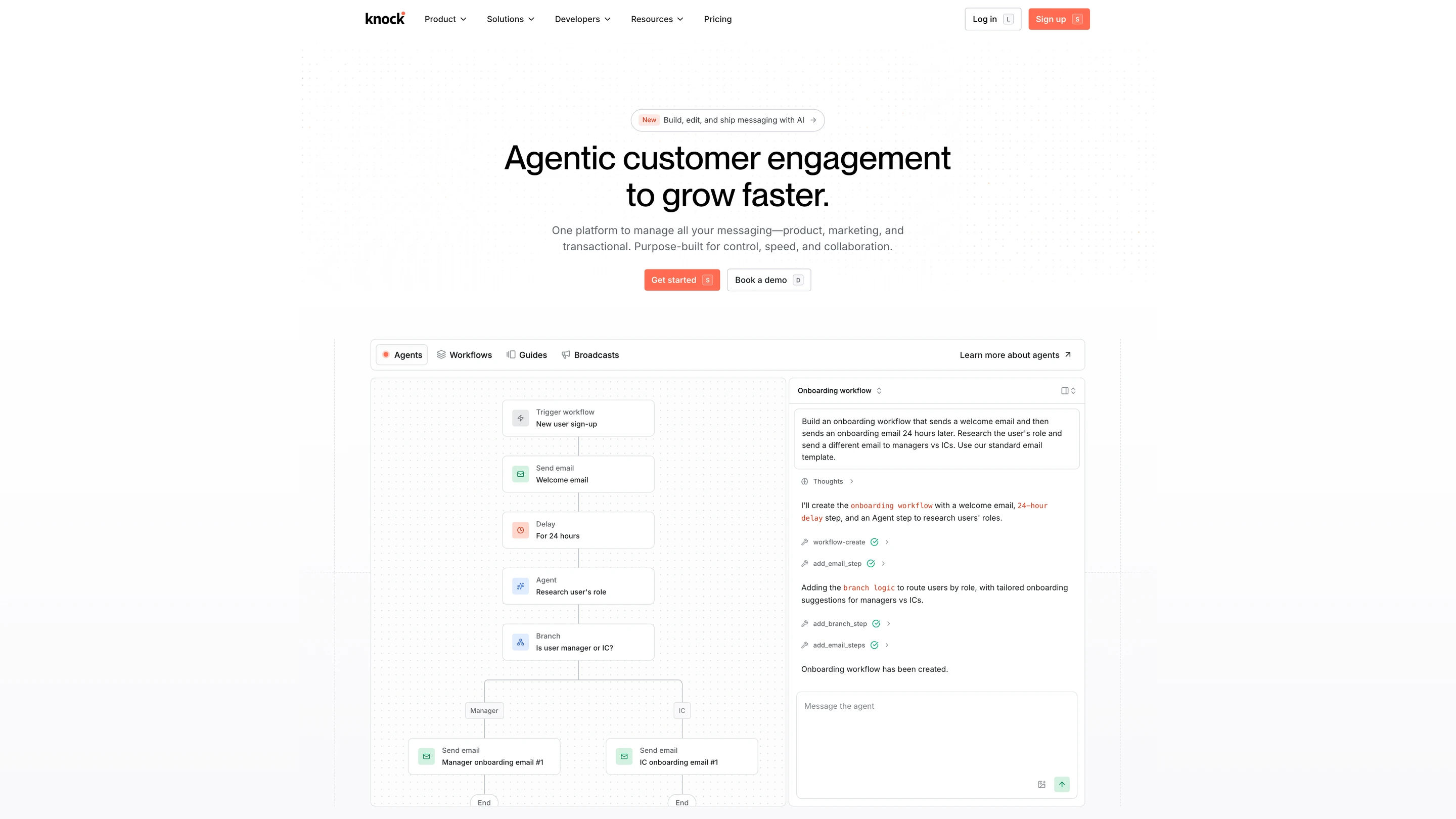
Knock's homepage, with its agent building an onboarding workflow: a trigger, welcome email, 24-hour delay, agent step and a branch for managers and ICs

Where it goes deep. Knock workflows batch, delay and branch before each channel step. Push goes through FCM, APNs or Expo from one template, and the Swift, Kotlin, React Native and Flutter SDKs register device tokens. Agents work from the dashboard, Slack, Claude, Cursor, ChatGPT and Codex, and workflows can include agent steps; an MCP server and CLI cover the same objects. Guides add in-product banners and modals.

Where it stops. Per-customer branding and preferences, translations, SAML, SCIM and a HIPAA BAA are on Enterprise. Knock runs in its cloud only.

Pick it if your team writes notifications as product features and wants agents in the loop.

Verdict. Knock is a strong developer platform with real agent support. Check which of the features you need sit on Enterprise before you commit.

7.Airship

Best for enterprise mobile teams running push, in-app and wallet programmes on large app audiences

Where it goes deep. Airship covers push, in-app messages, Message Center (a stored inbox inside the app), mobile wallet passes, SMS and email, with SDKs for iOS, Android, web, React Native, Flutter and more. Its MCP server is a developer tool: an agent in Claude Code or Cursor can send test pushes, look up channels, tags and opt-in status, and walk through SDK migrations.

Where it stops. Airship publishes no prices. G2 reviewers give it 7.0 for ease of setup across 30 ratings.

Pick it if you run a large consumer app with a mobile team and a contract budget.

Verdict. Airship is a mature enterprise mobile platform with an in-app inbox. Expect a sales process and an implementation project.

8.Expo Push

Best for react Native teams on Expo that want push on Android and iOS without managing FCM and APNs tokens separately

Where it goes deep. The Expo push service is free. The expo-notifications library returns one Expo push token per device, and your server sends to it through one API for both platforms. The Node server SDK throttles sends for you, and the EAS dashboard tracks delivery to FCM and APNs. Expo does not store notification contents after handing them to Google and Apple.

Where it stops. Sending is capped at 600 notifications a second per project. It has no users, templates, scheduling or second channel, and iOS rich media needs a config plugin with custom native code.

Pick it if your app is built with Expo and push is the only channel you need.

Verdict. Expo Push removes the token plumbing for Expo apps at no cost. It stays a transport, so the logic around each send remains in your code.

9.Pusher Beams

Best for developers who want a simple push API across iOS, Android and web with tokens handled for them

Where it goes deep. Beams SDKs store and refresh device tokens. You publish to interests, which work like topics, or to your own user IDs, and Beams sends to every device that user has signed in on. Plans are flat by device count.

Where it stops. Beams does push only. There are no in-app messages, journeys, A/B tests, templates or other channels.

Pick it if you want user-addressed push with no campaign tooling.

Verdict. Pusher Beams is a clean upgrade from raw FCM when user-to-device mapping is the pain. Anything beyond push stays yours to build.

When you should stay on FCM

  • Push is your only channel, and your roadmap has no email, SMS or in-app feed in it.
  • A small engineering team owns every message and is happy to ship copy changes with app releases.
  • Your marketing already runs on Firebase Analytics audiences and console campaigns, and nobody outside engineering edits transactional pushes.
  • You have no budget line for notification tooling and the push logic you have works.
  • Google Cloud must be the only processor for your push data.

Teams that stay usually end up writing the same code around FCM: a table that maps users to tokens with a job that cleans out stale ones, cron jobs and queues for delays and retries, a second integration and template set for email or SMS, and a preference store with its own unsubscribe logic. That code is a hidden cost in engineering time on top of a service that is free. Teams switch when that code starts growing with every new flow, when someone outside engineering needs to change messages, or when their own customers need separate branding and preferences.

How to migrate off FCM

  1. 01Record baselines. Take delivery and open rates per message type from the Firebase console or your BigQuery export, and count active tokens per platform.
  2. 02Rebuild each send as a workflow. List every place your code calls FCM and recreate each one with its delays and conditions. On SuprSend, pull and push the workflows and templates with the CLI so they are reviewed in pull requests.
  3. 03Move tokens and users. Keep FCM as the Android provider by connecting your Firebase service account, and import existing tokens onto user profiles so no one has to register again.
  4. 04Carry consent state. Import notification permissions and any opt-outs you store, per category and channel, before the first send.
  5. 05Rebuild the inbox. If your app turns FCM data messages into an in-app list, replace that code with the platform's feed component.
  6. 06Dual-send one message type. Route one notification through the new platform while the rest stay on direct FCM calls, and compare it with your baselines.
  7. 07Keep the old path for 30 days. Leave the direct FCM send code behind a flag for 30 days before you delete it.

Conclusion

FCM delivers push to Android, iOS and the web for free, with a quota that covers almost every app. It stays the Android delivery path whichever tool you add on top.

Move when a push has to sit in a sequence with email, SMS or an in-app feed, when product and growth need to change messages themselves, or when your agents should build and test notifications from the repo. SuprSend runs every kind of message in one system, with a complete orchestration engine that the whole team and its agents operate, and the free plan covers 10,000 notifications a month.

FAQ

Is FCM free?

Yes. FCM is free on both the Spark and Blaze plans at any volume. Costs come only from services you pair with it, such as a BigQuery export of delivery data or Cloud Functions that send messages.

What is the cheapest FCM alternative?

Take 50,000 notifications a month to 10,000 users on one device each. Expo Push is free. Pusher Beams is $29 a month for 10,000 devices. Pushwoosh Push only is $63, at $7 per 1,000 monthly active users after the first 1,000. OneSignal Growth is about $139, at $19 plus $0.012 per mobile user. SuprSend's free plan covers 10,000 notifications; Essentials is $100 for 50,000, then $2 per 1,000, and Business is $250 for 50,000, then $5 per 1,000. Knock is free to 10,000 messages and $250 for 50,000 on Starter. Pushwoosh and OneSignal bill users, Beams bills devices, and SuprSend and Knock bill each notification, so the order changes as messages per user change. MoEngage, Braze and Airship quote.

Which FCM alternatives include an in-app inbox?

SuprSend includes a real-time inbox with tabs, toasts and six client SDKs on every plan, Free included. Knock ships in-app feed components, Braze has Content Cards, and Airship has Message Center. OneSignal and Pushwoosh show in-app messages without a stored history, and Expo Push and Pusher Beams do push only.

Which alternatives have an MCP server or agent authoring?

The SuprSend agent builds workflows from a description, drafts copy and traces failed sends, and its MCP server lets Claude, ChatGPT or Cursor build and change workflows, templates and tenants, send, and query logs. Knock has agents, an MCP server and a CLI. OneSignal's agent and MCP server work on users, segments, templates and sends. MoEngage has Merlin AI agents and an MCP server. BrazeAI Operator works in the dashboard, and Braze's MCP server reads analytics and creates templates and content blocks. Airship's MCP server is for developers testing pushes and migrating SDKs. Firebase's MCP server sends an FCM message.

Can one platform send transactional and marketing notifications?

Yes. SuprSend runs transactional notifications, product updates and engagement broadcasts on the same users, preferences, unsubscribes and logs. Knock also covers transactional and broadcast messages. OneSignal, Pushwoosh, MoEngage, Braze and Airship start from marketing campaigns and send transactional messages through their APIs.

Which channels do FCM alternatives support?

FCM does Android, iOS and web push. SuprSend covers email, SMS, WhatsApp, mobile push, web push, Slack, Microsoft Teams, in-app and webhook on every plan. Knock covers push, email, SMS, WhatsApp, in-app, Slack and Teams. OneSignal adds email, SMS and in-app to push. Pushwoosh adds email, SMS, WhatsApp and messengers such as Kakao Talk, LINE and Telegram. MoEngage adds email, SMS, in-app and WhatsApp. Braze adds email, SMS, WhatsApp, LINE, KakaoTalk and in-app. Airship adds SMS, email and wallet passes. Expo Push and Pusher Beams do push only.

Which FCM alternatives are SOC 2, ISO 27001 or HIPAA compliant?

SuprSend holds SOC 2 Type II, ISO 27001, GDPR, HIPAA and CPRA, with a HIPAA BAA on Enterprise. Knock signs a HIPAA BAA on Enterprise. FCM is in scope for Firebase's ISO 27001 certification and SOC 1, 2 and 3 reports. Ask each vendor for its current report before you rely on it.

Can I self-host an FCM alternative?

SuprSend can be self-hosted in your VPC, on-prem or as bring your own cloud on Enterprise, with vendor support. Pushwoosh offers a dedicated private cloud on custom terms. FCM, Expo Push, Pusher Beams, OneSignal and Knock are cloud only. None of the nine is open source.

Do I still need FCM if I use one of these platforms?

Yes, for Android. Every tool here delivers Android push through FCM and iOS push through APNs. SuprSend, Knock, OneSignal, Pushwoosh, MoEngage, Braze and Airship use credentials from your Firebase project; Expo Push and Pusher Beams ask you to upload them once. The platform replaces the logic around each send, and FCM keeps doing the delivery at no cost.

What are FCM's sending limits?

FCM allows 600,000 messages a minute per project by default. Sends over quota get HTTP 429 until the quota refills the next minute, and projects that meet Google's criteria can request up to 25% more. A single Android device takes up to 240 messages a minute and 5,000 an hour. Android registrations expire after 270 days of inactivity.

Related Resources

How does SuprSend work with FCM, feature by feature?SuprSend vs FCM
What does SuprSend cost at my volume?SuprSend pricing
Which push and messaging providers does SuprSend connect to?SuprSend provider integrations
Can an agent build and debug notifications for me?SuprSend for AI agents

There’s no better place for you
to build notifications

Join thousands of product & engineering teams using SuprSend to build and ship better notifications—faster.