



8 best Sendbird alternativesfor in-app chat and notifications (2026)

Eight tools compared on the messages they cover, who on your team can run them, what an agent can do in them, ease of setup and pricing.

By , SuprSendOct 5, 2026

Sendbird sells APIs and SDKs for in-app chat, voice and video calls, and Business Messaging, which sends notifications to in-app, mobile push, SMS, WhatsApp and KakaoTalk.

Teams evaluating or already running Sendbird look elsewhere when chat pricing gets hard to forecast, or when notifications need to reach email and run from one system with workflows, user preferences and an agent the whole team can work with. The right replacement depends on which of those two jobs you are replacing. Some teams keep Sendbird Chat and move only their notifications.

Quick guide: Sendbird alternatives by use case

If you needChoose
An in-app notification bell and feed in your web and mobile apps?SuprSend's in-app inbox syncs read state across devices, adds tabs, toasts and per-tenant feeds, and ships six client SDKs for web and mobile.SuprSendSuprSend
Chat between your users, with ready UI components and published overage rates?SStreamCCometChat
Realtime messaging beyond chat, such as presence, live location or device updates?PPubNub
Transactional, product and marketing notifications in one platform, email included?SuprSendSuprSend
Open source, free self-hosting and workflows written as TypeScript in your repo?Novu
A full orchestration layer: workflows, batching and digests, preferences, provider fallback and step-by-step logs?SuprSendSuprSend
Each of your customers gets its own branding, templates and preferences, controlled by their admins?SuprSendSuprSend
An agent that builds and debugs notifications, or your own agent working over MCP?SuprSendSuprSend
Product and growth teams changing messages without waiting on an engineer?SuprSendSuprSendBraze
Marketing campaigns to millions of consumers, run from a UI?BrazeOneSignal
Notifications that run in your own VPC, on-prem or BYOC, with vendor support?SuprSendSuprSend
Sendbird chat is live, moderated and the whole requirement?See when to stay on Sendbird.SSendbird

What Sendbird does

Sendbird is a cloud communications API company. Its main product is Sendbird Chat: SDKs and UI kits for one-to-one chat, group channels, open channels with millions of participants, and moderation. Calls adds voice and video. Business Messaging is its notification product: you build a template in the dashboard, pick channels from in-app, mobile push, SMS, WhatsApp and KakaoTalk, and set a sequence that sends to the cheapest channel first and stops when the user engages. Sendbird’s AI customer-service agent now sells under a separate brand, Delight.ai.

Each product has its own pricing model. Chat is priced by monthly active users with a cap on peak concurrent connections, Calls by the minute from prepaid credits, and Business Messaging by quote.

LicenceProprietary, cloud only; dedicated servers on AWS on Enterprise.
ChannelsChat: in-app chat with push for new messages. Business Messaging: in-app, mobile push, SMS, WhatsApp and KakaoTalk.
Backend SDKsPlatform API (REST).
Frontend SDKsChat: iOS, Android, JavaScript, Flutter, React Native and Unity. Business Messaging: iOS, Android, JavaScript and Flutter.
ComplianceSOC 2, ISO 27001, GDPR, HIPAA with BAA.
Billing unitChat per monthly active user, with peak concurrent connections capped at 5% of MAU; Calls per minute; Business Messaging by quote.
Self-hostingNone; data stays in one of nine AWS regions you choose.
G24.6 across 126 reviews, ease of setup 9.0.

Where Sendbird is strong

  • Moderation depth: a moderation dashboard, profanity filter, AI image moderation, a rule engine, moderator groups and a ticket queue for content only a person can judge.
  • Scale in one channel: open channels hold millions of participants, and supergroup channels hold thousands in a private group.
  • Data location: nine AWS regions, including Mumbai, Seoul, Tokyo and Frankfurt, with private dedicated servers on Enterprise.
  • Channel cost control: a Business Messaging sequence sends in-app first and falls back to SMS or KakaoTalk only when the user has not engaged.
  • Support: G2 reviewers rate its quality of support 9.2 out of 10.
PlanPriceWhat you get
Chat free trialFreeUp to 1,000 MAU and 20 peak concurrent connections, all Pro features, no overages allowed.
Chat Starter (5,000 MAU)$349 a month on an annual plan, $399 month to monthMessaging essentials, basic moderation, ticketed support, 30,000 Business Messaging in-app messages.
Chat Pro (5,000 MAU)$499 a month on an annual plan, $599 month to monthStarter plus translation, data export, image moderation and supergroup channels.
Chat EnterpriseCustomMillions of MAU, dedicated or shared servers, add-on products, HIPAA with BAA.
Business MessagingQuote onlyIn-app, push, SMS, WhatsApp and KakaoTalk, templates, sequences and analytics.
CallsFrom $0.0010 per minute per userVoice and video from prepaid credits.

Why teams look elsewhere

  1. 01Notifications need to reach email too. Business Messaging's docs list in-app, mobile push, SMS, WhatsApp and KakaoTalk as its channels, with no email channel. A product that sends receipts, invites, password resets or weekly summaries by email runs a second system next to Sendbird, with its own templates, its own copy of each user, its own unsubscribe list and its own logs. Two systems also mean two places to check when a user says a message never arrived.
  2. 02A notification needs logic beyond a channel order. A Sendbird sequence sets the order of channels, the timing of each step and a stop condition. The docs list no branch on user or event data, no batching or digest step, no throttle, no step that fetches data from your API, no webhook step and no version history for templates. Anything past "send here, then there" is written in your own code before the API call.
  3. 03The chat bill has a second meter that is hard to predict. Sendbird Chat counts monthly active users, and on Starter and Pro it also caps peak concurrent connections at 5% of your MAU limit. Connections count devices, so a user on a phone and a laptop is two, and an open browser tab keeps counting. The pricing page says overages apply but publishes no overage rate, and self-serve prices stop at 25,000 MAU.
  4. 04A free plan you can ship notifications on. Business Messaging has no free plan and no published price; it is quote only, and chat plans include 30,000 in-app messages a month at the 5,000 MAU tier. A team that wants to test notifications in production before talking to sales looks for a free allowance. SuprSend's free plan covers 10,000 notifications a month across every channel.
  5. 05Notifications need to change from the repo or from an agent. Business Messaging templates and sequences are built in the Sendbird dashboard. Its docs list no CLI, no MCP server, and no development, staging and production environments for notifications. Sendbird's agent work goes into Delight.ai, which answers customer-service conversations. An engineer who wants a notification change reviewed in a pull request, or a coding agent that edits a workflow directly, has no route in.
  6. 06Users need to choose what they receive. Business Messaging's docs describe channels, templates, sequences, analytics, tags and webhooks, and list no preference centre where a user opts out of one category or one channel. Chat offers do-not-disturb for message push. A product with several notification types builds its own preference table and checks it before every send.

How we compared these tools

We read each tool’s documentation, API reference, pricing page and security or trust page, and the G2 reviews for each product. What we compared on: feature depth, use cases covered, billing model, developer experience, AI authoring, and ease of use for technical and non-technical team members.

Three different kinds of product get called “Sendbird alternatives,” and they solve different problems.

Layer 1: In-app chat APIs

Sendbird Chat, Stream, CometChat and PubNub run conversations between your users: channels, typing indicators, read receipts, presence and moderation. All four bill by monthly active users and meter concurrent connections in some form. Their push notifications tell a user a new chat message arrived. If chat is what you are replacing, your choice is in this layer.

Layer 2: Unified notification platforms

Sendbird Business Messaging sits here, alongside SuprSend and Novu. These platforms decide what to send, to whom, on which channel and when, then hand the message to a delivery provider such as FCM, APNs, Twilio or Amazon SES, which you still pay. SuprSend covers transactional, product and marketing notifications on every channel including email; Novu covers transactional notifications with workflows in code. SuprSend can be run from outside the dashboard by the SuprSend agent, your own agent over MCP, or the CLI; Novu has an MCP server, and its workflows can live as TypeScript in your app.

Layer 3: Customer engagement platforms

Braze and OneSignal run campaigns and journeys for consumer apps at scale, with segmentation, experiments and analytics built for growth teams. Their agents mostly read data and help inside the campaign canvas. Transactional workflows, a lasting in-app inbox and preferences a customer’s admin controls are usually left to you.

The best Sendbird alternatives

ToolBuilt aroundStrongest atMeant forBilling unitFree planPaid fromG2
SuprSendSuprSendA notification platform with workflows, templates, inbox, preferences and tenants in one engineTransactional, product and marketing notifications on every channel; SuprSend agent, MCP server and CLIEngineering, product and growth teams at B2B and B2C companiesPer notification per channel10,000 notifications a month$100 a month for 50,000 (Essentials)4.8 (129 reviews)Ease of setup: 9.4
StreamChat, video and activity feed APIs on a global edge networkIn-app chat at large scale with published overage rates; CLI and agent skills for coding agentsSocial, marketplace, gaming and health apps with user-to-user chatPer MAU, plus concurrent connections1,000 MAU and 100 concurrent connections$399 a month for 10,000 MAU on an annual plan4.5 (53 reviews)Ease of setup: 8.7
CometChatA chat SDK with UI kits, voice and video, and AI moderationFast chat UI integration; multi-tenancy and HIPAA on its Advanced planSmall and mid-size teams adding chat quicklyPer MAU, concurrent connections at 5% of MAU100 MAUBasic plan, priced by MAU tier4.6 (110 reviews)Ease of setup: 8.9
PubNubA realtime publish and subscribe network with chat SDKs on topRealtime data beyond chat, serverless functions on message events; MCP serverDevelopers building custom realtime featuresPer MAU, or per transaction200 MAU or 1 million transactions$98 a month for 1,000 MAU (Starter)4.4 (17 reviews)
OneSignalMobile and web push with journeys across email, SMS and in-app messagesPush at consumer scale; AI agent and MCP server on every planConsumer apps and small growth teamsPer mobile MAU, web push subscriber and emailPush, in-app and Live Activities up to 1,000 MAU$19 a month plus usage (Growth)4.7 (1,237 reviews)Ease of setup: 8.9
BrazeA customer engagement platform with the Canvas journey builderConsumer journeys with experiments, WhatsApp, LINE and KakaoTalk; BrazeAI Operator and an MCP serverEnterprise growth and lifecycle teamsData pointsNoneQuoted contracts4.4 (1,785 reviews)Ease of setup: 7.6
NovuAn open-source notification framework with an Inbox componentFree self-hosting and workflows as TypeScript; MCP server with 23 toolsDeveloper teams who want notifications in codePer workflow run per subscriber10,000 workflow runs; free to self-host$30 a month for 30,000 runs (Pro)4.6 (22 reviews)Ease of setup: 8.8
Build it in-houseWebSockets, a message store and FCM, APNs, SMS and email providers you wire togetherFull control of data, UI and cost per messageTeams with spare platform engineers and unusual requirementsYour servers plus each provider's ratesNot applicableEngineering time-

1.SuprSendSuprSend

Best for running transactional, product and engagement notifications from one platform, on every channel including email
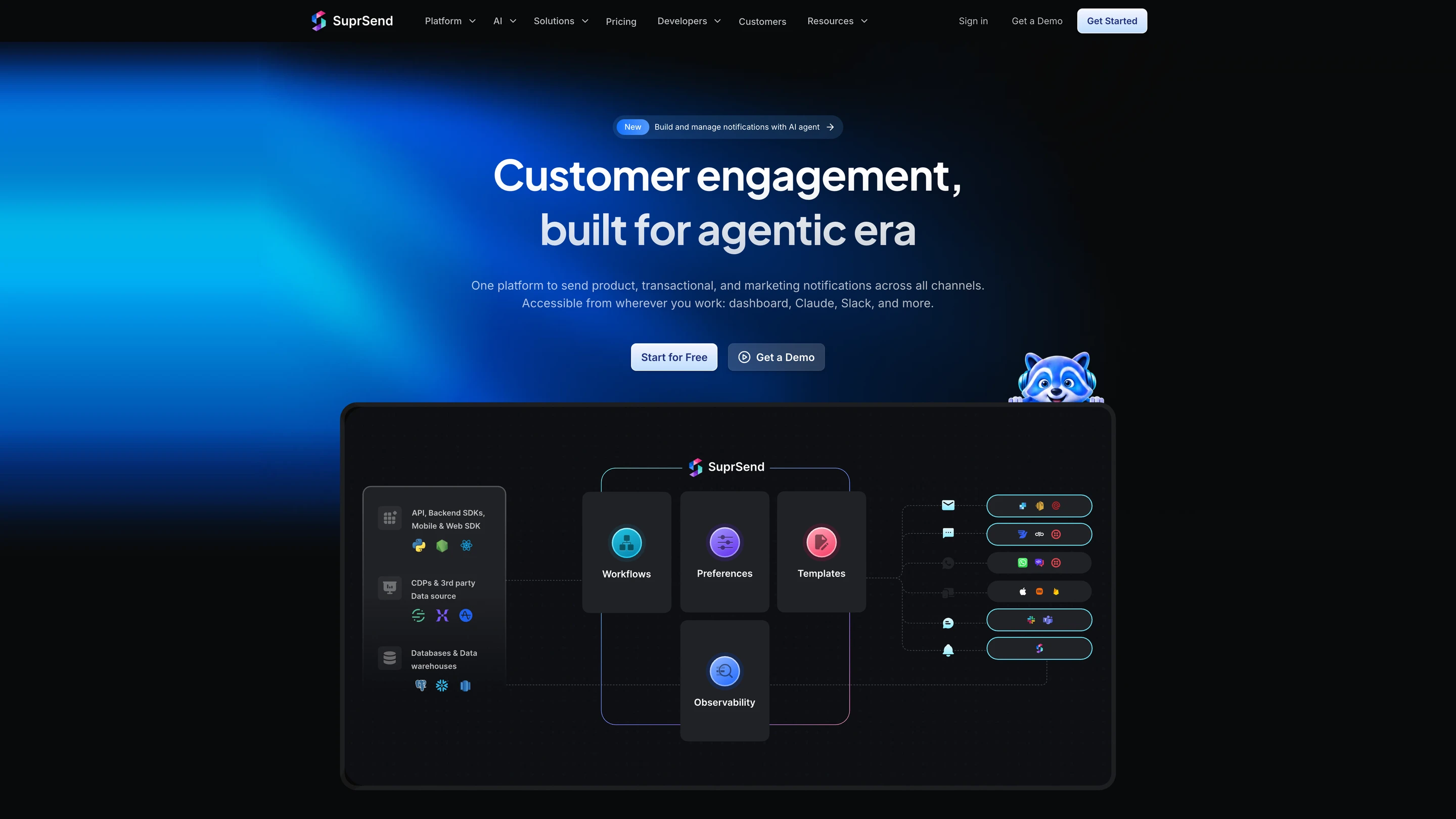
SuprSend's architecture: your API calls, SDKs, CDPs and data warehouses feed workflows, preferences, templates and observability, which send through email, SMS, WhatsApp, push, Slack and Microsoft Teams providers and the in-app inbox

What SuprSend is

SuprSend is a US company, founded in 2022, that runs every notification a product sends from one platform, from transactional alerts to engagement campaigns. Engineering, product and growth teams work in it alongside their agents.

A complete orchestration engine

WorkflowsA workflow engine with branches, conditions, delays, throttling, data fetch and webhook steps, and sends in each user's timezone. One send step reaches the user's channels in your order. Built visually, through the CLI or by an agent, with version history and rollback. Builder on every plan; throttling, fetch, webhook and timezone from Essentials.
In-app inboxA real-time bell and feed with read state synced across devices, tabs, toasts and per-tenant feeds, six client SDKs, embedded or headless. Every plan, Free included.
TemplatingEditors for every channel, variants by tenant, user or language, version history with rollback, translation files. Every plan; translation files on Business.
User preferencesUsers opt in or out per category and channel, in a preference centre you embed or host. Business.
Batching and digestsCollect events over a window and send one digest message, at a time the user picks. Business.
Per-tenant setupsEach of your customers gets its own branding, templates, preferences and provider routing. Business add-on, Enterprise.
ObservabilityStep-by-step workflow and message logs with the provider's error; 30 days on Free, 90 on paid plans; warehouse sync on Business.
Retries and fallbackBring your own providers; if one does not confirm delivery, the next one sends. Essentials.
DeploymentSuprSend cloud with 99.9% uptime, or your own VPC, on-prem or BYOC with vendor support; SOC 2 Type II, ISO 27001, GDPR, HIPAA, CPRA. Self-hosted and BYOC on Enterprise.

How your team operates it

In the dashboard

The SuprSend agent builds a workflow from a description, drafts the copy for each channel and traces why a send failed. Product and growth work here and in Slack.

In your own agent

Connect the MCP server to Claude, ChatGPT, Cursor or any MCP client and build and change workflows, templates and tenants, test and send, and read the delivery log and analytics from there.

In your IDE or codebase

The CLI pushes and pulls workflows, templates, schemas and translation files, promotes staging to production and generates TypeScript types, so a bulk change is one command reviewed in a pull request.

Pricing. Free up to 10,000 notifications a month; Essentials starts at $100 a month for 50,000, then $2 per 1,000; Business starts at $250 a month for 50,000, then $5 per 1,000; Enterprise custom.

Verdict. Choose SuprSend when notifications have to reach email and every other channel from one workflow, with preferences, digests and per-customer setups your team and its agents can change. Keep Sendbird Chat, or move to Stream, for conversations between your users, since SuprSend does not run chat.
2.Stream

Best for user-to-user chat at large scale with prices and overage rates you can read before signing

Where it goes deep. Stream is the closest like-for-like replacement for Sendbird Chat. It sells chat, video and audio calling, activity feeds and moderation as separate APIs, with SDKs for React, iOS, Android, Flutter, React Native, Angular, Unity and Unreal. Chat runs on an edge network with servers close to users, and Stream reports a median API response of about 8 milliseconds. One channel can hold millions of members, and the API covers threads, reactions, polls, reminders, silent system messages and custom message types for things like order cards.

Its pricing page lists every meter. The free Build plan covers 1,000 MAU and 100 concurrent connections. Start and Elevate both include 10,000 MAU and 500 concurrent connections, then charge $0.09 per extra user and $0.99 per extra concurrent connection. Elevate adds multi-tenancy, HIPAA, message translation and advanced search. A Campaigns API sends broadcast chat messages, three times your MAU each month on paid plans. Stream also publishes a CLI that manages apps and configuration from the terminal, and agent skills that teach a coding agent to build with Stream.

For teams leaving Sendbird, Stream offers free migration support for 30 days, including two-way webhook sync so both systems hold the same messages during the move. It lists SOC 2, ISO 27001, HIPAA, GDPR and CCPA, with SAML, dedicated AWS stacks and a 99.999% uptime SLA on Enterprise.

Where it stops. Stream’s push notifications tell a user about chat activity. Notifications about everything else in your product, on email, SMS or WhatsApp, with templates, sequences and user preferences, are outside Stream and need a second system. Concurrent connections are metered on every plan, and API calls, storage and bandwidth have their own allowances.

Pick it if chat is the product feature you are replacing and you want public prices at every tier up to Enterprise.

Verdict. Stream covers what most teams use in Sendbird Chat and publishes its overage rates. Pair it with a notification platform if your product also sends notifications outside chat.

3.CometChat

Best for adding chat, voice and video quickly through ready UI kits

Where it goes deep. CometChat ships UI kits for chat, voice and video calling, plus AI moderation, smart replies and conversation summaries. Its Advanced plan adds multi-tenancy, HIPAA with a BAA, message translation, advanced search and email and SMS notifications with templates. Overage is published at $0.10 per MAU, and concurrent connections are included at 5% of MAU on Basic and Advanced and 10% on Enterprise.

Where it stops. The free Build plan stops at 100 users, and paid prices sit behind a MAU slider on the pricing page.

Pick it if you want a chat UI working in days and your team is small.

Verdict. CometChat takes you from Sendbird's UIKit to another finished chat UI with little custom work. Check the price at your MAU on its slider before you commit.

4.PubNub

Best for realtime features beyond chat, such as live location, presence and device updates

Where it goes deep. PubNub is a publish and subscribe network: any client or server publishes to a channel and every subscriber gets the message in real time. Chat SDKs, presence, message persistence, access tokens and mobile push through APNs and FCM sit on top, and Functions run your code on message events. PubNub publishes an MCP server for coding agents that build and debug PubNub apps. The free plan covers 200 MAU or 1 million transactions, and Starter costs $98 a month for 1,000 MAU.

Where it stops. PubNub gives you building blocks; the finished chat experience, from UI to moderation rules, is more yours to assemble than on Stream or CometChat. A production keyset needs at least the Starter plan.

Pick it if chat is one of several realtime features you are building.

Verdict. PubNub suits teams who want a realtime network more than a chat product. Teams who want chat ready out of the box will move faster on Stream or CometChat.

5.OneSignal

Best for mobile and web push to a large consumer audience on a small budget

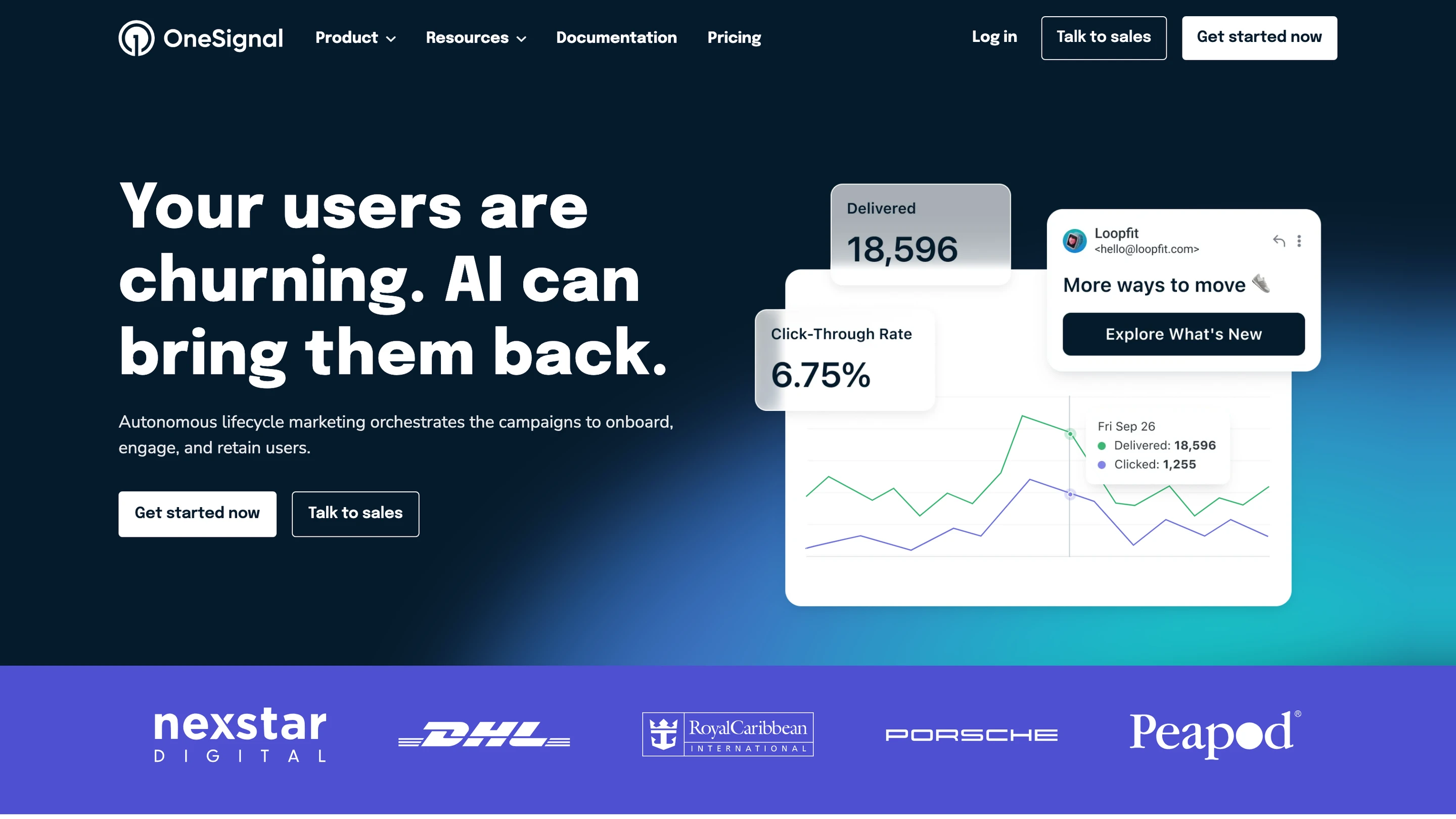
OneSignal's homepage: lifecycle marketing campaigns with a delivered and click-through-rate chart and an email preview

Where it goes deep. OneSignal started as a push service and added email, SMS and in-app messages later. Journeys branch across those channels, and push covers Live Activities on iOS. Its AI agent and MCP server, on every plan, work with users, segments, templates, sends and exports. The free plan covers push, in-app and Live Activities up to 1,000 MAU.

Where it stops. OneSignal has no WhatsApp channel and stores no per-user message history, so there is no lasting in-app feed. Preferences are push categories, and plans below Enterprise cap active journeys at 3, 5 or 20.

Pick it if your Sendbird Business Messaging use is mostly push and SMS campaigns to consumers.

Verdict. OneSignal is the budget answer for consumer push and simple journeys. It bills mobile MAU even for users who have not opted in, so model your audience before you switch.

6.Braze

Best for lifecycle marketing across many channels for large consumer brands

Braze's homepage: a customer engagement platform for marketers, with a loyalty push notification on a phone

Where it goes deep. Braze began as Appboy in 2011, a mobile push and in-app messaging company, and grew into email, SMS, WhatsApp, LINE and KakaoTalk. Canvas journeys carry experiment paths, decision splits, agent steps and version history, and Content Cards and Banners show messages inside your app. Segments can run on warehouse data through SQL. The BrazeAI Operator works in the dashboard, and its MCP server reads analytics and creates templates and content blocks. Sendbird Business Messaging itself integrates with Braze as a channel.

Where it stops. Braze sells quoted contracts with no published prices, counts data points on profile updates, events and sessions, and states its own average time to value as six weeks. It has no CLI.

Pick it if a growth team runs campaigns to millions of consumers and owns the budget.

Verdict. Braze is the like-for-like answer for Sendbird's marketing and campaign use at consumer scale. Product and transactional notifications still need an engineer's system next to it.

7.Novu

Best for developer teams who want open-source notifications they can self-host for free

Novu's homepage: open-source notification infrastructure for products and AI agents, with Slack, Teams, SMS, email, WhatsApp and Telegram channels

Where it goes deep. Novu’s core is MIT licensed and free to self-host. Workflows can live as TypeScript in your app through the Novu Framework, with a GitHub Action, and users can set quiet hours. It ships an Inbox component for in-app notifications. Its MCP server has 23 tools for subscribers, preferences, workflows, triggers, logs and integrations. Channels cover email, SMS, WhatsApp, push and in-app.

Where it stops. Each step sends on one channel, there is no version history, and the docs list no automatic provider failover. Billing counts every workflow run per subscriber, and the free cloud plan keeps logs for 24 hours.

Pick it if you want notification logic in your codebase and your team will run the infrastructure.

Verdict. Novu is the open-source route for teams moving notifications off Sendbird. Teams who want product and growth to edit messages without a deploy will find the code-first model slower.

8.Build it in-house

Best for teams with platform engineers to spare and requirements no vendor meets

Where it goes deep. You own the data, the UI and the cost per message. Chat runs on WebSockets and a message store, and notifications go out through FCM, APNs, an SMS provider and an email provider you pick.

Where it stops. Presence, offline sync, read receipts across devices, moderation, retries, digests, preferences and delivery logs are each a project, and each needs an owner after launch.

Pick it if messaging is your core product and you have a team for it.

Verdict. Building it yourself trades a vendor bill for permanent engineering work. Price that work honestly before you choose it.

When you should stay on Sendbird

  • Chat between your users is the core of your product, it is live, and your moderators rely on the workflows they have built in Sendbird's dashboard.
  • Most of your users are in Korea and KakaoTalk is a channel you cannot drop.
  • Your notifications are mobile only, go to in-app, push, SMS and WhatsApp, and an ordered sequence with a stop condition covers them.
  • Your MAU is steady, your users rarely connect from several devices at once, and your annual contract price works.
  • You are mid-contract and a migration would overlap a launch.

Look at the code your team has written around Sendbird. A separate email service with its own templates and unsubscribe list, a job that groups events into a daily summary, a preference table checked before every send, and scripts that rebuild templates when the copy changes are common. That code is a hidden cost: your team builds it, maintains it, and pays for it in engineering time on top of Sendbird’s price. Teams switch when that cost grows past the cost of moving, or when an overage on connections makes the chat bill impossible to forecast.

How to migrate off Sendbird

Decide first what is moving. Chat and notifications can move separately, and many teams move notifications first while chat stays on Sendbird.

  1. 01Record baselines. Export delivery, view and click rates per channel from Sendbird's analytics, and your monthly SMS and WhatsApp spend, so you can compare after the move.
  2. 02Rebuild templates and sequences as workflows. Each Sendbird template with a sequence becomes a workflow with a channel order and a stop condition; in SuprSend, keep them as files with the CLI so the rebuild is reviewed in a pull request.
  3. 03Move users and device tokens. Pull users from Sendbird's Platform API, and register FCM and APNs tokens from your apps on the next launch so no device is lost.
  4. 04Carry consent state. Copy SMS opt-outs, WhatsApp opt-ins and do-not-disturb settings, and import them before the first send.
  5. 05Rebuild the in-app feed. Replace Sendbird's notification feed with the new inbox component, and decide whether old notifications are imported or left to expire.
  6. 06Dual-send. Send each notification type from both systems to a small group, compare delivery and engagement with your baselines, then move types over one at a time.
  7. 07Keep the old system for 30 days. Leave Sendbird running as a fallback until a month passes without a missed message.

Conclusion

Sendbird covers in-app chat with deep moderation, voice and video calls, and mobile notifications on in-app, push, SMS, WhatsApp and KakaoTalk, from a cloud with nine regions to choose from. For chat alone, Stream and CometChat are the like-for-like choices, and both publish their overage rates.

Move your notifications when they need email, logic beyond a channel order, preferences your users control, or changes from the repo and from an agent. SuprSend runs every kind of message in one system, as a complete orchestration engine your engineering, product and growth teams and their agents operate together, and its free plan covers 10,000 notifications a month.

FAQ

Is Sendbird free?

Sendbird Chat has a free plan for development with up to 1,000 MAU and 20 peak concurrent connections, and no overages allowed. Paid Chat starts at $349 a month for 5,000 MAU on an annual plan, or $399 month to month. Sendbird Business Messaging has no free plan and is priced by quote, though chat plans include 30,000 in-app messages a month at the 5,000 MAU tier.

What is the cheapest Sendbird alternative?

It depends on which unit you buy. For 50,000 notifications a month: SuprSend is free to 10,000 notifications and its Essentials plan is $100 a month for 50,000, with overage at $2 per 1,000 ($5 on Business). Novu is free to 10,000 workflow runs, and Pro is $30 for 30,000 runs plus $1.20 per extra 1,000, about $54 at 50,000 runs; a run can send on several channels, so the units differ. OneSignal bills mobile MAU and web push subscribers. Sendbird Business Messaging is quote only. For chat, Stream is free to 1,000 MAU and $399 a month for 10,000 MAU on an annual plan, and PubNub is $98 a month for 1,000 MAU.

What is the best Sendbird alternative for in-app chat?

Stream is the closest match to Sendbird Chat, with SDKs for React, iOS, Android, Flutter, React Native, Angular, Unity and Unreal, published overage rates and 30 days of free migration support. CometChat suits small teams who want UI kits working quickly. PubNub suits teams building realtime features beyond chat.

Can I keep Sendbird Chat and move only notifications?

Yes. Chat and notifications are separate products with separate SDKs. Many teams keep Sendbird Chat for conversations and move product, transactional and marketing notifications to a platform such as SuprSend, which adds email, workflows, digests and user preferences.

Which Sendbird alternatives include an in-app notification inbox?

SuprSend ships an inbox with read state synced across devices, tabs, toasts and per-tenant feeds, on six client SDKs, on every plan. Novu ships an Inbox component. Braze shows in-app messages through Content Cards and Banners. OneSignal sends in-app messages but stores no per-user message history. Stream, CometChat and PubNub are chat products, so a notification feed is something you build on them.

Which Sendbird alternatives have an MCP server or agent authoring?

SuprSend's agent builds workflows from a description, drafts copy and traces failed sends, and its MCP server lets Claude, ChatGPT or Cursor build and change workflows, templates and tenants, send, and query logs. Novu's MCP server has 23 tools. OneSignal has an AI agent and MCP server on every plan. Braze's MCP server reads analytics and creates templates. PubNub publishes an MCP server, and Stream publishes a CLI and agent skills. Sendbird Business Messaging's docs list no MCP server.

Can one platform handle transactional and marketing notifications?

Yes. SuprSend runs transactional alerts, product notifications and engagement campaigns from the same workflows, users, preferences, unsubscribes and logs, on every channel including email. Braze and OneSignal lead with marketing, and Novu leads with transactional workflows.

Does Sendbird send email notifications?

Sendbird Business Messaging lists in-app, mobile push, SMS, WhatsApp and KakaoTalk as its channels, with no email channel. SuprSend covers email, SMS, WhatsApp, mobile push, web push, Slack, Microsoft Teams, in-app and webhook on every plan.

Which Sendbird alternatives are SOC 2 and HIPAA compliant?

Sendbird lists SOC 2, ISO 27001, GDPR and HIPAA with a BAA. SuprSend holds SOC 2 Type II, ISO 27001, GDPR, HIPAA and CPRA. Stream lists SOC 2, ISO 27001, GDPR and CCPA, with HIPAA on its Elevate plan. CometChat offers HIPAA with a BAA on its Advanced plan, and Novu offers a HIPAA BAA on Enterprise.

Can I self-host a Sendbird alternative?

Sendbird is cloud only, with dedicated servers in an AWS region of your choice on Enterprise. Novu is free to self-host, and you run the infrastructure. SuprSend runs in your own VPC, on-prem or as BYOC under an Enterprise licence, with vendor support. Stream offers dedicated AWS stacks on Enterprise.

Do I still pay SMS and push providers?

Push through FCM and APNs is free. With SuprSend and Novu you connect your own SMS, WhatsApp and email providers and pay them directly, which lets you switch providers in settings. Sendbird delivers SMS under its own messaging terms as part of a Business Messaging quote.

Related Resources

What does SuprSend cost at my volume?SuprSend pricing
What does SuprSend's in-app inbox include?SuprSend in-app inbox
How do agents build and run notifications in SuprSend?SuprSend for AI agents
Can SuprSend run in my own cloud?Bring your own cloud

There’s no better place for you
to build notifications

Join thousands of product & engineering teams using SuprSend to build and ship better notifications—faster.