
Last Updated: May 2026
At 2:47 AM, a user's OTP arrives 6 minutes late because it sat in the same delivery queue as a 50,000-recipient promotional campaign launched 90 seconds earlier. The OTP expired before it reached the phone. The user gave up. Support gets the ticket the next morning. That is what bad notification priority looks like in production, and it is more common than it should be.
Notification priority is the rule set that decides what reaches a user instantly versus what waits, what bypasses quiet hours versus what defers to them, and what survives a vendor outage versus what gets dropped. Most teams set it as a single global value on the message object and call it done. That model breaks the first time an OTP queues behind a promotional batch, or a low-balance alert wakes a user at 3 AM. This guide is a 2026 framework for thinking about priority across channels, across user states, and increasingly across AI agents that now send notifications on behalf of human users.
What Notification Priority Actually Is
Notification priority is not a single number. It is a stack of decisions:
- Queue priority determines order of processing inside your notification service. A critical OTP is pulled from a faster queue than a promotional broadcast.
- Channel-level priority determines how aggressively the destination platform (APNs, FCM, the user's email inbox) wakes the device and surfaces the alert.
- User-experience priority determines whether the notification interrupts the user (heads-up display, sound, Do Not Disturb bypass) or arrives quietly.
- Compliance priority determines whether the notification is subject to quiet hours, frequency caps, and user opt-outs, or is exempt because it is essential (OTP, security, transactional system messages).
Each of these four operates at a different layer. A team that conflates them ships subtle bugs: an OTP marked "low priority" by mistake misses an SLA; a promotional push set to APNs priority 10 drains battery and gets flagged by Apple's heuristics. The discipline is to think about priority at each layer separately, then map them consistently.
The Most Common Mistake: One Global Priority Field
A typical in-house notification service starts with a single priority column on the message table, integer 1 through 5. Engineers wire it into the queue ordering, set higher priority for "important" notifications, and call it shipped. Three failure modes show up within months.
Mismatched semantics across channels. An iOS push with priority 5 (APNs power-friendly) and an email with priority 5 (some internal SMTP queue rank) mean nothing in common. Engineers and PMs cannot reason about them as a single number.
Confusion between urgency and importance. A weekly digest is important (the user opted in, it drives engagement) but not urgent (it can wait until 9 AM). A system-status alert is urgent (must surface now) but only important to a subset of admins. One scalar value cannot encode both axes.
No room for the compliance dimension. An OTP cannot wait, even at 3 AM, even on a no-disturb day, even if the user is at frequency cap for the day. A "high priority" promotional push must still respect quiet hours and caps. A single priority field cannot express "essential, exempt from all gates" versus "high engagement target, still subject to all gates."
The fix is not a bigger integer. It is a category-based framework where category implies queue placement, channel-level priority, UX behavior, and compliance gating, all at once.
The Three-Tier Framework
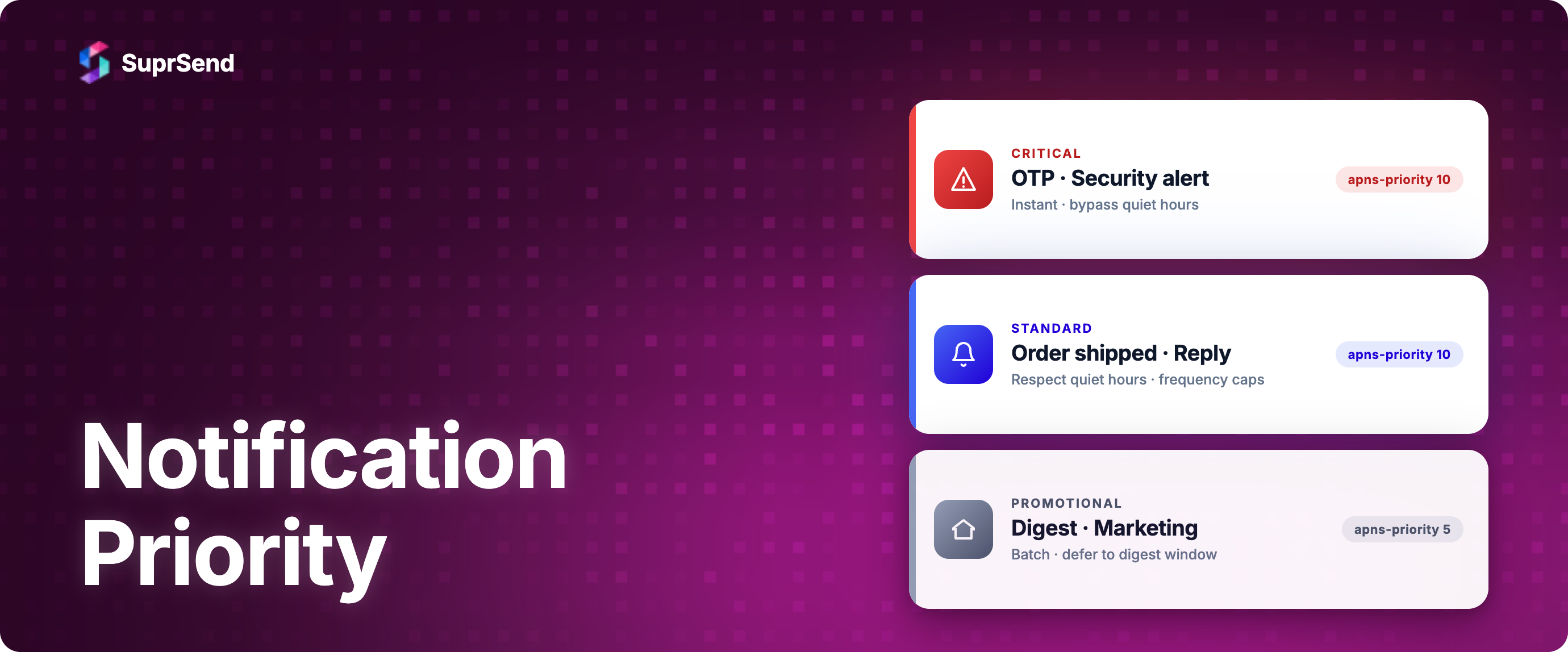
Most production notification systems converge on three priority tiers. SuprSend uses these as root notification categories; the same three appear in Knock, Customer.io, Braze, and every well-designed in-house system. Names vary; the substance is the same.
The decision rule for assigning a new notification to a tier is a single question: if this notification fails to reach the user, is the user worse off in a way they would complain about? Critical = always yes. Standard = sometimes yes. Promotional = rarely yes, and the cost of a missed marketing push is much smaller than the cost of a missed OTP.
This rule keeps the tiers honest. The temptation to mark every product update "Critical" because the team thinks it is important must be resisted. Critical is a bypass-everything tier, and every notification placed there narrows the user's tolerance for the next one.
Per-Platform Priority Mapping
Once a notification is tagged with a tier, the per-channel priority headers and flags follow mechanically. This table is the single most useful reference in this guide.
Three rules govern how to read this table.
Critical and Standard often share the same gateway-level priority on iOS and Android. Both use apns-priority: 10 and FCM HIGH. The difference shows up in the interruption level (iOS) and the NotificationChannel importance (Android). These are user-experience signals, not delivery-speed signals. APNs and FCM deliver high-priority messages at the same speed; the UX layer decides whether the user is jolted.
Promotional pushes on Android default to NORMAL priority. Google's documentation is explicit: HIGH priority should be reserved for messages "that require immediate user attention." Mass marketing pushes at HIGH risk being throttled by Android's adaptive delivery, which learns over time which apps abuse the priority and downranks them.
The critical iOS interruption level requires an Apple-granted entitlement. Most apps cannot use critical without an approved use case (medical, public safety, home security). time-sensitive is the practical "wake the user even in Focus mode" level for ordinary product critical-tier notifications.
How Priority Interacts with Quiet Hours and Frequency Caps
The most common runtime decision in a mature notification system is not "what priority is this notification" but "does this notification's priority let it through the gates we have in place right now."
The single most important takeaway: critical-tier notifications get a separate code path in a well-designed system. They share less infrastructure with standard and promotional than people expect. SuprSend's architecture reflects this in the docs: "We maintain separate notification queues for different notification categories to ensure that marketing and promotional notifications don't delay system or time-sensitive notifications." That sentence captures the principle in one line.
Priority for AI Agent Notifications
A new class of notifications became material in 2025-2026: notifications sent by AI agents on behalf of human users. An agent monitoring an inbox decides a meeting needs to move. An agent running a code review surfaces a critical bug. An agent watching a portfolio detects a margin call. These are not the same as system-generated notifications, and they are not the same as user-triggered notifications. The priority decision changes shape.
Three new questions appear:
1. Who pays the attention cost? A traditional system notification is one message from the system to one user. An agent can fire many notifications per day if not constrained. The frequency cap question gets sharper.
2. How does the agent know the priority of the message it is sending? The agent has to either be told (by the human user, in instructions) or inferred (from the event context). Most production agent setups expose priority as a parameter the agent populates per send.
3. Should agent-sent notifications inherit the user's trust budget, or have their own? Most teams give agent-sent notifications a tighter budget than user-direct system notifications. An agent that misfires a critical-tier notification spends the user's trust faster than a one-off system push.
The pattern that has emerged: agent SDKs expose the same three-tier framework, with the agent populating the category per send. SuprSend's MCP Server and Agent SDK let agents call workflow triggers with a category and priority signal, the same way an application backend would, so the queue separation and gating rules apply uniformly. The underlying infrastructure does not know or care that the caller is an agent versus a microservice; the category determines the routing. For a deeper treatment of how this layer should look, see notification layer for AI agents.
The strategic implication: notification priority is no longer a server-side decision made once by a backend engineer. It is a per-event decision that an agent has to make at inference time. Frameworks that previously left priority implicit are being updated to make it an explicit parameter at the SDK boundary.
Where SuprSend Fits in This Framework
SuprSend implements the three-tier framework as notification categories at the platform level: System, Transactional, Promotional. Three things follow from this design.
Queue separation by category, not by priority integer. System and Transactional traffic flows through separate queues from Promotional. The benefit is the OTP-behind-promotional-batch scenario at the top of this guide cannot happen by accident. The architecture enforces what the priority framework prescribes.
User preferences scoped to categories. System is Can't Unsubscribe by default (compliance and product safety). Transactional defaults to On, with user-visible toggle. Promotional defaults vary by region (often Off for GDPR jurisdictions, On with clear opt-out for US under CAN-SPAM). The category configuration handles these defaults centrally.
Per-channel vendor routing per category. Critical-tier email can use a transactional sending domain and IP pool; promotional uses a marketing pool. SMS can route critical through the transactional vendor and promotional through a bulk vendor. The vendor configuration is done at the root-category level rather than per-message, which is easier to audit.
For teams using SuprSend's MCP Server or Agent SDK to let AI agents send notifications, the same category framework applies (more on this in how AI agents will notify users). The agent populates a category when triggering a workflow; SuprSend's queue separation, preference enforcement, and channel routing follow automatically. For teams running with SuprSend's self-hosted deployment for compliance reasons, the category framework is the same.
The build-vs-buy implication is meaningful. A team building this from scratch has to design the category schema, build the separate queues, wire up the per-category preference store, configure per-vendor routing rules, and build the AI-agent SDK boundary. That is six to twelve months of engineering work. The framework above is the design document; the implementation is the part SuprSend abstracts. See build vs buy for notification service for the full cost breakdown.
How to Roll This Out
For a team about to apply the framework to an existing notification system, the rollout has three phases.
Phase 1: Inventory and classify. List every notification your product sends. Classify each into Critical / Standard / Promotional using the "would the user complain if it failed" test. Expect 60-70% of notifications to be Standard; 5-15% Critical; the rest Promotional. If your Critical bucket is bigger than 15%, you are over-classifying. Be honest about which notifications are genuinely essential.
Phase 2: Wire up per-channel mappings. Apply the per-platform table above. For iOS, update push payloads to set the right apns-priority and interruption level. For Android, define NotificationChannels for each tier and set importance accordingly. For email, separate transactional and marketing IP pools. For SMS, ensure transactional traffic does not share carrier reputation with marketing.
Phase 3: Wire up the gates. Quiet hours, frequency caps, vendor failover policies. Each gate gets a per-tier policy as in the gate-interaction table. Test the edge cases: what happens when a Critical notification fires during DND, a Promotional notification hits the daily cap, an SMS vendor is down for the Standard tier.
The discipline through all three phases is to treat tier assignment as a product decision, not an engineering convenience. Engineering implements the rules; product owns the tier each notification belongs to.
FAQ
What are the standard notification priority levels?
The widely-used framework is three tiers: Critical (essential to product functioning, exempt from quiet hours and frequency caps, cannot be unsubscribed for compliance reasons), Standard (transactional, in response to user actions, respects quiet hours and caps), and Promotional (engagement-oriented, strictly respects all gates and user preferences). Some teams add a fourth tier ("Internal" or "Operational") for admin alerts; most stop at three.
How do FCM and APNs priorities differ?
FCM has two priorities: HIGH and NORMAL. HIGH wakes the device immediately; NORMAL allows the OS to batch and conserve battery. APNs has three: 1 (lowest), 5 (power-friendly), 10 (immediate). For practical use, FCM HIGH maps to APNs 10, and FCM NORMAL maps to APNs 5. APNs adds a separate interruption-level field (passive, active, time-sensitive, critical) on top of the numeric priority, which controls UX behavior on iOS 15+.
What is the difference between APNs priority 10 and interruption level critical?
APNs priority 10 means "deliver immediately" at the gateway level. Interruption level critical means "bypass the user's Do Not Disturb and ring at full volume." A notification can be priority 10 with interruption level active (immediate delivery, respects DND) or priority 5 with interruption level passive (power-friendly delivery, no sound or breakthrough). The two fields are independent. critical requires an Apple-granted entitlement.
Should marketing pushes ever use HIGH priority on Android?
No. Google explicitly states HIGH priority should be reserved for messages requiring immediate user attention. Marketing pushes at HIGH risk being throttled by Android's adaptive delivery system and damaging the app's overall delivery reputation. Use NORMAL for promotional pushes.
How does notification priority interact with quiet hours?
Critical-tier notifications typically bypass quiet hours (OTPs at 3 AM still need to deliver). Standard-tier notifications defer until quiet hours end. Promotional-tier notifications strictly respect quiet hours and may also respect channel-specific windows (e.g., US SMS marketing limited to 8 AM-9 PM under TCPA). The gates compose: a Promotional SMS attempted at 2 AM in the recipient's timezone defers to 8 AM, regardless of any app-level priority signal.
What priority should AI-agent-sent notifications use?
The agent should populate the priority at send time based on the event the agent is responding to. Most teams give agent notifications a tighter frequency budget than user-triggered notifications, because agents can fire more often. The same three-tier framework applies: an agent surfacing a security alert uses Critical, an agent moving a meeting uses Standard, an agent suggesting an article uses Promotional.
Why are Critical-tier notifications usually exempt from frequency caps?
Because the cost of missing one is higher than the cost of the user receiving one extra. A user hitting their daily cap should still get an OTP, a security alert, or a payment-failure notification. If those got capped, the cap mechanism would directly damage the product. The honest design is that Critical does not count against caps; this implies discipline in keeping the Critical bucket small.
How does SuprSend handle notification priority?
SuprSend implements the three-tier framework as notification categories: System (cannot unsubscribe, queue priority), Transactional (default on, respects preferences), Promotional (default off in some regions, strictly capped). The platform uses queue separation rather than a numeric priority field, which prevents a promotional batch from blocking a transactional or system message. Per-channel vendor routing and user preference defaults are configured at the category level.
TL;DR
Notification priority is not a single number. It is a four-layer decision (queue, channel header, UX behavior, compliance gating) best implemented as a three-tier category system (Critical / Standard / Promotional) with per-platform mappings, gate interaction rules, and explicit priority for AI-agent notifications. APNs and FCM gateway priorities map mechanically once the tier is decided. Quiet hours and frequency caps interact with tier predictably: Critical bypasses, Standard respects, Promotional strictly respects. SuprSend implements this as notification categories with queue separation, removing the most common production bug where promotional traffic blocks transactional or system notifications.
Next Steps
If you want to apply this framework without building the queue separation, category schema, and per-channel routing yourself, the fastest path is to start building for free on SuprSend's free tier (10,000 notifications/month, all channels, no credit card) and configure your three categories in the dashboard in under 15 minutes. If you want to walk through your specific priority and compliance requirements with our team, book a demo.


