SuprSendVSAirship

SuprSend vs Airship

Airship was built for a marketing team sending push and in-app campaigns to a consumer app. SuprSend does the same job for engineering, product, growth and their agents.

Trusted infrastructure layer behind hundreds of platforms

ExaCareSiemensEmergentSarvamCrazyGamesEvocalizeEskoFrankieOneSennderDelightreeHeyReachFreightify

Airship and SuprSend both turn what users do into messages across push, in-app, email and SMS, with journeys, segments and preferences. Airship grew out of mobile push and centres on native in-app experiences a marketer builds in its dashboard. SuprSend is notification infrastructure where transactional, product and engagement messages run in one system, changed from the dashboard, from an agent, or from the repo.

Why teams choose SuprSend over Airship

AI works where your team works

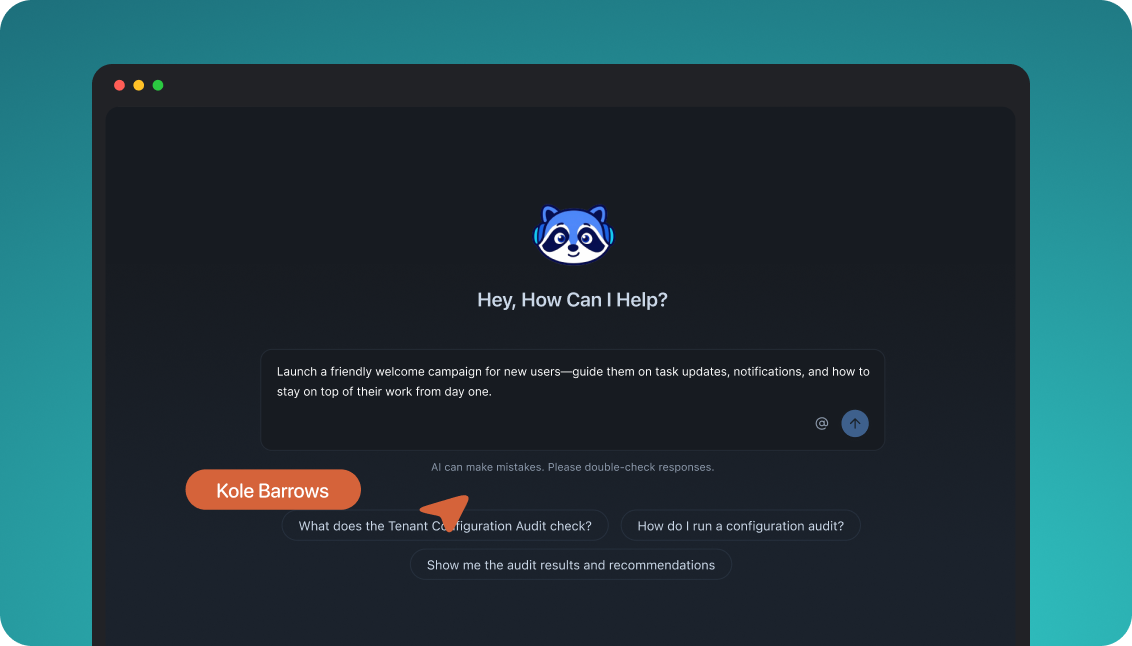
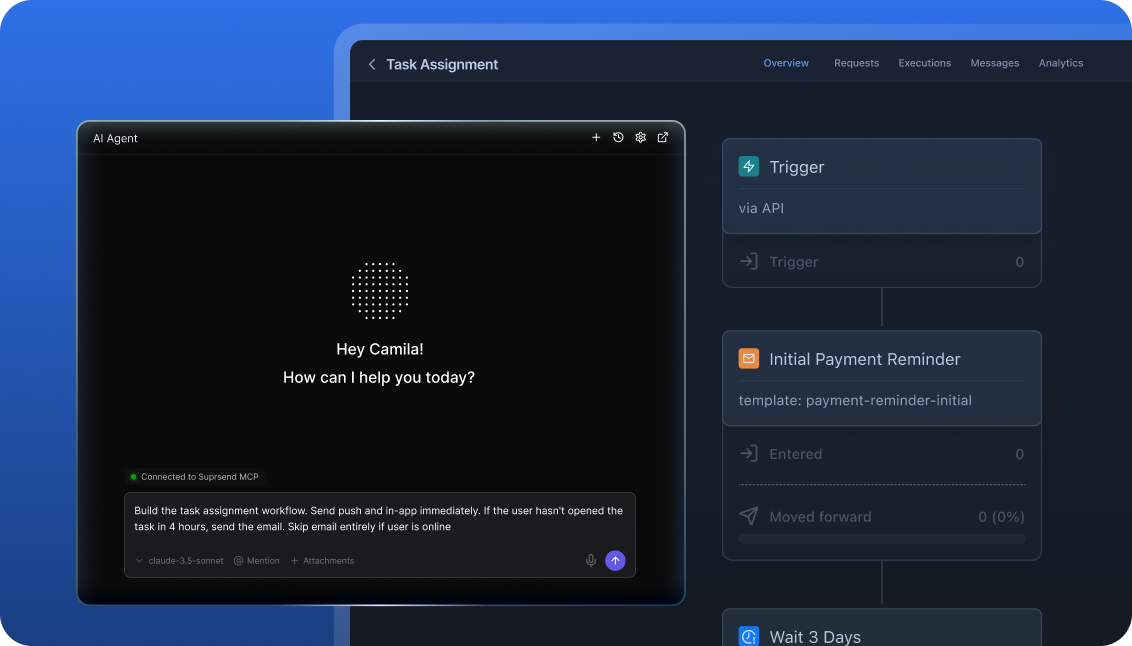
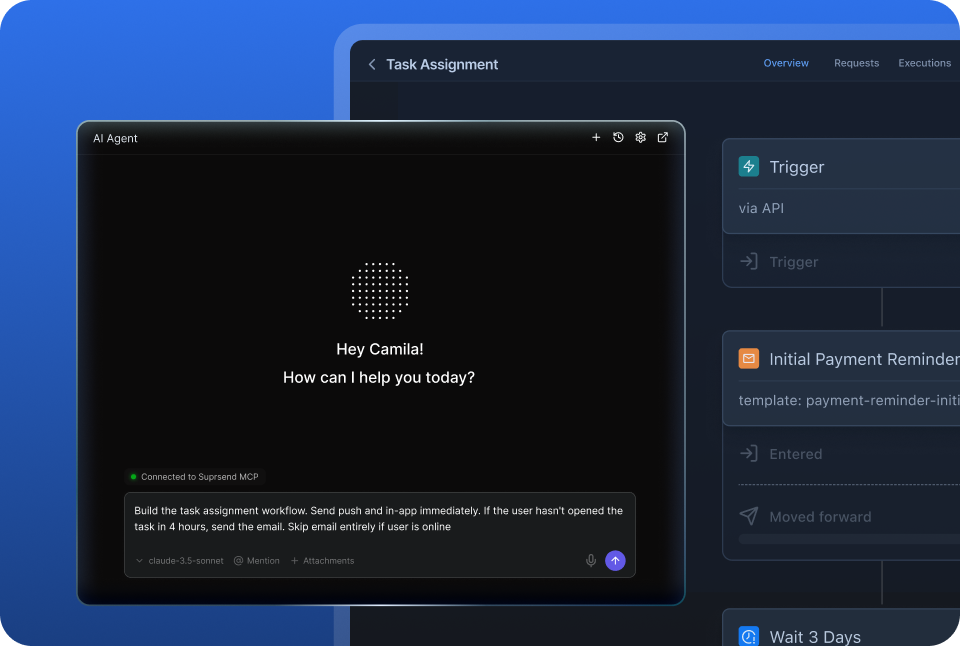
The SuprSend agent builds a workflow, drafts the copy and traces a failed send from the dashboard or Slack. Claude, ChatGPT, Cursor or Claude Code connect over MCP and do the same work. Airship’s AI agents live inside its dashboard, so the team learns that UI first.

Reach customers on every channel, with every message

Email, SMS, WhatsApp, mobile and web push, Slack, Teams, an in-app inbox and webhooks sit on one user profile on every plan. A password reset and a win-back campaign share one engine. Airship sells email, SMS and wallet as separately purchased packages.

Customise notifications per tenant, with per-user preferences

Each tenant gets its own sending domain, provider, template version, defaults and inbox feed, with sub-tenants nesting five levels deep. Each user sets preferences per channel, category and digest schedule. Airship separates customers by project and has no tenant object.

Failover, batching and version history under every message

A failed send moves to the next provider, a burst of events becomes one digest, and every workflow and template keeps versions with rollback. Event payloads are checked against a schema before a run starts. Airship has no provider failover, digest or version history.

Build notifications in the dashboard, in your own agent, or in your codebase

A product manager changes a workflow in the dashboard. A developer commits the same workflow as a file and ships it through a pull request. A marketer asks Claude to build a list and send a campaign. All three are working on the same workflows, templates and logs, so nobody waits on a ticket.

The built-in agent builds, edits and debugs notifications from a description; product and growth ship without a ticket.

In the dashboard

Connect the MCP to Claude, ChatGPT or any client and operate templates, workflows, tenants and preferences from there.

In your own agent

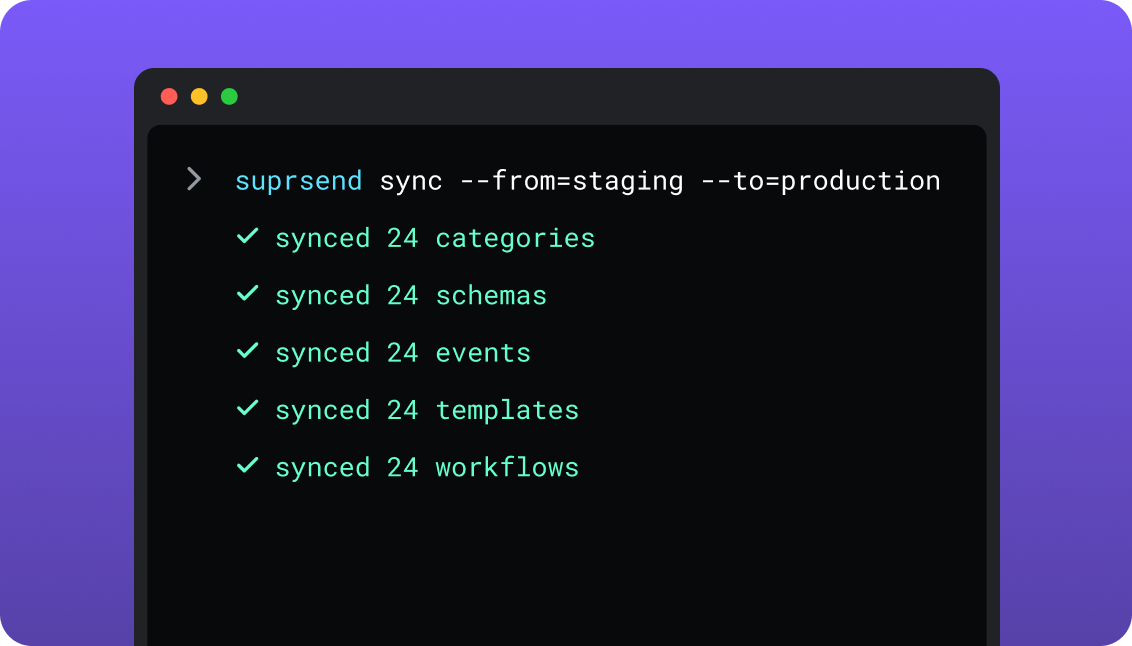
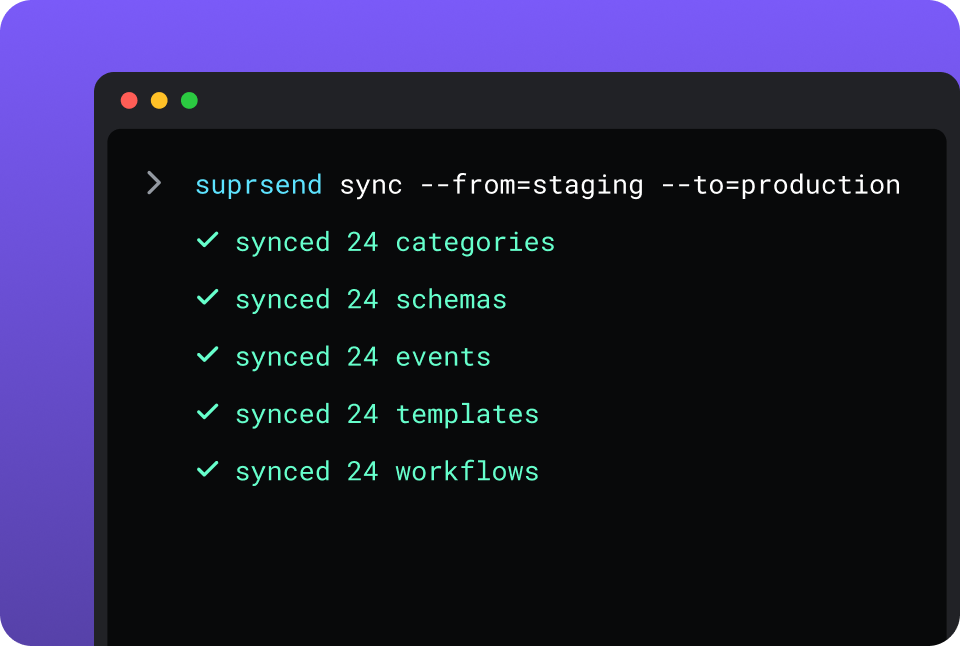
CLI and API keep workflows versioned, diffable and reviewed in pull requests; coding agents make bulk changes.

In your IDE or codebase
In the dashboardIn your own agentIn your IDE or codebase

One SuprSend customer runs its marketing email end to end from Claude Code, with nobody in the dashboard.

Airship is built in its dashboard. Journeys, Sequences, Scenes and campaigns are composed there, and its AI agents draft a Journey or a Scene for a person to approve. The REST API sends messages, creates Automations and moves users in and out of a Sequence that was built in the dashboard. Airship’s open-source MCP server and Skills give coding agents tools for push sends, channel management and SDK migration. There is no CLI, and a Sequence cannot be exported or promoted between projects.

Everything from one place

Transactional alerts, product notifications and engagement campaigns share one set of users, one preference model and one log. A marketing team working in the SuprSend dashboard also runs the event-driven transactional messages from the same workflows, lists and logs as its campaigns.

Lists built five waysRules on properties and events, a scheduled SQL query on your warehouse, a CSV, the API, or a Segment, Mixpanel or Amplitude sync, all set up in the dashboard.
User properties with no schema to declareAny number per user, holding any JSON value, nested objects and arrays included.
An inbox inside your productWeb and mobile SDKs with read state, tabs by category, per-tenant feeds and a headless mode, on every plan.
Users choose channels per category; admins set the defaultsA user takes mentions on push and billing on email; a customer’s admin makes security alerts mandatory.
Bring your own providersSendGrid, SES, Postmark, Twilio or whichever providers you already pay for, chosen per channel and per tenant.
Translations as filesOne translation file per language, pulled and pushed by the CLI with the templates, so one template renders in every language.
Logs that say whyRendered content, the provider’s error and the block reason for every message, kept 30 days on Free and 90 on paid plans.

Short answer

If this is youChoose
A consumer app whose marketing team runs native in-app Scenes, surveys and stories alongside pushAirshipAirship
A brand that needs Apple and Google Wallet passes, Live Activities or RCS messagingAirshipAirship
A growth programme built on feature flags, holdout experiments and control groupsAirshipAirship
A product where messages start from what users do and reach several channels and an in-app inboxSuprSendSuprSend
A marketing team that wants transactional messages in the same dashboard, lists and logs as its campaignsSuprSendSuprSend
A B2B product where each customer account needs its own domain, provider, content and defaultsSuprSendSuprSend
A team that wants agents to build, send and manage its notifications, from Claude, ChatGPT, Claude Code, Cursor or SlackSuprSendSuprSend
Engineers who want workflows versioned in the repo and promoted from staging to productionSuprSendSuprSend
Airship already runs the Scenes and campaigns, and the product needs transactional notifications with failover and category preferencesBoth

At a glance

SuprSendSuprSendAirshipAirship
Best whenEngineering, product and growth all send messages to users, across channels and customer accountsA marketing team runs push, in-app experiences and campaigns for a consumer app
Who uses itEngineers, product, growth, and agents over MCP; unlimited seatsMarketers and CX teams in the dashboard; engineers on the SDKs and API
Messages coveredTransactional, product and customer engagement, in one systemCampaigns, journeys and in-app experiences; transactional email and SMS inside their packages
Built and changed fromDashboard agent, your own agent over MCP, CLI and APIDashboard with AI agents; REST API for sends and Automations
ChannelsEmail, SMS, WhatsApp, mobile push, web push, Slack, Teams, in-app, webhook, every planPush, web push, in-app, Message Center, Live Activities; email, SMS and wallet as purchased packages
Data modelUsers, lists, objects, tenants and sub-tenantsChannels tied to named users, with tags and typed attributes
Multi-tenancyNested tenants with own provider, domain, template version and defaultsProjects under a company account; no tenant object
PreferencesPer category: channels, digest schedule, conditions; tenant defaultsOpt-in per subscription list, in a hosted or embedded centre
Journeys and workflowsOne send step for all channels; batch, digest, branch, failover, versionsJourneys of Sequences, Scenes and In-App Automations; A/B tests and holdouts
In-appInbox and toasts on web and mobile, headless optionMessage Center, In-App Automation, Scenes with surveys and stories
Provider failoverOrdered providers with timer and delivery confirmationNo second provider; falls back to another opted-in channel
Log retention30 days Free, 90 days paid, rendered content keptUnicast content not stored; multicast and analytics 13 months
AIAgent builds, writes copy and debugs in dashboard or Slack; MCP; Agent SDKScene, Experimentation and Recommendation agents and AI-built Journeys, in the dashboard
HostingSuprSend cloud on every plan; your VPC, on-prem or BYOC on Enterprise, full product, supportedAirship cloud; US and EU data centres
Pricing modelPer notification per channel; a digest counts as one; 10,000 freeMonthly active users, contacts and impressions, by quote
ImplementationFree plan, no sales call; first workflow the same dayEssentials self-service; Enterprise by quote with services
ComplianceSOC 2 Type II, GDPR, HIPAA BAA on EnterpriseSOC 2 Type II, report under NDA
G24.8, 129 reviews4.0, 83 reviews

What each is built for

AirshipAirship

Airship is a customer experience platform for consumer apps. It began in 2009 as Urban Airship, a push notification service, and its centre is still the app audience: devices and addresses tied to a named user, carrying tags and attributes.

Around push it added native in-app Scenes, surveys and feature flags that change without an app release, then email, SMS and wallet as separately purchased packages. Marketers draw Journeys in the dashboard, and engineers maintain the SDKs.

SuprSendSuprSend

SuprSend is a notification platform for products whose messages start from what users do and are built by more than one team. One event becomes the right message on every channel through a workflow that batches, routes and fails over.

Engineers, product, growth and agents work on the same workflows, templates and logs. Transactional, product and engagement messages all run in it on one user profile, and it runs in SuprSend’s cloud or in yours.

Where Airship wins

Native in-app experiencesScenes, stories, surveys and NPS render with native UI, branch on answers and change without an app release.
Experimentation built inA/B tests on messages, holdout experiments, control groups and Intelligent Rollouts, with Feature Flags as an add-on.
Mobile channels beyond pushApple and Google Wallet passes, iOS Live Activities, Android Live Updates, MMS, and RCS for customers on its US data centre.
AI agents inside the dashboardScene, Experimentation and Recommendation agents work together, with brand-guideline and accessibility checks, on every AXP plan.
Predictive modelsPredictive Churn and Send Time Optimization on AXP, and Audience Pulse recommendations on AXP Enterprise.
More app frameworksSDKs for iOS, Android, Web, React Native, Flutter, Capacitor, Cordova, Unity and .NET.
Access control on every planEight access levels, company-account SSO and an IP allowlist.
Services and a results guaranteeImplementation consultants, strategic services and a published results guarantee.

Where SuprSend wins

Workflows and templates in your repoPull them as files, edit, push, and promote staging to production from CI. Airship Sequences are built in the dashboard and cannot be exported.
Environments and a test modeDevelopment, staging and production on every plan, and a test mode that blocks real delivery. Airship tests with preview groups that receive real messages.
Warehouse audiences you set up yourselfA scheduled SQL query on your warehouse, created in the dashboard. Airship’s Snowflake integration is configured by Airship.
Chat channels on every planSlack, Microsoft Teams and WhatsApp are native channels. Airship reaches them through an Open Channels integration you build.
Objects as recipientsAn order, a team or a device can hold its own channels and subscribers and receive a notification.
A free plan and a same-day start10,000 notifications a month on every channel, with no sales call. Airship’s email and SMS are purchased packages, provisioned by Airship.
A choice of where it runsSuprSend cloud on every plan, or the full product in your VPC, on-prem or BYOC on Enterprise, supported. Airship runs in its own cloud, US or EU.

Who works in it

AirshipAirship

Marketers and CX teams build Journeys, Scenes, segments and campaigns in the dashboard, under eight access levels. Engineers maintain the app SDKs and call the REST API to send messages, create Automations and move users into Sequences.

Agents: Airship’s own agents draft Scenes, Journeys and recommendations for a person to approve; coding agents use its MCP server to send push and manage channels.

SuprSendSuprSend

Engineers integrate once through the API, a backend SDK in Python, Node, Java or Go, the CLI and MCP. Product and growth build workflows, lists, templates and broadcasts in the dashboard, or have the SuprSend agent build them.

Agents connect over MCP from Claude, ChatGPT, Claude Code or Cursor and create users and lists, build and trigger workflows, write templates and read the delivery log.

Feature by feature

From both pricing pages, Airship’s billing, feature-package and data-retention references, both documentation sites and the products, September 2026. Plan names mark the lowest plan that includes a feature.

How notifications are built and changed

Everything in SuprSend has an API and a file form behind the dashboard, so it can be scripted, versioned, staged and handed to an agent. Airship is composed in its dashboard on a live project; the API sends messages and moves users through what the dashboard built.

CapabilitySuprSendSuprSendAirshipAirship
Dashboard builder YES YESJourney map of Sequences, Scenes and In-App Automations
Workflows by API YESCreate, update and trigger PARTIALAutomations by API; Sequences built in the dashboard, entered by API
CLI push and pull of assets YESWorkflows, templates, schemas, events, categories, translations NO
Promote staging to production YESFrom the CLI or CI NOContent copied between projects loses its segments and lists
Change many assets in one command or prompt YESBy CLI or agent NOOne Sequence or template at a time
Export a workflow as a file YES NOSequences archive only; no export
Headless UI YESInbox, preference centre, template editor PARTIALCustom Message Center and preference centre views on app SDKs
Agent that builds in the dashboard YESWorkflows, copy and debugging, also in Slack YESJourneys, Scenes and campaigns, for a person to approve

Teams and scope

Airship is sold to marketing and CX teams, with engineers maintaining the SDKs. SuprSend is one system for engineering, product and growth, with no seat count and three environments on every plan.

CapabilitySuprSendSuprSendAirshipAirship
Who builds workflowsEngineers, product and growth, in the dashboard, by CLI, API, MCP or agentMarketers in the dashboard; engineers through the API
Team membersUnlimited on every planInvited per project under eight access levels
Transactional notifications YESEvery channel YES, BUTEmail and SMS inside the purchased packages
Product notifications YESWith an in-app inbox YESPush, in-app and Message Center
Customer engagement campaigns YESLists and broadcasts on every plan YESThe core of the product
EnvironmentsDevelopment, staging and production on every planTest and production projects
Test mode that blocks delivery YES NOPreview and test groups receive real messages

Data model and tenancy

Airship models the consumer audience: a channel tied to a named user, with tags, typed attributes and events, inside a project. SuprSend adds objects and nested tenants with their own domain, provider, content and defaults, which is what a B2B or marketplace product needs.

CapabilitySuprSendSuprSendAirshipAirship
User recordUser with channels, any JSON properties and preferencesChannel tied to a named user or contact, with tags and attributes
Non-user recipients YESObjects with own channels and subscribers; Business NO
Tenants YESNested five levels; Business add-on or Enterprise NOProjects under a company account
Per-tenant provider and sending domain YES NO
Per-tenant template and branding YES NO
Tenant-admin preference defaults YESDefaults, mandatory channels, visible categories NO
Event payload schema YESJSON schema with generated TypeScript types NO
External data at send time YESFetch-from-API step; Essentials YESExternal data feeds
Location data NO YESLocation triggers and attributes

Marketing campaigns and lists

Both run one-time and scheduled campaigns to an audience. Airship builds the audience from tags, attributes, events and app lifecycle. SuprSend builds it from properties, events, your warehouse or a CDP, and sends it on any channel through the same workflow engine as transactional messages.

CapabilitySuprSendSuprSendAirshipAirship
How a list is builtRules on properties and events; scheduled warehouse SQL; CSV; API; Segment, Mixpanel, Amplitude syncSegments on tags, attributes, events and lifecycle; uploaded, lifecycle and subscription lists
Lists that refresh YES, BUTDynamic lists on Enterprise, or an add-on on Essentials and Business YESSegments evaluate at send; lifecycle lists update automatically
User propertiesAny number, any JSON value, nothing to declare firstAttributes added to the project first, typed Text, Number, Date or JSON
Warehouse audiences YESScheduled SQL query, set up in the dashboard YES, BUTSnowflake zero-copy integration, configured by Airship
Broadcast channelsAny of the nine channels, or several in one sendPush, web push, in-app and Message Center; email, SMS and wallet in their packages
SchedulingOne-time, scheduled or recurring; recipient’s timezone on EssentialsOne-time or scheduled; recipient’s time zone; Send Time Optimization
Campaign through the workflow engine YESBatches, routes, falls over and respects preferences PARTIALChannel Coordination picks the channel per message
Transactional messages from the same dashboard YES YES, BUTEmail and SMS flagged transactional per send, inside the packages
Campaign analyticsDelivered, seen, clicked and unsubscribed per broadcast, template, category and tenantMessage reports on every plan; Performance Analytics with 3 months of data
A/B tests and holdouts NO YESA/B tests, holdout experiments, control groups

Channels

Airship began as push and added the rest around it: email, SMS and wallet are purchased as packages on Enterprise, and chat apps go through an Open Channels integration you build. SuprSend has nine channels on every plan, on one user profile.

CapabilitySuprSendSuprSendAirshipAirship
Mobile push YESAPNs and FCM, direct YESiOS, Android, Fire OS
Web push YES YES
In-app inbox YESEvery plan, Free included YESMessage Center
Email YESEvery plan, through your provider YES, BUTPurchased package on Enterprise
SMS YESEvery plan, through your provider YES, BUTPurchased package on Enterprise; MMS, and RCS in the US
WhatsApp YESCloud API or a provider NOBuild it on the Open Channels API
Slack and Microsoft Teams YES NOBuild it on the Open Channels API
Webhook as a channel YES YESOpen Channels API
Mobile Wallet NO YES, BUTPurchased package on Enterprise
Live Activities and Live Updates NO YES
Bring your own provider YESAny supported provider per channel and tenant YES, BUTTwilio and SendGrid, arranged through an account manager
Provider failover YESOrdered providers, timer, delivery confirmation; Essentials NO

Workflows

Both trigger on events, schedules and audience changes, delay, branch on user data and exit on a goal. Airship goes further on journey experimentation and in-app branching. SuprSend’s workflow engine goes further underneath: one send step for every channel, digest, failover, versions and cancellation.

CapabilitySuprSendSuprSendAirshipAirship
TriggersAPI, SDK or Segment event, schedule, list changeCustom event, tag change, first seen, inactivity, location, date attribute, predicted churn, API
One step sends to every channel YES NOChannel chosen per message
Try channels in order, stop on response YES PARTIALPriority Channel with Fallback, by opt-in state
Branching YESBranch node YESConditions, Sequence outcomes, Scene answers
Batching and digest YESUser-chosen time, due date, skip if too few; Business NO
Delay and wait for event YES YES
Version history and rollback YES NO
Cancel runs YESBy run, recipient or workflow YESExit users through the API or on an event
Active flow limitNo limit published1,000 active automations on Enterprise and Essentials; 25 on Essentials Starter
Feature flags and rollouts NO YES, BUTAdd-on, billed on active flags

Templates and content

Both have visual editors, Handlebars and snippets. SuprSend’s templates keep versions, vary by tenant, user or language, and embed in your product. Airship localises per message and feeds brand guidelines to its AI copy.

CapabilitySuprSendSuprSendAirshipAirship
EditorsRich editors for all nine channelsEmail editor, Scenes editor, push and in-app composers
Template languageHandlebars; JSONNET for Slack and Teams cardsHandlebars
Embeddable template editor YESReact SDK NO
VariantsBy tenant, user, event data or languageOverrides per platform
Translations YESTranslation files per language, pushed by CLI; Business YESLocalisation per message
Reusable blocks and brand rulesPartials; branding per tenantSnippets; brand guidelines for AI copy
Version history YES NO

Preferences

A preference is what a user has said about which messages they want and where. In SuprSend it is set per category and resolved user, then tenant admin, then category default, on every send. In Airship it is an opt-in on a subscription list.

CapabilitySuprSendSuprSendAirshipAirship
ModelPer category: channels, digest schedule, condition rules; BusinessOpt-in per subscription list
PrecedenceUser per tenant, then tenant admin, then category defaultUser only; no admin layer
User-chosen digest schedule YES NO
Condition rules per category YES NO
Hosted preference page YESBusiness YESAirship-hosted or embedded
Multi-channel preference centre YES YES
Quiet hours set by the user NO YES, BUTQuiet Time as an iOS SDK setting

In-app inbox

Airship’s in-app surface is wider: Message Center plus In-App Automation, Scenes and Live Activities. SuprSend’s inbox is one channel of the same workflow that sends the email and the push, with preferences across all of them.

CapabilitySuprSendSuprSendAirshipAirship
Web SDKsReact, Angular, Vue, JavaScriptWeb SDK
Mobile SDKsReact Native, Flutter, iOS headless; native iOS and AndroidiOS, Android, React Native, Flutter, Capacitor, Cordova, Unity, .NET
Tabs, filters, snooze, pin, archive YES PARTIALRead state and list views; custom UI for more
Per-tenant feed YES NO
Toasts YES YESIn-app banner
Native screens, surveys, stories NO YES, BUTScenes, billed per impression
Inbox content retentionSame as log retention13 months

Analytics and logs

Airship reports on engagement across its audience. SuprSend’s logs answer whether a user got a message, and if not, why, with the rendered content in front of you.

CapabilitySuprSendSuprSendAirshipAirship
Message log with content YES NOUnicast content not stored; 30 days in support logs
Block reasons named YES NO
Retention30 days Free, 90 days paid, custom Enterprise13 months for multicast content and analytics
ExportCSV to 50 million rows; logs to your warehouse on BusinessPerformance Analytics exports
Event stream outWebhooks on every planReal-Time Data Streaming, kept 7 days or 100 GB
Monitoring tools YESDatadog, New Relic; Enterprise NO
Marketing reportsDelivered, seen and clicked per workflow, template, category and tenantPerformance Analytics; 3 months included, more on Enterprise

Developer experience

Airship has the longer list of app SDKs. SuprSend has the tooling that treats notifications as code: a CLI, an OpenAPI spec, generated types and three environments.

CapabilitySuprSendSuprSendAirshipAirship
Backend SDKsPython, Node, Java, GoJava, PHP, Python, Ruby
Client SDKsJavaScript, React, React Native, Flutter, iOS, AndroidiOS, Android, Web, React Native, Flutter, Capacitor, Cordova, Unity, .NET
CLI YES NO
OpenAPI spec and try-it YES PARTIALPostman collection
TypeScript types from schemas YES NO
API authWorkspace keys per environment; expiring JWT for the inboxOAuth 2.0 with scoped tokens; app key and secret

AI, by what it can do

Airship’s agents draft Journeys, Scenes and tests for a person to approve inside its dashboard. The SuprSend agent, and any agent connected over MCP, can build, send and diagnose on its own.

CapabilitySuprSendSuprSendAirshipAirship
Build a workflow from a description YESIn the dashboard, Slack, or any agent over MCP YESAI-generated Journeys in the dashboard, 100 per project
Draft copy per channel YESAll nine channels YESWith brand guidelines and personalities
Diagnose a failed send YESReads the log and names the reason NO
MCP server YESUsers, lists, tenants, preferences, workflows, templates, logs YESPush sends, channels, SDK migration
Build and run a workflow from an external agent YES NOThe API enters users into a Sequence built in the dashboard
Agent SDK for your own agents YESOpenAI, LangChain, Vercel AI NO
Experimentation agent NO YESTests message and experience variants
Predictive models NO YESPredictive Churn, Send Time Optimization

Security, compliance, support

Airship has the fuller access model on every plan. SuprSend has two-factor sign-in on every plan, puts roles, SAML and the audit trail on Enterprise, and adds HIPAA, dedicated infrastructure and a choice of where it runs there.

CapabilitySuprSendSuprSendAirshipAirship
Two-factor sign-in YESEvery plan YESEvery account
SSO YES, BUTGoogle and GitHub on every plan; SAML on Enterprise YESCompany-account SSO
Roles YES, BUTRBAC on Enterprise YESEight access levels on every plan
IP allowlist NO YES
Audit trail YES, BUTEnterprise YESTeam activity log, 90 days
CertificationsSOC 2 Type II, GDPR, HIPAA BAA on EnterpriseSOC 2 Type II, report under NDA
HostingSuprSend cloud on every plan; your VPC, on-prem or BYOC on Enterprise, full product, supportedAirship cloud; US and EU data centres
Uptime99.9 percent on every plan; SLA on EnterpriseNot published
SupportSlack community; email and chat on paid; phone and CSM on EnterpriseSupport portal; account manager and consultants on Enterprise

Pricing and implementation

SuprSend counts one notification per user per channel, a digest counts as one, and sends blocked by an opt-out are not billed. Airship quotes on monthly active users, contacts and Scene impressions, with email and SMS committed in separate packages.

A product sending 300,000 notifications a month pays $1,500 a month on SuprSend Business billed annually: $250 plus 250,000 extra at $5 per 1,000. Airship prices the same product on its active audience and channel commitments, so the two bills do not line up. Compare on your own event-to-notification ratio; SuprSend’s pricing page has the tiers.

CapabilitySuprSendSuprSendAirshipAirship
Billing unitNotification per user per channel; digest counts as oneMonthly active users, contacts, impressions; SMS by message part
Free10,000 notifications a month on every channelNo free plan on the pricing page
Entry paidEssentials $100 a month billed annually; 50,000; $2 per extra 1,000Essentials Starter and Essentials, self-service; no price on the pricing page
Next tierBusiness $250 a month billed annually; adds digest, preferences, objectsAXP Enterprise by quote; email, SMS and wallet packages
CommitmentsMonthly or annual; overage per 1,000Committed email, SMS and impression volumes; unused volume does not roll over
Add-onsMulti-tenant; dynamic listsScenes impressions, Feature Flags, Boost, data-stream connectors
Time to first sendSame day on the free planEssentials self-service; Enterprise with onboarding services

Migrating from Airship to SuprSend

Some teams move everything. More often, Airship keeps the Scenes, feature flags and wallet passes, and the notifications the product sends move to SuprSend. Rebuilding Sequences is most of the work, and the SuprSend agent can draft them from a description.

AirshipSuprSendMoves how
Named user, contactUserUsers API, backend SDK or CSV; keep the same ID
ChannelChannel on the userPush tokens re-registered by the SDK; emails and numbers set on the user
Tags, attributesUser propertiesSet as any JSON value
Custom eventEvent with a schemaSame event names from your backend or Segment
Segment, lifecycle listListRebuilt from rules or a warehouse query
Subscription listPreference categoryPreferences API; opt-outs carried over
ProjectEnvironment or tenantTest project becomes staging; a per-brand project becomes a tenant
Sequence, Automation, JourneyWorkflowRebuilt; no export maps across
Template, snippetTemplate with versionsHandlebars carries over; recreated in the editors
Message CenterInboxSwap the SDK; move to JWT auth
Airship email and SMSYour email and SMS providersConnect SendGrid, SES, Twilio or another; add a fallback
Scenes, flags, walletNo equivalentKeep in Airship
01

Inventory every Sequence, Automation, template, subscription list and integration, and mark what stays in Airship.

02

Stand up SuprSend development and staging. Connect providers with a fallback order and create tenants and their defaults.

03

Import users and lists, and map subscription lists to preference categories with their opt-outs.

04

Rebuild the critical flows first: verification codes, password resets, billing and security alerts. Test them in test mode, then pull them into your repo.

05

Run both platforms on those flows for a week, with the SuprSend inbox behind a feature flag.

06

Move the remaining flows, cut over, and keep a Performance Analytics export for reference.

Enterprise customers get migration support and a scoped plan; on other plans the Slack community and docs are the path.

FAQ

Is SuprSend better than Airship?
SuprSendSuprSend

SuprSend is better when messages start from what users do, reach several channels and an inbox, follow preferences per category and per customer account, and are built by engineering, product, growth or their agents. Transactional, product and engagement messages run in one system.

AirshipAirship

Airship is better for a consumer app whose marketing team runs native in-app Scenes, surveys, wallet passes, feature flags and experiments, with services behind the contract.

Can a marketing team run campaigns in SuprSend?

Yes. Marketers build lists from rules, a warehouse query, a CSV or a CDP sync, and send one-time, scheduled or recurring broadcasts on any of the nine channels. The same dashboard runs the event-driven transactional messages, with the same preferences and logs.

Can I keep Airship for Scenes and use SuprSend for notifications?

Yes. Airship keeps the in-app experiences, flags and wallet passes, and SuprSend receives product events and sends everything the product needs to tell users. That is two bills, one priced on active users and one on notifications.

Does Airship support multi-tenancy?
SuprSendSuprSend

SuprSend tenants live inside one integration, each with its own sending domain, provider, template version, preference defaults and inbox feed, nested up to five levels.

AirshipAirship

Airship separates customers by project under a company account and has no tenant object. Content copied into another project arrives without its segments, lists or preference centres.

Does Airship fall back to another provider if a send fails?

No. Airship’s Priority Channel with Fallback moves a message to the next channel a user has opted in to; it has no second provider for the same channel. SuprSend retries on the next provider in an ordered list after a set time and stops once delivery is confirmed.

Where does each run, and can I self-host SuprSend?
SuprSendSuprSend

SuprSend runs in SuprSend’s cloud on every plan. On Enterprise the full product also runs in your VPC, your data centre or bring-your-own-cloud, with vendor support.

AirshipAirship

Airship runs in Airship’s cloud, with US and EU data centres.

Which is cheaper?

The units differ. SuprSend bills per notification per channel from a free plan of 10,000 a month. Airship quotes on monthly active users, contacts and impressions, with email and SMS committed separately. Price both on your own volume.

Related Resources

Can SuprSend run inside my own cloud?Bring your own cloud
How do agents build notifications in SuprSend?SuprSend MCP
How does SuprSend handle multi-tenant products?multi-tenant notifications
What does SuprSend cost at my volume?SuprSend pricing

There’s no better place for you
to build notifications

Join thousands of product & engineering teams using SuprSend to build and ship better notifications—faster.