
Last Updated: May 2026
A typo in your password reset email subject line takes a week to fix. The product manager files a Linear ticket, the engineer schedules it for next sprint, the change goes through code review, deploy, and QA, all for two words. This is the bottleneck that notification template management exists to solve. It separates notification content from application logic so that the people who own the messaging (product managers, content writers, growth teams) can edit what users see without waiting for engineering. At the same time, it gives engineers control over the structure, variables, and delivery logic that templates depend on.
The challenge is that notifications are not a single format. An email template is rich HTML with layouts, images, and footers. A push notification is 40 to 120 characters. An SMS is 160 characters before segmentation kicks in. A WhatsApp message requires pre-approved templates registered with Meta. In-app notifications are structured JSON objects rendered by your frontend. A real notification template management system handles all of these from a single interface, respecting each channel's constraints while keeping content ownership with non-technical teams.
This guide covers what to look for in a notification template editor, how templates differ across channels, and how the major notification platforms compare on template management capabilities.
What Is Notification Template Management?
Notification template management is the practice of creating, editing, versioning, and deploying notification content through a dedicated system rather than embedding it in application code. It covers every channel your product communicates through: email, push, SMS, in-app, WhatsApp, Slack, and any others you add over time.
A notification template is not just the body text. It includes:
- Subject lines (email) or title text (push, in-app)
- Body content with dynamic variables (e.g.,
{{user.first_name}},{{order.total}}) - Channel-specific formatting (HTML for email, plain text for SMS, structured payload for in-app)
- Locale variants (the same template in English, Spanish, French, German)
- Tenant-specific overrides (different branding per B2B customer)
- Draft and live states for safe editing without affecting production
The "management" part is what distinguishes this from just having templates. Management means there is a system with access controls, version history, preview capabilities, and a publishing workflow. Without that system, templates are just strings in a database with no guardrails.
Think of it as a notification CMS. The same way a web CMS lets marketing teams publish landing pages without engineering, a notification template management system lets product teams publish notification content without deploys. The difference is that notification templates have tighter constraints (character limits, variable injection, multi-channel rendering) and higher stakes (a broken transactional notification directly affects revenue). For SuprSend's reference, see the templates documentation.
Why Templates Should Live Outside Your Codebase
When templates live in code, every text change follows the full software development lifecycle. That means a product manager who wants to change "Your order has shipped" to "Your order is on its way" has to file a ticket, wait for sprint prioritization, get a developer to make the change, go through code review, merge, deploy, and verify in production. This is wildly disproportionate to the complexity of the change. Treating notification config (templates, workflows, preferences) as notification-as-code versus pulling content into a managed system is one of the central architectural choices for any notification stack.
Here is what breaks when templates stay in the codebase:
1. Content velocity drops to zero
Product and content teams iterate on copy constantly. Subject line tests, tone adjustments, CTA experiments, seasonal updates. If every change requires engineering, the team either stops iterating (bad for engagement) or overwhelms engineering with trivial PRs (bad for velocity). Teams that move template editing into a dedicated UI ship copy changes in minutes instead of queueing them behind sprint planning.
2. Localization becomes a nightmare
Supporting multiple languages with templates in code means maintaining parallel string files, syncing translations across branches, and deploying for every locale update. A template management system with built-in i18n lets translators work in a UI, see previews per locale, and publish without touching code. When you serve users in 10+ languages, this is the difference between manageable and chaotic.
3. Transactional notifications are too critical for slow iteration
Password reset emails, OTP messages, payment confirmations: these are transactional notifications that directly affect user trust and revenue. If you discover a broken variable or misleading copy in a transactional template, you need to fix it in minutes, not days. A template editor with draft/live states and instant publishing makes that possible.
4. Multi-tenant B2B products need per-customer branding
If you sell to businesses that have their own end users, those businesses expect notifications to carry their brand: their logo, their colors, their sender name. Managing per-tenant template overrides in code means maintaining branching logic or separate template directories for each customer. A template management system handles this through override layers without multiplying your codebase.
5. Audit trails disappear
Git history technically tracks template changes, but it buries them inside hundreds of other commits. A dedicated notification content management system provides a clear audit log: who changed what, when, and what the previous version looked like. For regulated industries (fintech, healthcare), this is a compliance requirement, not a nice-to-have.
What a Good Notification Template System Includes
Not every template system is equal. Some are glorified text fields. Others are full content management platforms. Here are the capabilities that separate a production-grade notification template editor from a basic one.
| Capability | What It Does | Why It Matters | Priority |
|---|---|---|---|
| Visual editor (WYSIWYG) | Drag-and-drop or rich text editing for email templates | Non-engineers can build and edit email layouts without writing HTML | High |
| Per-channel editors | Separate editing interfaces for email, push, SMS, in-app, WhatsApp | Each channel has different constraints; one editor cannot serve all | High |
| Dynamic variables | Handlebars/Mustache syntax for injecting event data | Every notification needs personalized content from the triggering event | High |
| Draft/Live versioning | Edit templates in draft mode, publish to live when ready | Prevents accidental changes to production notifications | High |
| Multi-language (i18n) | Maintain locale-specific variants of each template | Global products need localized notifications without separate templates | High |
| Preview and test send | Render the template with sample data and send a test to a real inbox | Catch rendering issues before they reach users | High |
| Tenant/brand overrides | Override logos, colors, sender names per B2B customer | B2B SaaS products need white-labeled notifications | Medium |
| Version history | Full history of every template change with rollback | Audit trail for compliance; fast recovery from bad edits | Medium |
| Conditional content blocks | Show or hide sections based on variables | Reduces template sprawl; one template handles multiple scenarios | Medium |
| Role-based access control | Control who can edit vs. who can publish | Content writers can draft; leads can publish to production | Medium |
| Template analytics | Track open, click, and delivery rates per template version | Measure whether template changes improve engagement | Low |
When evaluating a notification template editor, start with the "High" priority items. If a platform lacks visual editing, draft/live states, or per-channel editors, it will not meaningfully reduce engineering involvement in content changes.
Template Management Across Channels
The biggest misconception about notification template management is that one editor can handle all channels. In reality, each channel has fundamentally different constraints, and a good template system respects those differences while keeping everything accessible from a single dashboard. For background on coordinating these channels through a single API, see the guide on unified programmatic access to Slack, email, SMS, WhatsApp, and webhook channels.
Email is the most complex channel for templates. It supports full HTML and CSS (with caveats for email client compatibility), images, buttons, multi-column layouts, and custom fonts. Email templates are essentially web pages that render inside dozens of email clients, each with its own quirks.
- Format: HTML + inline CSS (most email clients strip
<style>blocks) - Variables: Handlebars syntax for personalization (
{{user.first_name}},{{order.items}}with loop support) - Constraints: Email client rendering differences (Outlook vs. Gmail vs. Apple Mail). Responsive design is challenging. Image hosting and alt text required.
- What the editor needs: Drag-and-drop builder, HTML code view, plain-text fallback, mobile preview, dark mode preview, test send to real inboxes. SuprSend's email template editor exposes all three modes.
Push Notifications
Push is the opposite extreme: minimal content, maximum constraint. A push notification has a title (typically 40 to 65 characters before truncation) and a body (80 to 120 characters). On iOS, you also get a subtitle. Rich push supports an image or action buttons, but the text itself must be extremely concise.
- Format: Plain text with optional image URL and action buttons
- Variables: Same Handlebars syntax, but content must be much shorter
- Constraints: Character limits vary by OS and device. Title truncation on Android differs from iOS. Emoji rendering varies.
- What the editor needs: Character counter, platform-specific preview (iOS vs. Android), action button configuration
SMS
SMS templates are plain text, limited to 160 characters per segment. Exceeding 160 characters splits the message into multiple segments, which increases cost and can arrive out of order. Some carriers also filter messages that look like spam, so template content matters for deliverability.
- Format: Plain text only (no HTML, no formatting)
- Variables: Dynamic variables count toward the character limit, and the limit applies after variable substitution
- Constraints: 160-character segments, carrier filtering, opt-out footer requirements, no link previews
- What the editor needs: Segment counter that accounts for variable length, opt-out compliance checker
In-App Notifications
In-app notifications are rendered by your frontend, which means the template is not a visual layout but a structured data payload. The template defines the title, body, action URL, avatar, and any custom fields your notification center supports. The frontend renders this data according to its own design system. For a deeper customization example combining structured payloads with template logic, see customising transactional notifications using Slack Block Kit and Jsonnet.
- Format: Structured JSON (title, body, action URL, avatar, category, custom data)
- Variables: Standard Handlebars syntax in all text fields
- Constraints: No visual formatting in the template itself; rendering depends on your UI component. Must support both web and mobile feed components.
- What the editor needs: JSON payload builder with field validation, preview that simulates your notification feed
WhatsApp (Business API)
WhatsApp is unique because templates must be pre-approved by Meta before they can be used. You cannot send arbitrary content through the WhatsApp Business API. Templates are submitted with placeholder variables, reviewed by Meta (typically minutes to a few hours, with up to 24 hours in some cases), and only then can be used in production. SuprSend's WhatsApp template guide walks through the submit-and-approve flow end to end.
- Format: Pre-registered template with variable placeholders. Supports header (text, image, document, video), body, footer, and quick-reply/CTA buttons.
- Variables: Numbered placeholders (
{{1}},{{2}}) instead of named variables. The notification platform maps named variables to these positional placeholders. - Constraints: Must be pre-approved. Template edits require re-approval. Rejected templates cannot be sent. Rate limits and quality scores apply.
- What the editor needs: Template submission to Meta, approval status tracking, variable mapping from your event payload to WhatsApp positional placeholders
This is why "one template per notification" is misleading. A single notification event (e.g., "order_shipped") needs five different template variants, one per channel, each with its own format, constraints, and editing needs. A good notification template management system treats these as one logical template with per-channel implementations.
How Notification Platforms Handle Templates
Here is how the four major notification infrastructure platforms compare on template management capabilities. This comparison is based on publicly available documentation and product features as of May 2026.
| Feature | SuprSend | Knock | Courier | Novu |
|---|---|---|---|---|
| Visual email editor (WYSIWYG) | Yes, drag-and-drop builder | Markdown-based editor | Yes, drag-and-drop builder | Limited; code-first approach |
| Per-channel template editors | Yes, separate editors per channel | Yes, per-channel content blocks | Yes, per-channel designers | Yes, channel-specific editors |
| Draft/Live versioning | Yes, with publish workflow | Yes, commit-based versioning | Yes, with draft states | Limited versioning |
| Multi-language (i18n) | Yes, built-in locale management | Yes, translation support | Yes, locale variants | Community-driven; basic support |
| Dynamic variables (Handlebars) | Yes, with conditional logic | Yes, Liquid templating | Yes, Handlebars | Yes, Handlebars |
| Per-tenant brand overrides | Yes, native multi-tenant support | Limited; requires workarounds | Yes, brand management | No native support |
| WhatsApp template management | Yes, with Meta approval sync | Not natively supported | Yes, with approval workflow | Community plugin |
| Preview and test send | Yes, per-channel preview with test send | Yes, preview with sample data | Yes, preview and test | Basic preview |
| Role-based access for templates | Yes, granular permissions | Yes, team-based access | Yes, workspace roles | Basic role support |
| Conditional content blocks | Yes, show/hide based on variables | Yes, with Liquid conditionals | Yes, conditional rendering | Limited |
| Version history with rollback | Yes, full audit trail | Yes, git-like versioning | Yes, version history | Basic version tracking |
| Non-engineer editing UX | Designed for product teams | Developer-oriented | Designer-friendly | Developer-oriented |
Capability comparison based on each platform's public documentation as of May 2026: Knock, Courier, Novu.
Key takeaways from this comparison:
- SuprSend and Courier are the strongest options if non-engineer editing is the primary requirement. Both offer visual email builders, per-channel editors, and built-in i18n. SuprSend differentiates with native multi-tenant brand overrides, which matters for B2B SaaS products.
- Knock takes a developer-first approach with git-like versioning and Liquid templating. This is powerful for engineering teams that want code-level control, but it raises the bar for non-technical editors.
- Novu is open-source and developer-oriented. Template management is functional but less polished for non-engineer workflows. The trade-off is flexibility and self-hosting capability.
For a deeper comparison of these platforms across all capabilities (not just templates), see the notification platform evaluation guide.
How SuprSend's Template Management Works
SuprSend's template management system is built around the idea that notification content and notification logic are separate concerns owned by different teams. Engineers define the workflow (triggers, routing, timing, preferences). Product and content teams own the templates (copy, layout, translations, branding). The two connect through a shared set of dynamic variables defined by the event payload.
Template structure
In SuprSend, templates and workflows are separate objects. Engineers define workflows that handle triggers, routing, and delivery logic. Templates contain the per-channel content. A workflow's delivery node references a template by slug, so the same template can be reused across multiple workflows without duplication. Each template contains per-channel content: email, push, SMS, in-app, WhatsApp, Slack, or other channels you enable. All channel variants share the same dynamic variables, which come from the event payload sent via the API.
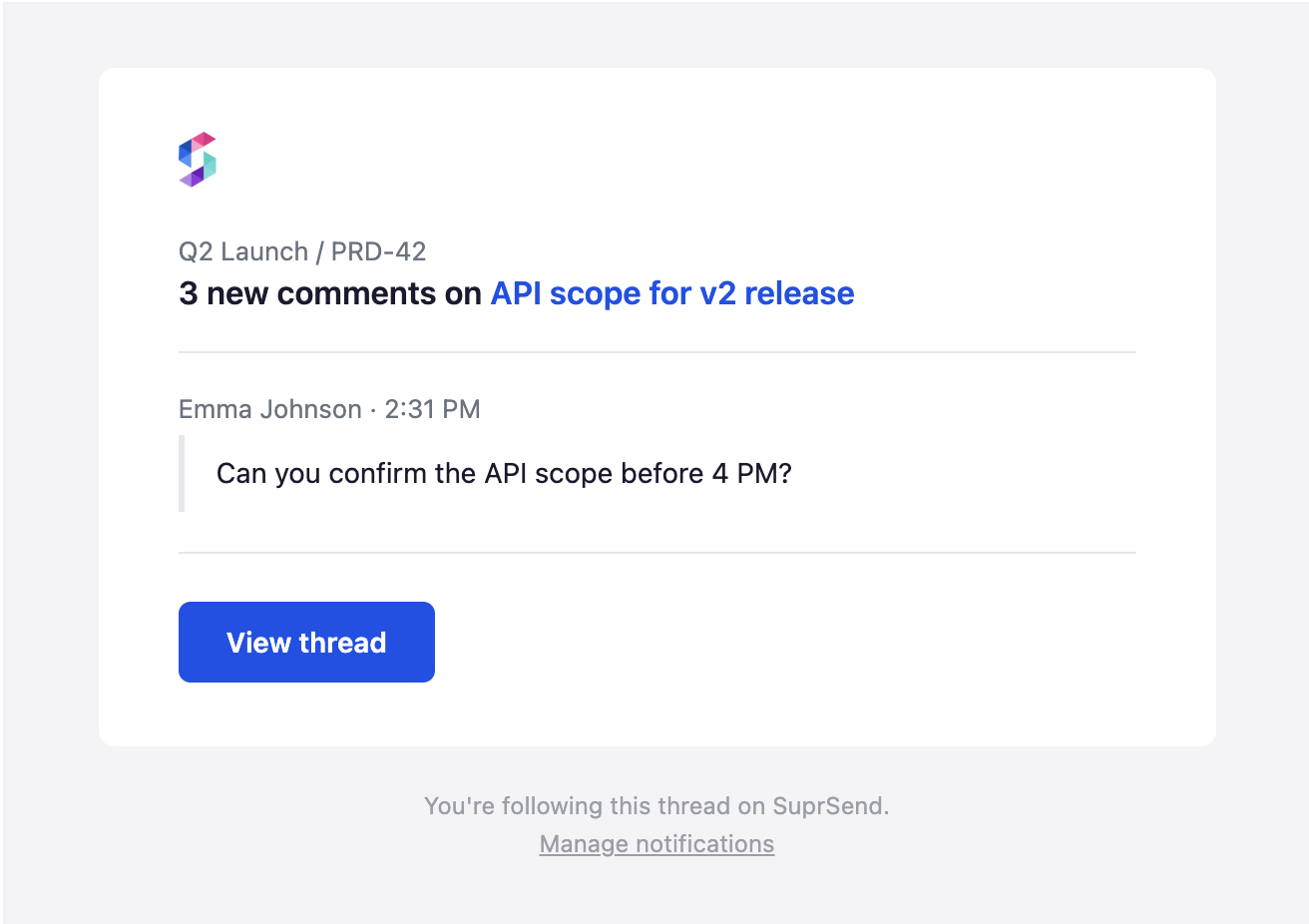
Here is a real example from a SuprSend digest template (comment_activity-digest) that ships in two channels:
Email subject:    {{comment_count}} new comments on {{thread_name}}
Email preheader:  {{project_name}} / {{thread_key}} · Latest from {{latest_actor_name}}

In-app header:    {{comment_count}} comments on {{thread_name}}
In-app body:      {{latest_actor_name}}: "{{latest_comment_preview}}" | {{project_name}}
The same {{thread_name}} and {{comment_count}} are reused across both channels. Email gets the longer preheader; in-app gets the latest comment preview. One source of truth, two rendering shapes, zero duplication.
Visual email editor
The email editor exposes three modes: a Design Editor (drag-and-drop with layout blocks, content blocks, and styling controls), an HTML Editor (raw code), and a Plain Text mode (text fallback for deliverability). Non-engineers can build responsive email templates without writing HTML, while developers retain full code-level control when they need it.
Draft and live states
Every template edit starts in draft state. The editor shows a clear "Draft" badge, and changes are not visible to production users. When the content is ready, the editor publishes the draft to live. The previous live version is archived with full history, so rollback is one click away. This is critical for transactional notifications where a broken template can directly impact revenue and user trust.
Multi-language support
SuprSend's multi-lingual templates support two approaches. The first is translation keys ({{t "key"}}) for cases where only text changes across locales (the same template structure with translated strings managed in JSON files). The second is full language variants when entire content (images, layout, structure) differs per language. When a notification is triggered, the workflow checks the user's locale preference and renders the correct language. If a locale variant does not exist, it falls back to the default language.
Per-tenant brand overrides
For B2B SaaS products, SuprSend supports tenant-level brand configuration. Each tenant (your customer's organization) can have its own logo, color palette, sender name, and reply-to address. These brand properties are injected into templates at render time, so you maintain one template that renders differently for each tenant. This eliminates the need for duplicate templates per customer.
Digest template handling
Templates for batched and digest notifications require special handling because the number of items is variable. If a user receives 3 comment notifications or 15, the digest template needs to render all of them cleanly. SuprSend's template editor supports the {{#each $batched_events}} loop with the {{$batched_events_count}} helper variable, so the template dynamically renders however many events were batched, with configurable limits (e.g., show first 5, then "and 10 more"). See the Handlebars helpers reference for the full set of template helpers.
Connecting templates to preferences
Templates map to notification categories, which connect to the user-facing preference center. When a product team creates a template for "Weekly Activity Digest," that template is automatically associated with the category the user can toggle on or off. This ensures that template content and user preferences are always in sync without manual wiring.
A library of pre-built workflows and templates for common use cases (authentication, digests, billing, onboarding, and more) is shipping soon, so teams can clone vetted starting points instead of building from scratch.
FAQ
What is notification template management?
Notification template management is a system for creating, editing, versioning, and publishing notification content across channels (email, push, SMS, in-app, WhatsApp) without modifying application code. It lets non-engineers like product managers and content teams update notification copy, subject lines, and layouts through a visual interface, with safeguards like draft/live states and version history.
Can non-engineers edit notification templates without a developer?
Yes, if your notification template editor supports visual editing (drag-and-drop for email, form-based editors for push and SMS). The key requirement is that dynamic variables are clearly documented so content editors know which placeholders are available (e.g., {{user.first_name}}, {{order.total}}) without needing to read API code.
How does notification template versioning work?
Template versioning typically uses a draft/live model. Editors make changes in a draft state that is invisible to production users. When changes are reviewed and approved, the draft is published to live. The previous live version is stored in version history, and teams can roll back to any prior version if needed. This prevents accidental changes to critical transactional messages.
What is the difference between notification templates and email templates?
Email templates are one channel within a broader notification template system. A notification template management system handles templates across all channels: email (HTML), push (short text), SMS (plain text), in-app (structured data), and WhatsApp (pre-approved templates). Each channel has its own format, constraints, and editor, but they share the same dynamic variables and are managed from a single dashboard.
How do WhatsApp notification templates differ from other channels?
WhatsApp Business API templates must be pre-approved by Meta before they can be sent. They use numbered placeholders ({{1}}, {{2}}) instead of named variables, support specific formats (header, body, footer, buttons), and require re-approval after edits. Other channels let you edit and publish templates instantly. A good notification platform handles the Meta approval workflow and maps your named variables to WhatsApp's positional placeholders automatically.
Do notification template systems support multiple languages?
Most mature notification template management platforms support multi-language templates. You create locale variants of each template (English, Spanish, French, etc.), and the system selects the correct variant at send time based on the user's locale preference. If a variant does not exist for a user's locale, the system falls back to the default language.
What are per-tenant template overrides in B2B SaaS?
Per-tenant overrides let B2B SaaS products customize notification branding (logos, colors, sender names, reply-to addresses) for each customer organization. Instead of duplicating templates per tenant, you create one base template and configure brand properties per tenant. The template engine injects the correct brand assets at render time. This is essential for white-labeled products where end users should see their organization's branding, not yours.
How do digest templates handle variable-length content?
Digest templates use loop constructs (like {{#each $batched_events}} in SuprSend's Handlebars implementation, with {{$batched_events_count}} available as a helper) to render a variable number of batched events. If 3 events were batched, the template renders 3 items. If 20 were batched, it renders 20 (or a configurable maximum with a "and X more" summary). The template must be designed to look good regardless of how many items appear, which is why digest templates need specific testing with different item counts.
TL;DR
- Notification template management separates notification content from code, giving product and content teams direct control over what users see.
- Templates in code create a bottleneck: every copy change requires engineering, slowing iteration to a crawl.
- Each channel has different constraints. Email is rich HTML. Push is 40 to 120 characters. SMS is 160-character segments. WhatsApp requires Meta pre-approval. In-app is structured JSON. One editor does not fit all.
- Must-have capabilities: Visual editor, per-channel editors, dynamic variables, draft/live versioning, multi-language support, and preview with test send.
- B2B SaaS products also need per-tenant brand overrides so each customer's notifications carry their own branding.
- Among platforms, SuprSend and Courier are strongest for non-engineer editing. Knock is developer-first with git-like versioning. Novu is open-source but less polished for non-technical users.
- SuprSend handles all of this natively: drag-and-drop email editor, per-channel templates, draft/live states, i18n, tenant branding, digest loops, and preference center integration.
Take Control of Your Notification Content
If your product team is still filing engineering tickets to change notification copy, your template management is a bottleneck. SuprSend gives product managers, content writers, and growth teams a full notification template editor with per-channel editing, draft/live versioning, multi-language support, and tenant-level branding. Engineers define the workflow and variables. Everyone else owns the content.
Explore SuprSend's template management or book a demo to see how it works with your stack.


