Infrastructure-as-code transformed how teams manage servers and cloud resources. The same principle is now reshaping how engineering teams handle product notifications. Notification-as-code is the practice of defining notification templates, workflows, routing rules, and user preferences in version-controlled configuration files rather than managing them through dashboards or hardcoding them into application logic.
Gartner’s 2025 Market Guide for Infrastructure Automation found that only 23% of organizations have successfully integrated functional automation into their service delivery - which means the gap between teams that want modern infrastructure and teams that have it is still enormous. Notification systems, which often span multiple channels and teams, are a natural extension of this approach. This guide covers what notification-as-code means, why it matters, and how to implement it without overcomplicating your stack.
What Is Notification-as-Code?
Notification-as-code is a methodology where all notification-related configuration - templates, workflows, channel routing, delay logic, batching rules, and user preference schemas - is defined in code (typically YAML, JSON, or a DSL) and stored in version control systems like Git.
Think of it as the notification equivalent of Terraform or Pulumi. Instead of clicking through a dashboard to set up an email template or configure a workflow’s delay step, you define it declaratively in a file. That file gets reviewed in a pull request, tested in CI, and deployed alongside your application code.
The key distinction: notification-as-code doesn’t mean writing send-notification calls in your backend (that’s just code). It means the configuration and logic that governs how notifications behave is externalized, versioned, and managed as infrastructure.
Why Notification Logic Belongs in Code
Most notification systems start simple. A few email templates. A Slack webhook. Maybe a push notification for mobile. But notification complexity scales non-linearly with product growth.
A typical Series B SaaS product manages 30-50 distinct notification types across 3-5 channels. Each notification has its own template, routing logic, delay rules, and preference settings. When this configuration lives in a dashboard, several problems emerge:
No audit trail. Dashboard changes aren’t tracked. When a workflow breaks, there’s no git blame to identify who changed what and when. Teams spend hours debugging issues that a diff would resolve in seconds.
No staging environment. Most notification dashboards don’t support environment separation. Changes go directly to production. A typo in a template or a misconfigured delay affects real users immediately.
No review process. Dashboard changes bypass code review. A product manager updating a template doesn’t get the same scrutiny as a backend engineer merging a pull request. This creates an asymmetry in quality control.
Configuration drift. When multiple team members make dashboard changes without coordination, configurations diverge from the intended state. This is the same problem infrastructure-as-code solved for cloud resources - and the same solution applies to notifications.
What Notification-as-Code Covers
A complete notification-as-code implementation manages five layers of configuration:
1. Templates. Email HTML, SMS copy, push notification payloads, Slack Block Kit messages, and in-app notification content. Each template is defined in a file with variable placeholders (Handlebars, Jinja, or similar) and versioned independently.
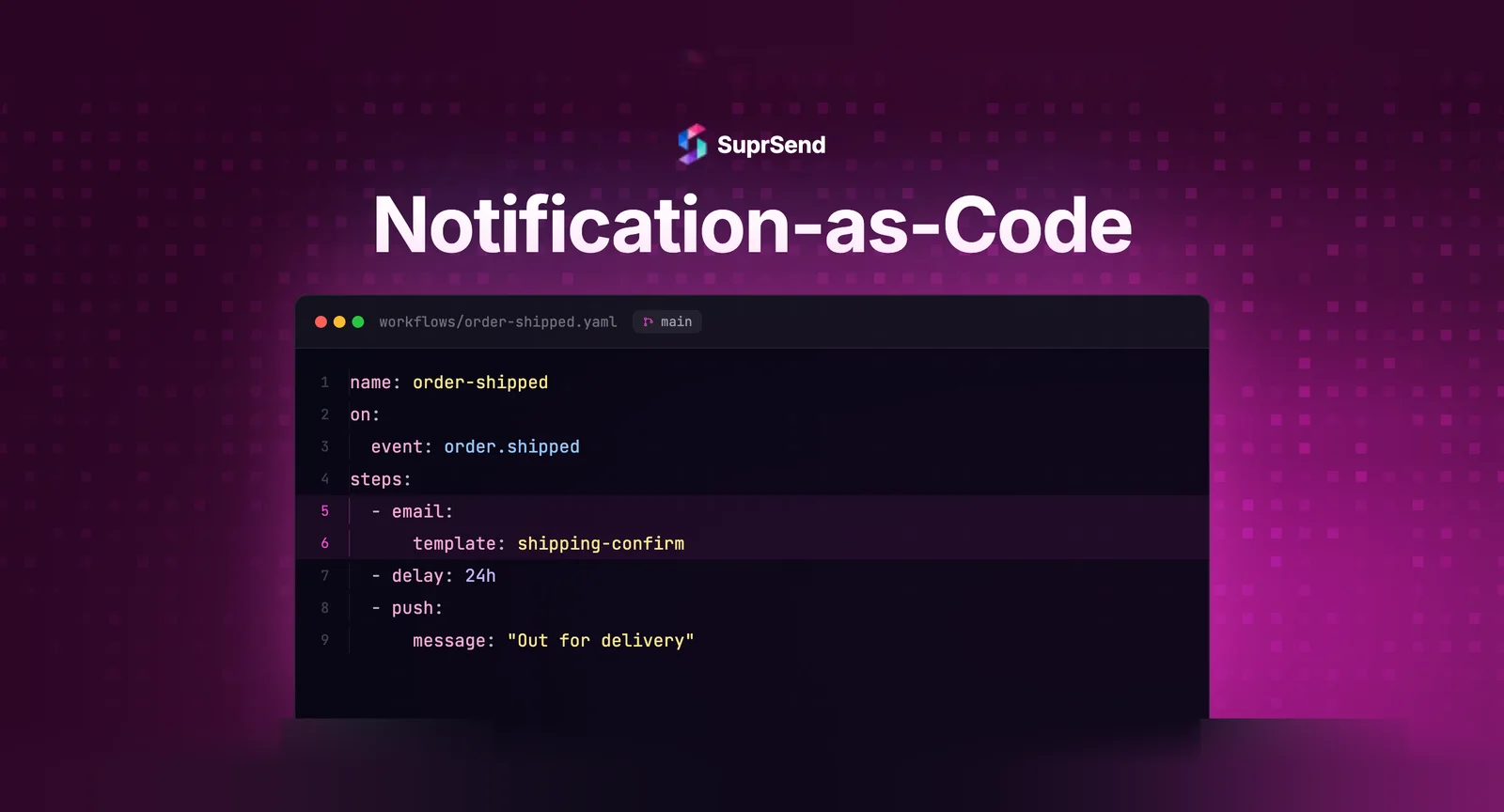
2. Workflows. The orchestration logic that determines what happens after an event triggers a notification. This includes delays, batching/digest rules, conditional branching, channel priority, and fallback logic. In code, a workflow might look like a YAML file with steps, conditions, and channel sequences.
3. Routing rules. Channel selection logic - which users get push notifications, which get email, which get both. Routing rules often depend on user preferences, device availability, and notification urgency. Defining these in code makes them testable and reproducible.
4. User preference schemas. The structure of what users can control - notification categories, channel opt-ins, frequency caps, quiet hours. When preference schemas are in code, product and engineering teams can review changes before they affect the preference center UI.
5. Provider configurations. Which email provider handles transactional emails vs marketing emails, SMS vendor routing by region, push notification certificate management. These configurations change rarely but have high blast radius when misconfigured.
Notification-as-Code vs Traditional Dashboard Management
| Dimension | Dashboard Management | Notification-as-Code |
|---|---|---|
| Change tracking | No audit trail | Full git history with diffs |
| Review process | None — direct edits | Pull request reviews |
| Environment separation | Usually production-only | Staging, preview, production |
| Rollback | Manual — if possible at all | Git revert in seconds |
| Testing | Manual verification | Automated CI/CD validation |
| Collaboration | Last-write-wins conflicts | Merge conflict resolution |
| Reproducibility | Difficult to replicate across environments | Identical setup from code |
| Onboarding | Tribal knowledge | Self-documenting in repo |
The dashboard approach works fine for teams sending fewer than 10 notification types. Beyond that threshold, the operational overhead of dashboard management grows faster than the team’s capacity to manage it.
How Teams Implement Notification-as-Code
Implementation varies based on team maturity and existing tooling, but the most common patterns fall into three categories.
Pattern 1: CLI-Driven Configuration
Teams define notification resources in YAML files and use a CLI tool to sync them with their notification platform. The workflow looks like standard infrastructure-as-code: edit a file locally, test it, commit, and the CLI pushes changes to the platform on deploy.
This pattern is popular with platform engineering teams who already use Terraform or similar tools. The learning curve is minimal because the workflow is identical - only the resource type changes.
Pattern 2: API-First with CI/CD
Teams store notification configurations as JSON or YAML in their application repository and use API calls in their CI/CD pipeline to sync configurations with the notification platform. GitHub Actions, CircleCI, or Jenkins jobs run on merge to main, pushing template and workflow updates automatically.
This pattern integrates tightly with existing deployment workflows. Notification changes deploy alongside application code, ensuring consistency between the app’s event triggers and the notification system’s configuration.
Pattern 3: SDK-Based Definitions
Some platforms provide SDKs that let teams define notifications programmatically in their application’s native language. Instead of YAML, a Python team writes notification definitions in Python. A Node.js team uses JavaScript objects. The SDK handles serialization and API communication.
This pattern suits teams that prefer type safety and IDE support over declarative configuration files. The trade-off is tighter coupling between notification definitions and the application codebase.
Where Notification-as-Code Fits in a Platform Like SuprSend
SuprSend supports notification-as-code through its CLI and API. Teams can define notification templates, workflows, and routing rules in YAML configuration files, manage them in Git, and sync them with the SuprSend platform using the CLI.
The CLI supports environment separation - staging and production configurations stay isolated. Changes sync on deploy, and rollbacks are as simple as reverting a commit. Combined with SuprSend’s workflow engine, teams get the best of both worlds: visual debugging through the dashboard’s observability tools, and code-level control over configuration.
For teams that prefer dashboard management for template design (drag-and-drop editors are genuinely faster for email layout), SuprSend’s approach is hybrid. Design templates visually, export them as code, and manage the exported code in version control going forward. This bridges the gap between non-technical template designers and engineering teams that need version-controlled deployments.
The platform’s API-first architecture also supports CI/CD-driven syncing. Teams using GitHub Actions or similar pipelines can automate notification deployments alongside their application code, ensuring notification configurations and application event triggers stay in sync.
Common Mistakes When Adopting Notification-as-Code
Over-abstracting too early. Teams sometimes build elaborate internal DSLs for notification configuration before understanding their actual requirements. Start with simple YAML files and add abstraction only when complexity demands it. Premature abstraction creates maintenance burden without delivering proportional value.
Ignoring the non-technical stakeholder. Product managers and marketing teams need to update notification copy and timing. A pure code-only approach that requires a pull request for every copy change creates bottlenecks. The best implementations provide a visual layer on top of code-managed configurations - allowing non-technical edits that are still tracked and versioned.
Not validating configurations in CI. Notification-as-code loses much of its value if configurations aren’t validated before deployment. Schema validation, template rendering tests, and workflow logic checks should run in CI. Catching a broken Handlebars variable in CI is infinitely cheaper than discovering it when 50,000 users receive a notification with {{user.frist_name}}.
Treating notification-as-code as all-or-nothing. Teams don’t need to migrate every notification to code on day one. Start with the highest-volume, most-critical notification types. Migrate gradually. A phased approach reduces risk and lets the team develop internal expertise incrementally.
FAQ
What is the difference between notification-as-code and just sending notifications from code?
Sending notifications from code means your application calls a send function when an event occurs. Notification-as-code means the configuration that governs how that notification behaves - template, workflow, routing, timing - is defined in version-controlled files, not hardcoded or managed through a dashboard.
Do I need a notification platform to implement notification-as-code?
Not necessarily. You can manage notification configurations in YAML files and build your own sync tooling. However, platforms like SuprSend, Knock, and Novu provide CLI and API tooling that eliminates the need to build sync, validation, and environment management from scratch.
Is notification-as-code only for large engineering teams?
No. Even a two-person startup benefits from version-controlled notification configurations. The setup cost is minimal - a few YAML files and a CI step - and the payoff compounds as the product grows. Teams that adopt notification-as-code early avoid the painful migration from dashboard-managed chaos later.
How does notification-as-code handle template design?
Most implementations use a hybrid approach. Visual editors handle the design phase (drag-and-drop layout, styling). The resulting template is exported as code (HTML with Handlebars variables) and managed in version control. Future edits can happen in either the visual editor or directly in code, with the code repository serving as the source of truth.
Can product managers use notification-as-code without coding?
Yes, with the right tooling. Platforms that support notification-as-code typically provide a dashboard overlay that translates visual changes into code commits. Product managers interact with a familiar UI, and their changes are automatically versioned and tracked - giving engineering teams visibility without creating bottlenecks.
What file formats are commonly used for notification-as-code?
YAML is the most common format for workflow and routing definitions due to its readability. JSON is used for structured data like preference schemas. HTML with template variables (Handlebars, Jinja2) is standard for email templates. Some teams use their application's native language (Python, TypeScript) via SDK-based definitions.
TL;DR: Notification-as-code applies infrastructure-as-code principles to notification systems. Templates, workflows, routing rules, and preference schemas are defined in version-controlled files, reviewed through pull requests, and deployed via CI/CD. It eliminates configuration drift, enables staging environments, and gives engineering teams audit trails for every notification change. Start with your highest-volume notifications, validate configurations in CI, and maintain a visual layer for non-technical stakeholders.
Ready to manage your notification infrastructure as code? Start building for free with SuprSend, or book a demo to see how the CLI and API-first architecture works with your existing CI/CD pipeline.