
Today we’re launching SuprSend Agent Plugin.
The SuprSend agent plugin is a single install that gives your coding agent everything it needs to work with SuprSend.
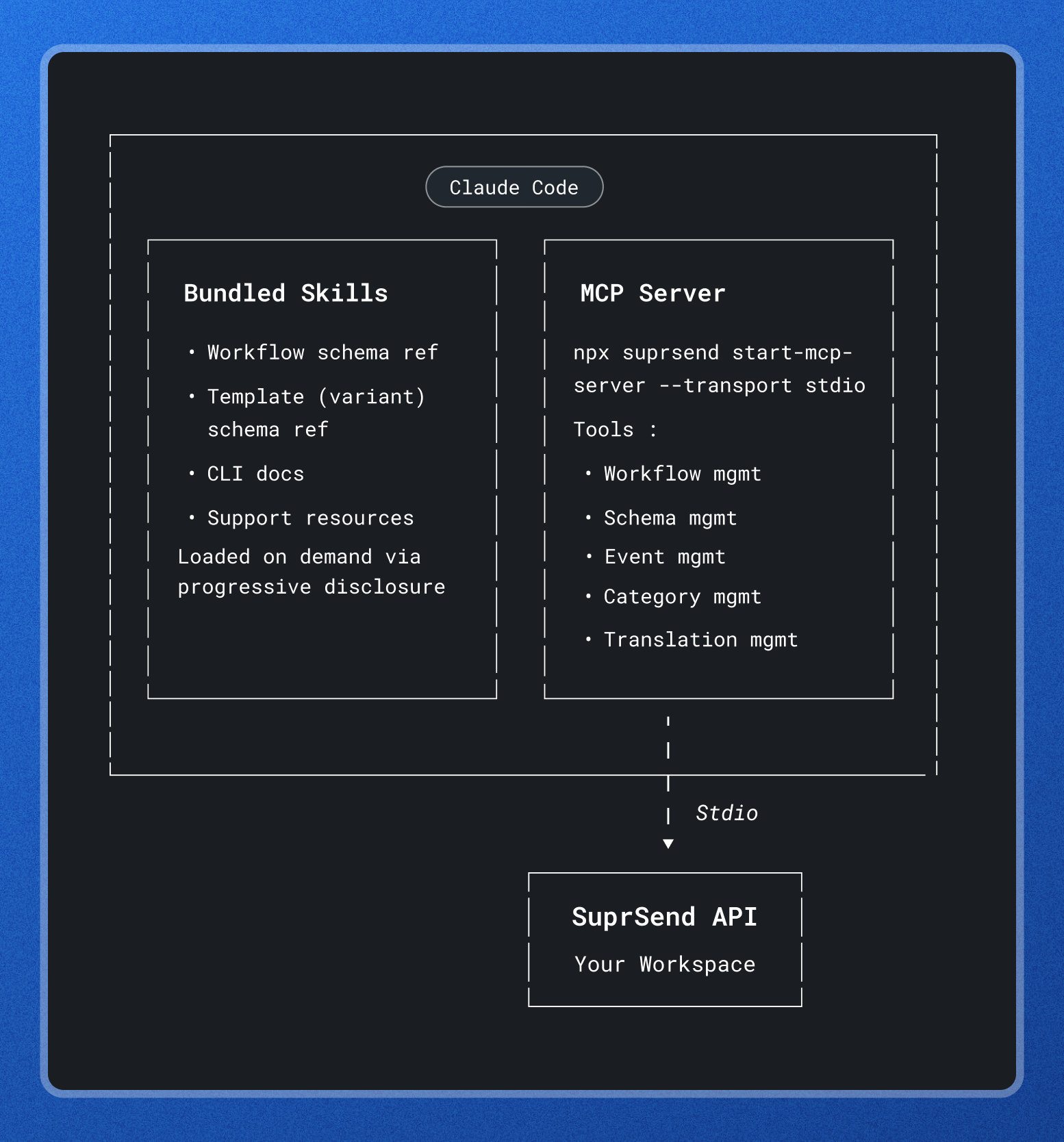
It bundles the SuprSend MCP server and SuprSend agent skills so your coding agent can author workflows, templates, schemas, events, categories, and translations, and follow SuprSend primitives and best practices, without manual configuration.
Why use the plugin?
The SuprSend agent plugin bundles two layers of agent extension into one package:
- MCP server: The MCP server connects your coding agent directly to your SuprSend workspace. Once authenticated, your agent can manage workflows, templates, schemas, events, categories, and translations through tools the server exposes.
- Agent skills: Skills give your agent SuprSend-specific procedural and domain knowledge, loaded on demand through progressive disclosure. The plugin bundles three:
- suprsend-workflow-schema — Complete workflow node reference: JSON schema, documentation, and usage examples for every node type
- suprsend-template-schema – The template variant schema reference: the variant envelope, multi-tenant and multi-lingual variants, Handlebars and JSONNET syntax, and per-channel content schemas for all nine channels (email, SMS, WhatsApp, inbox, Slack, MS Teams, Android push, iOS push, web push)
- suprsend-cli — Full CLI command reference with agent-targeted per-command Tips — managing workspaces, templates, workflows, schemas, and more
- suprsend-docs-support — How to reach SuprSend documentation, LLM-friendly endpoints, in-app chat, the Slack community, and email support
Bundling them into a single plugin means you set up both in one step. You can also install them separately if you prefer. You can install the plugin globally to use it across all your projects, or per project to keep it isolated.
Architecture
Usage Examples
Integrate SuprSend into your product
- Integrate SuprSend SDK Integration with a simple prompt in your codebase
- Add the in-app inbox or preference center to your app
- Setup up workflow or event triggers on product actions where you want to send notifications
- Map customer tenants to SuprSend tenants and sync them from codebase
- Add user identification call when user logs in or signs upMigrate templates from internal codebase or external tools
Setup your account and create test data
- Create a workflow for a product event — define the channels, steps, and routing from a description of when it should fire
- Generate templates for a workflow across channels (email, SMS, push, in-app) with consistent content and branding
- Configure a preference hierarchy: set category defaults, apply tenant-level overrides, then layer in user choices
- Seed test users with channel addresses, then subscribe them to objects so they inherit the right preferences
Query and debug
- User id 583 says they never got the notification — show me their available channels, and preferences
- How did the workflow do this week — sent, delivered, failed?
- How many users opted out of the newsletter category?
- Check what an error means and how to fix it
- Pull up a workflow to verify if it’s active and inspect its configuration
Setup
Simple two steps setup:
- Authenticate: Save a service token from your SuprSend Dashboard as a profile
- Install the plugin in your AI tool: The plugin format is shared between Claude Code, VS Code Copilot, and GitHub Copilot CLI — pick the install path that matches your editor.
For the exact commands and platform-specific instructions, follow the setup guide..
For the full reference, see the SuprSend documentation.


