HeyReach shipped multi-tenant notifications with SuprSend, cutting support tickets by 80%


Challenge
HeyReach was growing fast, but had no notification system in place. Users missed critical updates, flooding support with avoidable tickets. Building a notification system in-house meant handling workspace-level member scoping, multi-channel integrations, and a real-time feed – months of engineering efforts in non-core capabilities.
Solution
Each HeyReach workspace maps to a SuprSend Object, handling member scoping and delivery per workspace out of the box. One API integration covered all channels. The pre-built inbox SDK gave them a production-ready notification UI with custom branding, read/unread states, and deeplink actions.
Outcome
HeyReach now runs a full multi-channel notification system — without building one from scratch. Production go-live in 3 weeks with one engineer. ~80% drop in support tickets. Users now self-resolve issues through notifications with deep linked help articles instead of reaching support. Engineering bandwidth redirected to core product.


About HeyReach
HeyReach is an automated LinkedIn outreach platform built for agencies, sales teams, and GTM operations. It lets teams run high-volume outbound campaigns while keeping LinkedIn accounts safe and maintaining a personal touch through customizable messaging sequences.
No Notifications. No Visibility.
LinkedIn outreach is not a set-and-forget activity. Accounts get disconnected. Proxies fail. Campaigns stall. These are routine events which need users’ attention. But HeyReach had no notification system to flag them. No in-app alerts. No email notifications. The only channel was a standalone Slack integration, limited in scope.
So when something needed attention, users had no idea. If they didn’t happen to login to HeyReach, issues piled up silently. Campaigns stalled. No leads. No replies. No progress.
"Customers were running campaigns but when something broke, like a disconnected account or a stalled campaign. Users had no way of knowing until they logged in, sometimes days or weeks later. No actions would go out through the campaign."
Aleksandar, Senior Software Engineer, HeyReach
Every silent failure became a support ticket. “Why is my account disconnected?” “Why did my campaign fail?” These weren’t support issues. There were proactive communication issues. The information existed in HeyReach. It just wasn’t reaching the people who needed it.
Build vs. Buy
The team’s first instinct was to build a notification system in-house. But the scope went well beyond “send a notification.”
HeyReach runs on a multi-workspace model. Each workspace needs its own notification settings, its own member list, and independent inbox feed. Building that in-house means solving:
- Multi-channel integrations for email, in-app, Slack, and WhatsApp — each with its own integration
- Workspace-level recipient resolution — figuring out who to notify based on which workspace the event belongs to.
- Template management with dynamic variables (campaign names, account details, action URLs)
- An in-app inbox with read/unread/archived state management and deeplink actions
“We wanted to go live with a notification system a little bit faster. If we developed it ourselves, we’d need to tackle a lot of places and build the infrastructure ourselves. With SuprSend, the infrastructure was already there.”
Aleksandar, Senior Software Engineer, HeyReach
Here’s a quick snapshot of how HeyReach uses notifications today:
Why SuprSend?
SuprSend came through a direct recommendation. Once the team started evaluating, three things stood out.
One integration, all channels
Instead of wiring up email, in-app, Slack, and WhatsApp separately, a single API integration routes notifications to any channel. Add a vendor, configure a workflow, and trigger – all through one API.
Pre-built inbox SDK
The Angular SDK gave HeyReach a production-ready in-app inbox they could customize to match their design language, without building notification UI from scratch.
Workspace-level targeting with Objects
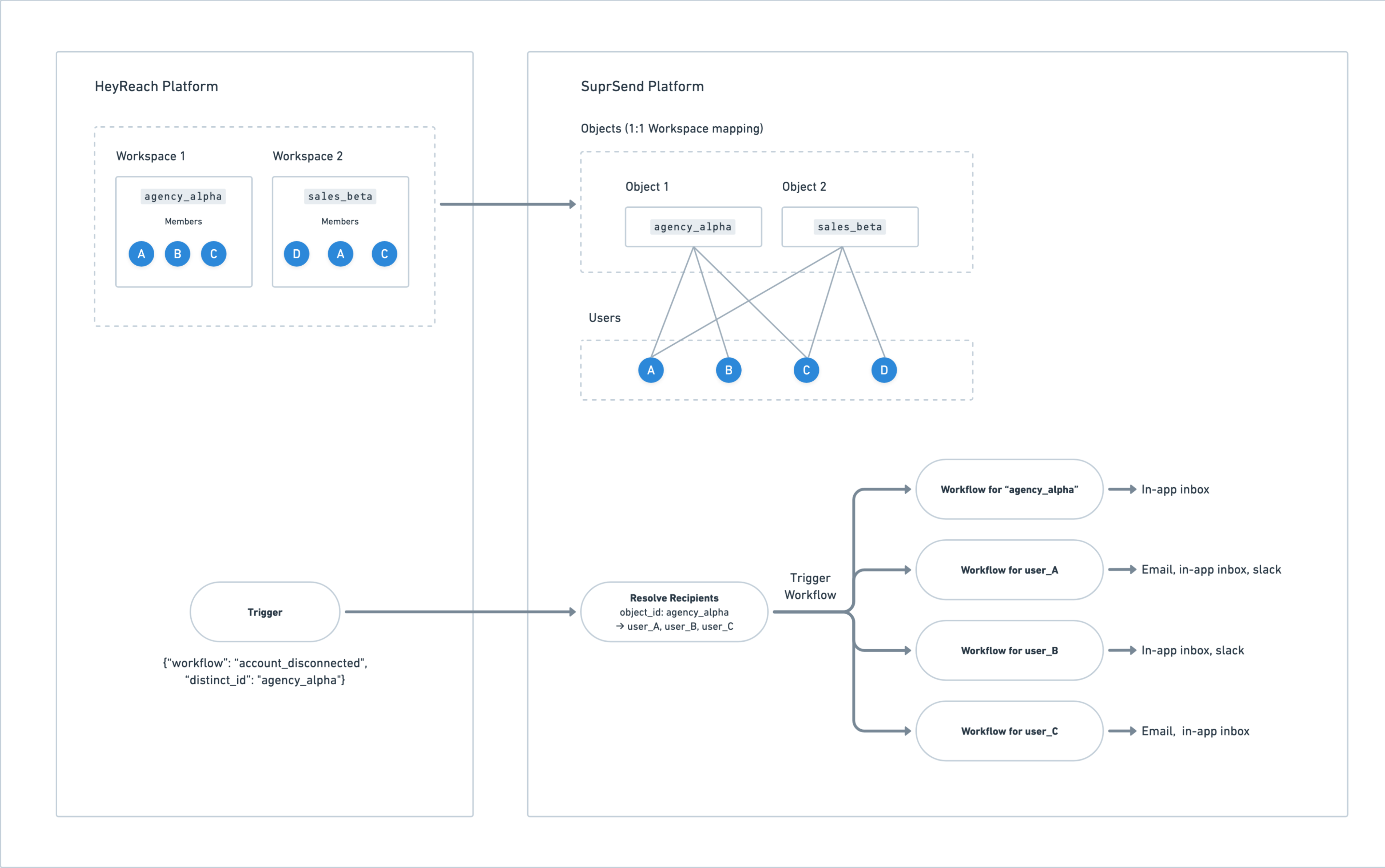
This was the turning point. HeyReach’s notification model is workspace-scoped, not user-scoped. SuprSend’s Objects mapped directly to this structure: one Object per workspace, members dynamically subscribed to the respective workspaces, and every workflow triggered to the object automatically reached the right group of people, no extra logic needed.
"Every channel in one place was a big plus. And Objects was a very helpful feature because we had a scenario where we wanted notifications to be per workspace. That helped a lot."
Aleksandar, Senior Software Engineer, HeyReach
How HeyReach Implemented SuprSend
Architecture: Event Queue to API
The integration architecture is deliberately simple. Events fire across the HeyReach application when something noteworthy happens:
- A LinkedIn account gets disconnected
- A campaign reply comes in
- A proxy fails
- A contact gets tagged
- A campaign completes or fails
Each event gets pushed to an internal notification queue.
A dedicated consumer service picks up events from that queue and calls the SuprSend API. It sends workflow triggers along with custom variable data (campaign names, account names, dynamically constructed deep link URLs) and extra JSON payload that the frontend uses for routing and rendering.
Data Modeling with Objects
This is where SuprSend’s Objects proved their value. Each HeyReach workspace maps to one SuprSend Object. Before triggering any workflow, the consumer service syncs the current members of that workspace as subscribers to corresponding Object. When a workflow triggers for a workspace, SuprSend delivers in-app notifications to every subscribed member of that Object automatically.Email takes a different path. Users can configure up to 3 custom email addresses per workspace, and those addresses aren’t necessarily tied to any workspace member. To handle this, the team uses transient recipients in the trigger payload, sending emails directly to addresses that don’t need a persistent user profile in SuprSend.
In-App Inbox
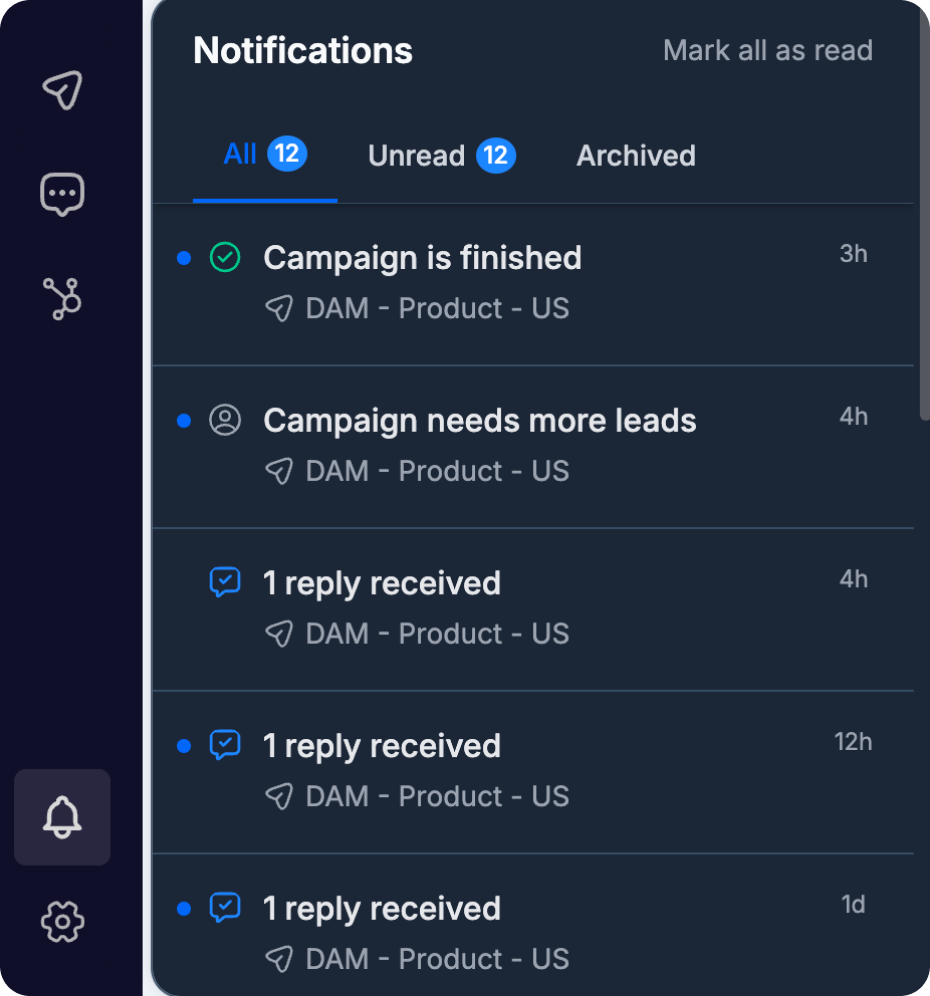
HeyReach used SuprSend’s Angular SDK for the in-app inbox. The SDK ships a fully functional inbox out of the box — notification bell, container, message content, read/unread states, real-time updates, and pagination all handled. HeyReach team further customized how individual notifications rendered: each type has its own icon based on the notification category, and clicking a notification routes the user to the exact screen in HeyReach where they can take action.
Read, unread, and archived states work natively. The additional action metadata and JSON payloads give the frontend everything it needs to display contextual information and handle routing without extra API calls.
“Inbox was easy because SuprSend had an SDK out of the box, and we just layered other things on it. If we had built from scratch and done all the integration, it would have been a much longer period of time.”
Aleksandar, Senior Software Engineer, HeyReach
Email via AWS SES
HeyReach set up AWS SES through SuprSend for the first time, following the step-by-step documentation. It worked on the first attempt.
Templates and Workflows
All templates use dynamic variables: campaign names, account details, action URLs, and help article links, rendered at run time. The workflows are straightforward: trigger and multi-channel delivery.
The email notifications include links to relevant help articles. If a LinkedIn account gets disconnected, the email doesn’t just tell the user what happened. It links to a step-by-step guide on what to do next.
“Your documentation was quite good. The SDK, the API, the setup, it was straightforward. Every time I had questions, I got a good path forward. The sandbox was particularly useful while I was testing, and that was great.”
Aleksandar, Senior Software Engineer, HeyReach
Business Impact
Before notifications, every disconnected account, every failed proxy, every stalled campaign turned into a support ticket. Users discovered problems days or weeks later and contacted support asking what went wrong.
Now, users get notified the moment something happens. They see the issue in their in-app inbox. They get an email with context and a link to the relevant help article. Most of the time, they resolve the issue themselves without opening a ticket.
What’s Next for HeyReach
The notification foundation is live and stable. Next is channel expansion. Slack notifications, currently a separate integration, will be migrated into SuprSend so all channels are managed from one place. WhatsApp is on the roadmap.
The architecture supports it. The event queue, the consumer service, the Objects, and the workflows are all in place. Adding a channel is a vendor addition in SuprSend and a template update entirely from SuprSend dashboard. No new development needed. As HeyReach scales across more channels and campaigns, the notification layer scales with it.