The average US smartphone user gets 46 push notifications a day. That’s just push. Add in email, in-app feed, SMS, Slack, WhatsApp and it’s no wonder users tune out.
For product teams, the stakes are high. Get it right, and notifications are how your product stays top of mind. Get it wrong, and you’re either ignored or worse, lose trust.

A solid notification strategy starts with one word: centralization.
But what does that actually mean?
For most teams, it starts with a single service that unifies channels. But true centralization goes further — covering content guidelines, preferences, logs, delivery logic, and business rules abstracted across all teams and products.
This guide breaks down what a centralized notification system looks like, why it matters, and how to build it the right way.
What Is Centralized Notification Infrastructure?
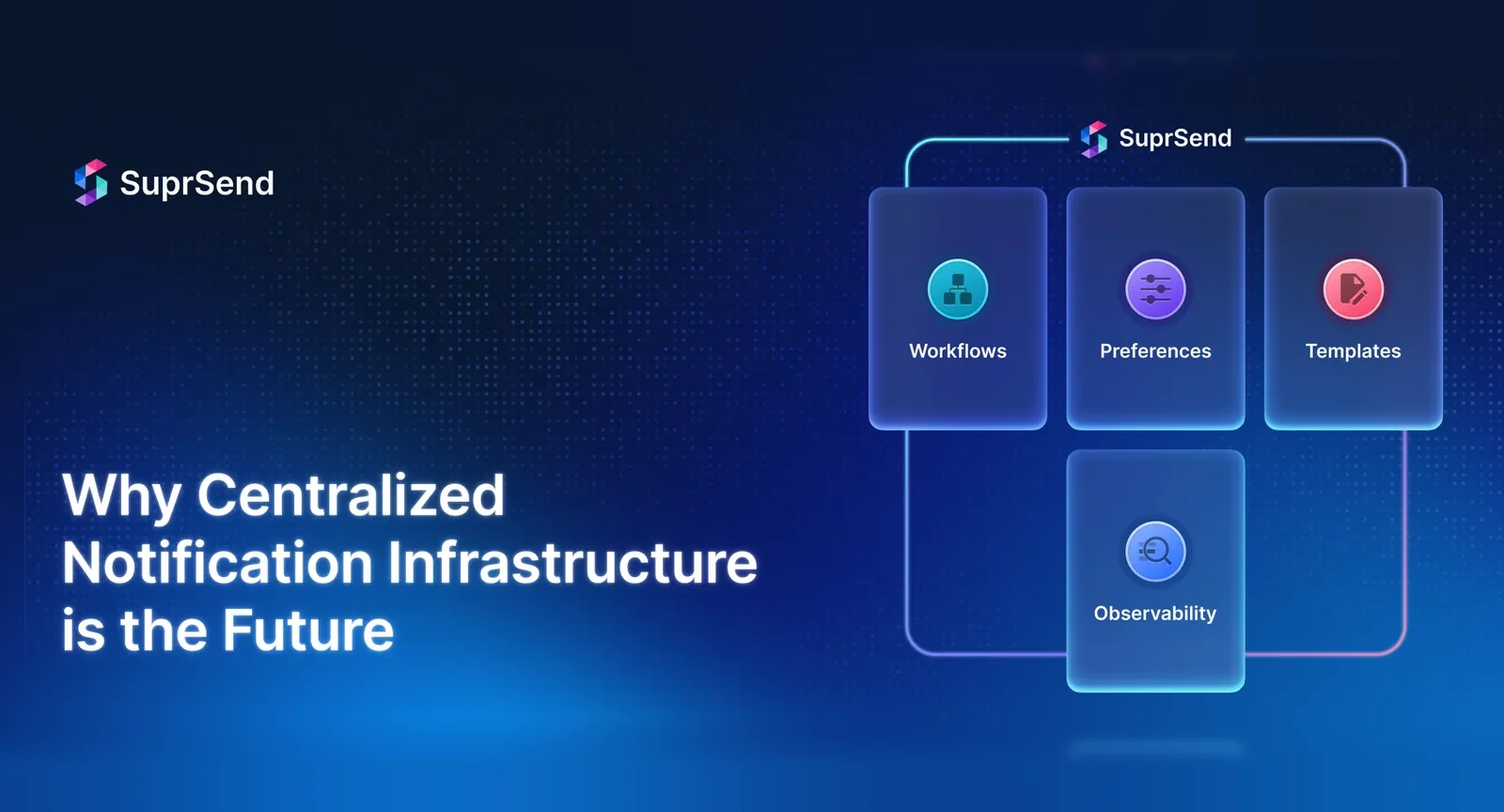
A centralized notification platform is a product in itself that handles the full lifecycle of notifications — from content to delivery to analytics — across every channel and team.
It includes:
- Channel Integrations: Email, SMS, push, in-app, chat, WhatsApp with channel-level abstractions
- Templates: Central storage with WYIWYG editors, versioning, approvals, and dynamic placeholders for non-tech teams
- Preferences: Opt-ins, opt-outs, unsubscriptions, managed per user across channels
- Reliable delivery: Retries, fallbacks, rate limits, throttling, message queue prioritization across categories
- Workflows: Create multi-step alerts with state-managed conditions via APIs or a drag-and-drop interface.
- Logic abstracted from business code: Batching, digests, timezone-aware delivery, localization, deduplication, suppression rules, throttling and more.
- Logs & analytics: Every send, failure, delivery, open, click — tracked across all channels
- Environments & RBAC: Staging/production isolation, reviews, granular role-based access across teams
- Interfaces for devs & non-devs: Well-documented APIs and CLI for developers; UI for PMs/marketers; SDKs for AI Agents
- Guardrails: Rules to prevent over-alerting, suppress messages, and enforce policy
Want more depth? Check these out:
- Designing a Scalable Notification Architecture
- Complete Guide to Notification System for Modern Apps
The Default State: The Big Notification Mess
In almost every organization, notifications begin life as hardcoded, one-off implementations. These implementations:
- are synchronous to the feature being built.
- use whatever vendor/tooling is fastest to get the job done.
- are tightly coupled to business logic.
- usually lack retries, preference checks, abstraction, or observability.
In response to the pain, teams often spin up their own microservices. Here, APIs are wrapped behind a common notification service so teams can control vendors, channels, and delivery more consistently. However, it is not without problems.
- Inconsistent behavior: Some emails retry, some don’t; some include unsubscribe logic, some don’t.
- No shared metrics: No unified understanding of what was sent or delivered.
- Fragmented UX: Users get duplicate messages across channels or random message timing.
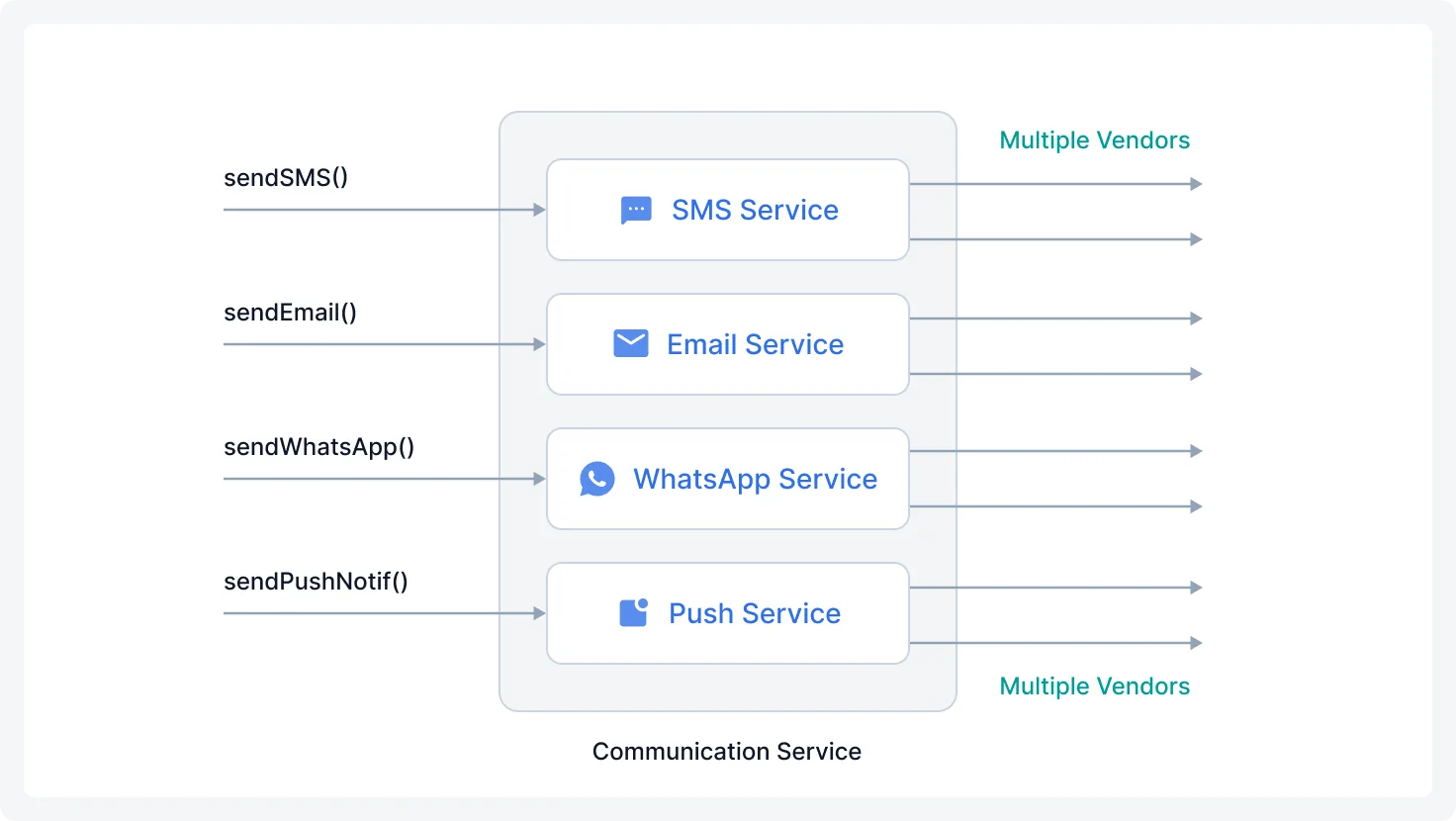
Moreover, there are larger, more complex challenges for organizations to tackle.
1. Vendor-specific limitations leaking through
Despite abstraction, each channel or vendor has its quirks: rate limits, payload differences, message size constraints. Teams still need to handle these edge cases, which can bleed through the abstraction layer and lead to hidden technical debt.
2. Every teams rebuilds the basics
As various teams across an organization often have unique notification requirements—such as timezone handling, language localization, workflow logic, conditional triggers, and batching—they can’t always wait for central platform teams to deliver these features. This leads to siloed teams independently implementing similar solutions, resulting in duplicated effort and inconsistent standards.
Repetitive engineering work = productivity and quality loss.
3. Business logic is scattered
There’s no central orchestration layer to define workflows like: “Send email, and if not delivered, fallback to SMS after 5min.” or “Batch all low-priority alerts into a daily digest.”
Instead, these are embedded in whatever service triggered the notification with no shared understanding of:
- What was sent
- to whom
- from where
- under what conditions
Because of this, users end up receiving confusing or duplicate messages. And if something fails to trigger because of a delivery issue or some condition failing somewhere, no one notices until a user complains because the alert failure was logged only in a vendor’s dashboard, not in a shared place.
4. No unified observability
There are two parts to observability
- Delivery Tracking
- Was the message sent?
- Did it bounce?
- Was there a vendor related issue?
- Engagement Insights
- Was it opened?
- Was it clicked?
- Did the user complete the intended task?
This data is either not tracked or fragmented across vendor dashboards, logs, and tools. There’s no centralized place to debug issues or analyze performance across channels.
Meme idea: Charlie from “It’s Always Sunny” - tracing notification failures across dashboards
5. Templates live in code
Most teams hardcode templates in code. Which means:
- Every copy change requires code deployments
- A/B testing is nearly impossible
- No versioning, previewing, or localization support
Product teams are blocked on engineering for minor copy updates. Engineers are frustrated doing these changes instead of focusing on core features.
6. Preferences and consent are scattered (or ignored)
Consent is often handled inconsistently or ignored:
- Some services include unsubscribe logic, others don’t
- Each team builds their own model of user preferences, or don’t
- There’s no system-wide policy for honoring opt-outs
This leads to duplicate messages, legal risk, and frustrated users.
7. Building new notification is slow and repetitive
Business teams constantly need new notifications — for onboarding, features, adoption, alerts, experiments. But building one means:
- Hooking into the right event stream
- Writing custom logic
- Selecting the channel
- Creating templates
- Testing everything
- Deployment
This takes time. So, notifications pile up in the backlog. Roadmap delivery slows down and business teams miss time-sensitive launches.
8. Limited support for modern features
Today, users have high expectations when it comes to how products talk to them. For example, users expect that messages arrive at the right time (e.g., 9 AM in their timezone), in the right language, on their preferred channel. They also need a control on how often they want to receive alerts, instantly or daily digests. Best product teams understand this and even create these kinds of experiences as default.
To support this, your system needs:
- User timezone and location awareness
- Stored language/channel preferences
- Queued delivery logic
- Dynamic formatting and fallback logic
Also:
- Multi-tenancy for B2B2C, where each customer may require customizations in content, branding, or preferences
- Digests/Batching to reduce noise
- Prioritization between transactional and promotional traffic
Most teams don’t have any of this. And if they want to build it? It’s not clear who owns it: platform team, individual teams? Usually, nobody builds it or everyone builds their own incomplete version.
Key challenges in a fragmented notification setup
| Challenge | Impact |
|---|---|
| Channel/vendor quirks (e.g., SMS 160-char limit, email vendor throttles) | Unseen technical issues, inconsistent notification behavior |
| Teams rebuilding common features (timezone handling, preferences, batching) | Wasted engineering effort, inconsistent quality |
| No central orchestration (fallbacks, retries, batching) | Duplicate or missed messages, poor coordination |
| Templates managed in code (PR/QA/deploys required) | Engineering bottlenecks, slow content updates |
| Delivery and engagement insights spread across tools | Difficult troubleshooting, no unified insight to act on |
| New notification creation depends on engineering | Time-sensitive comms delayed, roadmap blocked |
| Lack of personalization | Generic messaging, lower engagement |
| Inconsistent brand voice across teams | Fragmented UX, diluted identity |
| Compliance risks (unsubscribe, opt-outs) | Legal exposure, frustrated users |
| Billing/vendor usage is opaque | Uncontrolled costs, poor vendor negotiation |
| Multi-tenant (B2B2C) scaling pain | Manual overhead, inconsistent customer experience |
| User preference management siloed or missing | Notification fatigue, loss of trust |
The Benefits of Centralization
1. Across Channels
Abstract Channel-Specific Logic
For retries, fallbacks, rate limits, every channel comes with its quirks. A centralized platform handles this behind a unified API, so teams don’t need to rebuild retry logic, fallbacks, and vendor integrations over and over again. It also allows easy swapping or addition of vendors without changing core business logic.
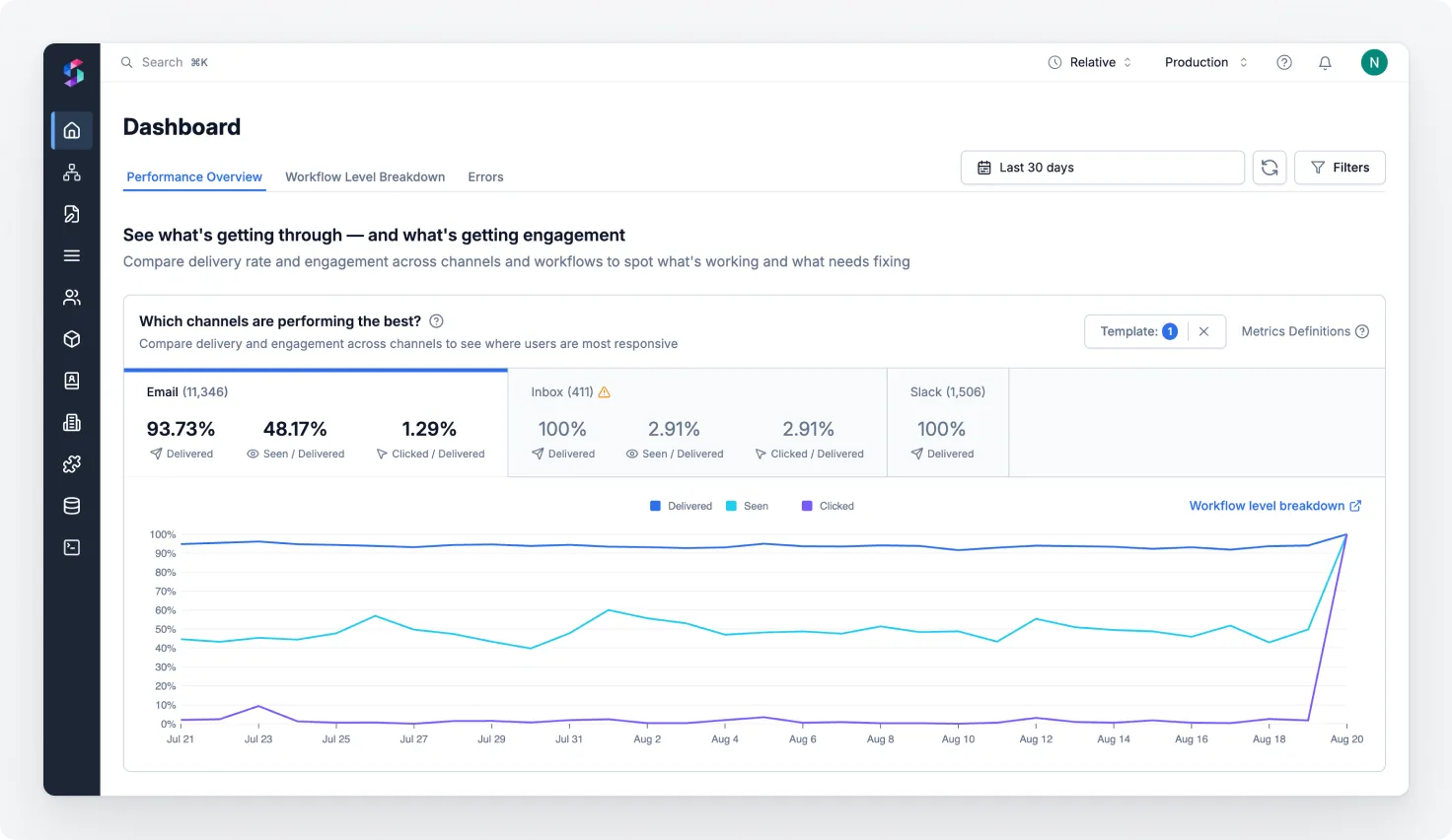
Unified Logs and Analytics
Delivery events, failures, and engagement data are consolidated into a single system. This enables:
- Faster debugging
- Exposing delivery status to customer support teams
- Real-time visibility into critical failures or delays
- Visibility into who’s getting notified, how often, and via which channel, thus correlating fatigue trends with unsubscription
As a result, teams can make data-driven decisions about their notification strategies and user engagement.
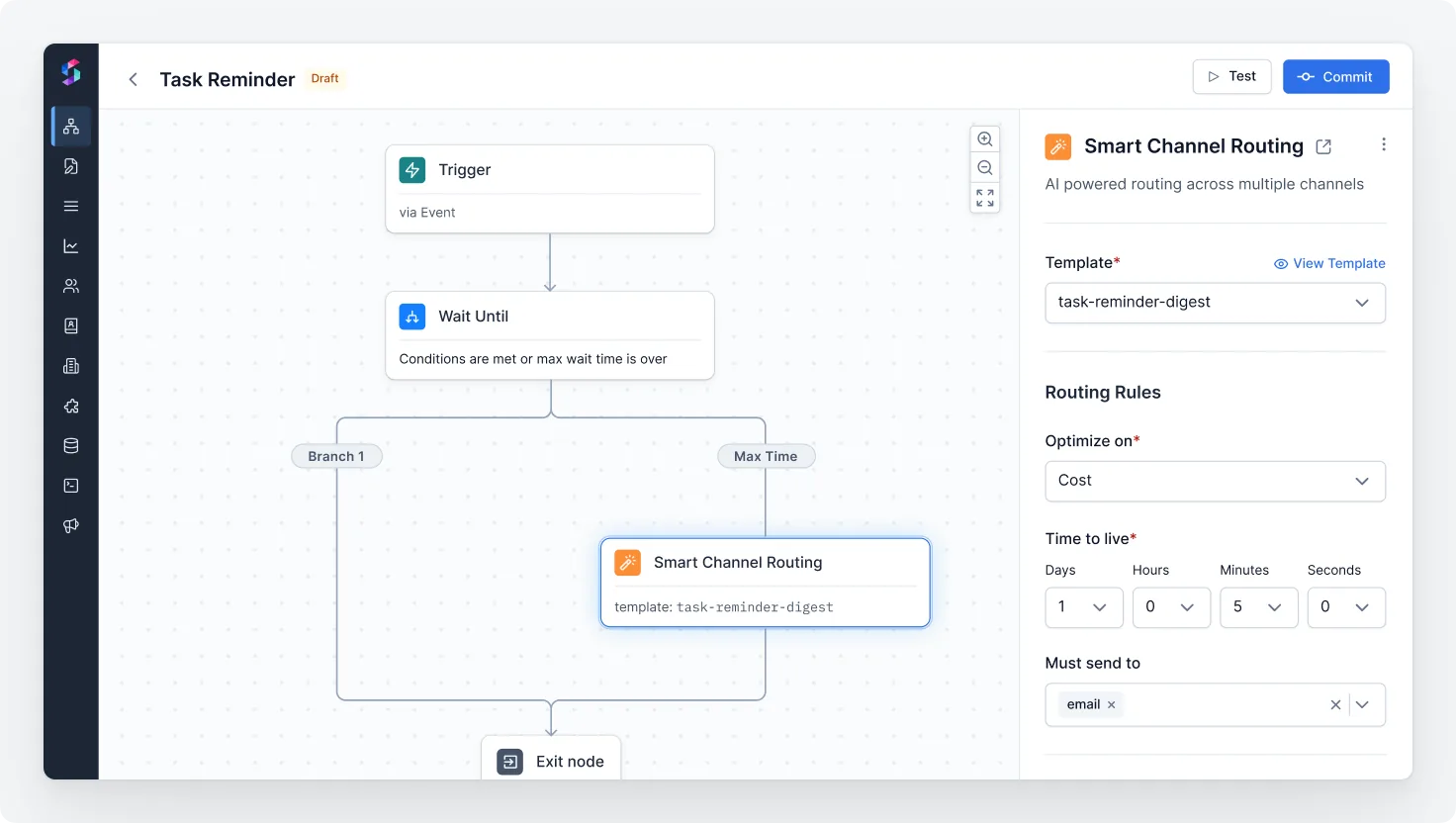
Smart Routing Logic
Teams can improve chances of user engagement by selecting the most effective channel. For example, the flow could be
- Send an email first.
- If no engagement or delivery failure, fallback to push notification or SMS.
- Dynamically choose the best channel based on user preferences and past engagement.
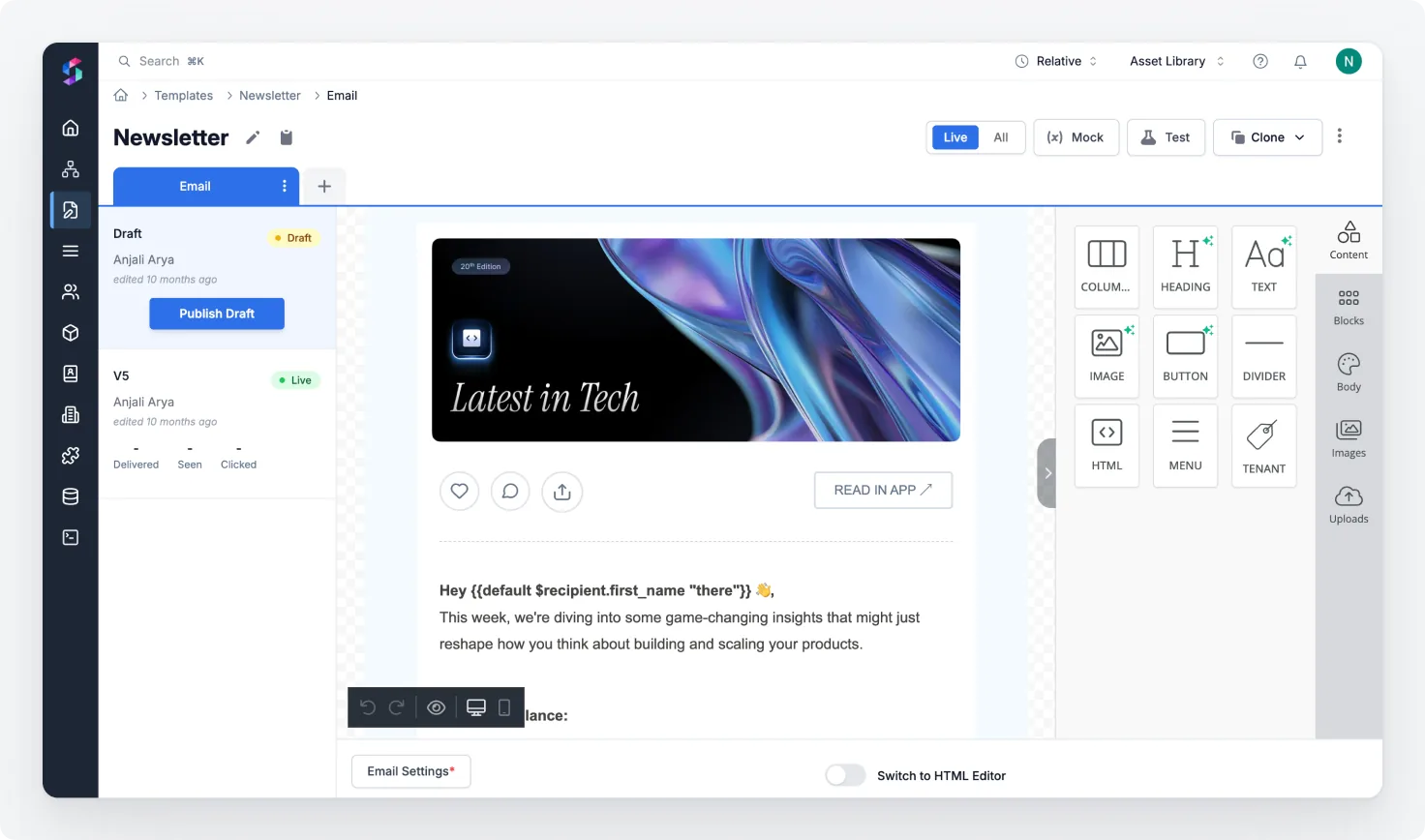
Centralized Template Management
Templates can be updated without engineering involvement. Internal teams can own content management directly via WYSIWYG editors with support for locale and dynamic placeholders. They can
- preview templates across devices and channels
- See how content renders with different user data
- Run test sends before going live
Engineers are no longer the bottleneck for every wording tweak or A/B experiment. This reduces dev fatigue and accelerates time-to-market for communication updates.
Cross-Channel Deduplication
A centralised notification system can prevent users from receiving duplicate or conflicting messages across channels. For example, if a user acted on a push notification about an event, the platform suppresses sending the same alert via SMS or email unless a fallback is needed.
2. Across Teams
Shared Visibility into Notifications Sent
A central platform provides a clear view of:
- What notifications exist
- Which ones are live
- What is the logic
- What is the content
- Who owns them
- When they were last triggered, and so on
This avoids duplicated efforts and helps teams reason about gaps and overlaps in user messaging.
Shared Access to Templates and Settings
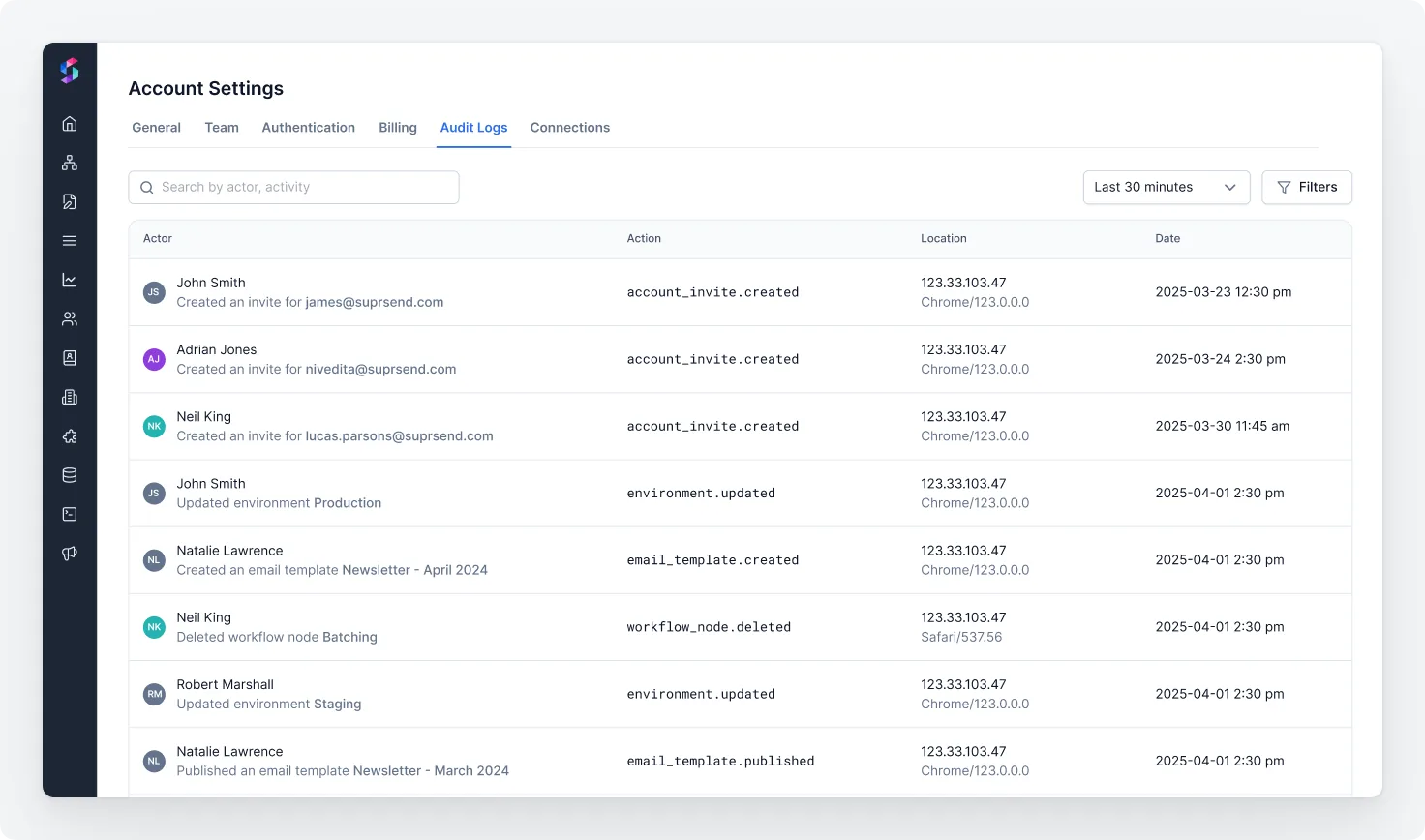
When teams use a centralized platform, everyone works from the same set of templates and user settings. Consistency in branding, tone, and compliance across all communications is maintained. And preferences are respected. You get version history, and audit trails without code deploys.
Robust Preference Management
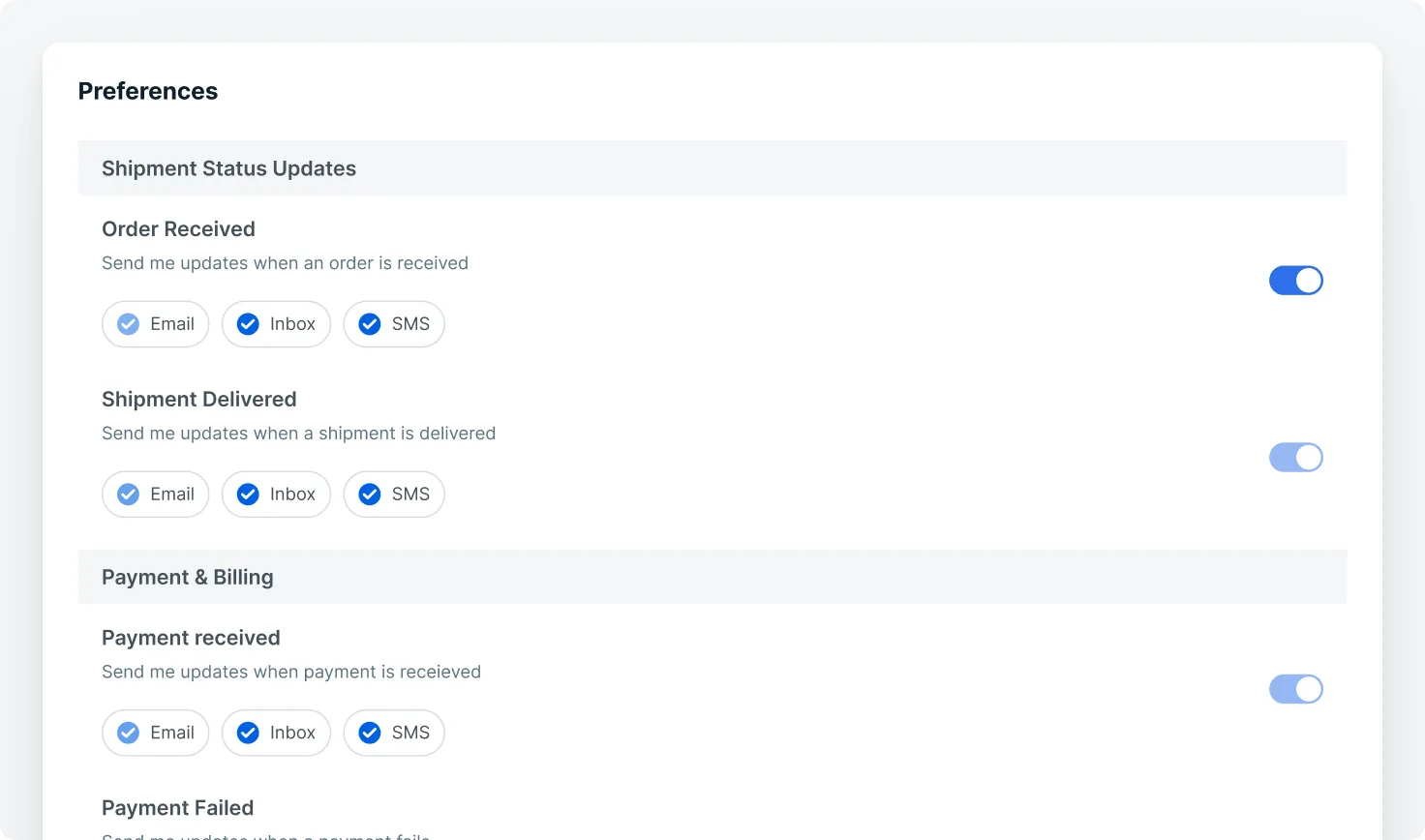
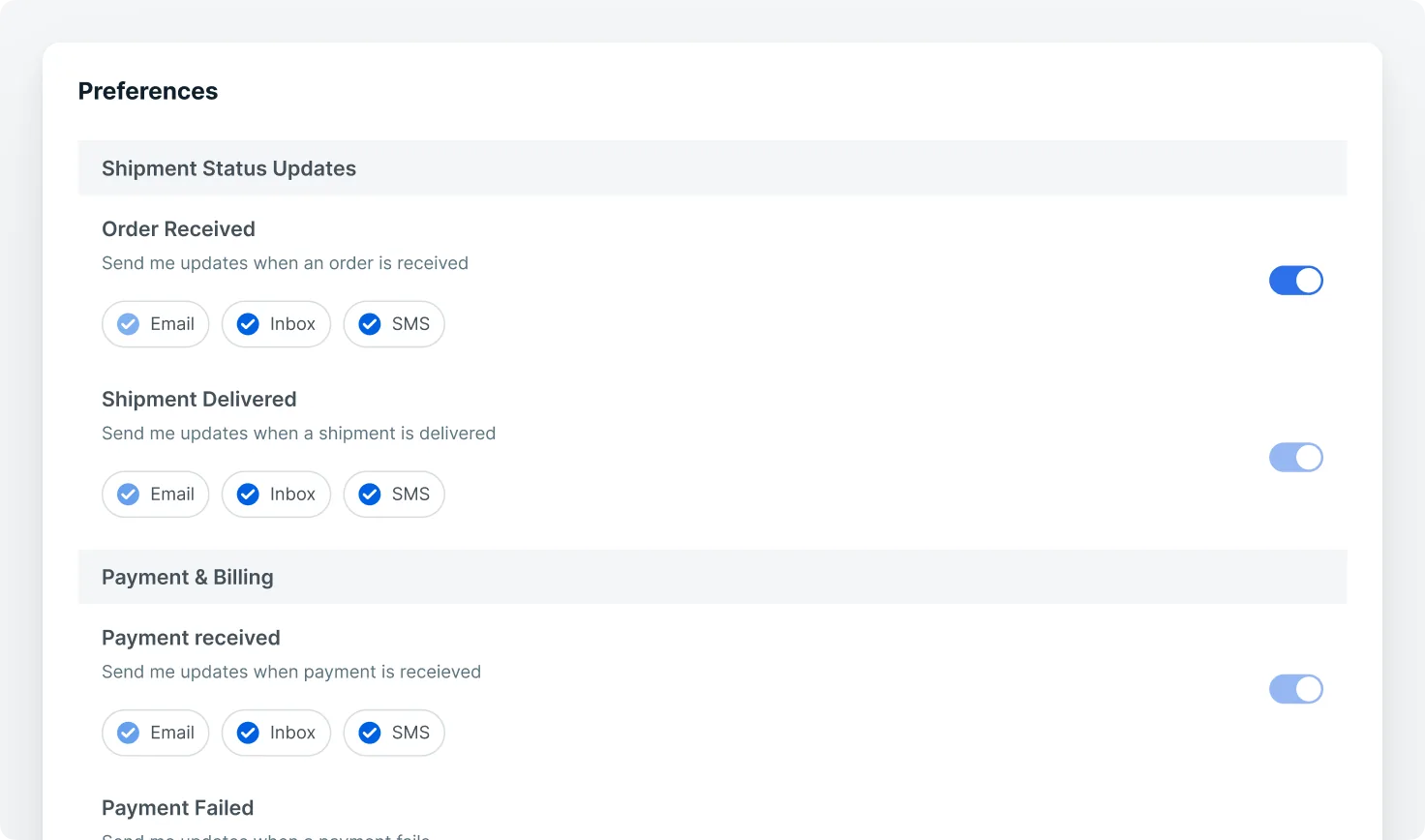
Preference management allows users to specify their choices regarding communication channels (e.g., email, SMS, push), frequency limits, content categories, and language preferences. This capability helps reduce notification fatigue and boosts user satisfaction and engagement.
By centralizing preference data, organizations can consistently enforce opt-in and opt-out rules, comply with regulations such as GDPR and CAN-SPAM, and avoid sending duplicate or unwanted messages across channels. The platform can dynamically honor user preferences in real-time, eliminating the risk of outdated or conflicting rules that commonly occur in distributed systems.
RBAC for Team-Specific Control
Granular permissions mean:
- Marketing can’t edit transactional templates
- Product teams can preview templates but not publish without approval
- Editors follow proper content review and publishing flow
Increased Developer Velocity
Centralization removes engineering bottlenecks, letting product and marketing teams manage templates, campaigns, and experiments through dashboards.
Timezone and Localization Support
Teams can easily reach a wider audience by scheduling notifications to be sent at optimal local times per user. Additionally, they can serve localized content dynamically based on user language preferences.
3. Across Products
Consistent Messaging Across Services
One platform supports all user communications including onboarding, billing, product updates with shared features and logic.
You prevent:
- Conflicting alerts from multiple teams
- Duplicated messages from different services
- Fragmented preference handling
You unlock:
- Cross-product journeys
- Real-time updates
- Personalized sequences
Support for Global Features
The central notification system powers advanced functionality out of the box:
- Localized templates with default language
- Timezone-aware delivery windows
- Batching and digesting to reduce message fatigue
- Throttling and prioritization (e.g., transactional > promotional)
- Cross-product analytics for a 360° view of user messaging
Faster Feature Rollouts
Add a new channel or feature and roll it out everywhere at once. No need to reimplement for every product team.
The Hidden Powers of Centralization
Centralization isn’t just about cleaning up tech debt. It unlocks entirely new possibilities for how you communicate with your customers.
Power AI-driven personalization with user profiling
When your notification system is centralized, you can build rich, behavioral user profiles that aren’t just an email ID. It’s a dynamic data object that includes:
- Engagement signals: open/click history, last active time, time-of-day engagement patterns
- Preferences: channel interaction, opt-ins/outs, content types
- Notification history: sent messages, delivery status, past suppressions or failures
With this foundation, AI agents can start making smart decisions in real time:
- Best time to send: Learn when a user typically engages, then schedule accordingly.
- Adaptive frequency control: Pause or throttle notifications for users who just engaged, or suppress alerts for those who are unresponsive.
- Context-aware journeys: Trigger personalized workflows based on recent behavior (e.g., a user interacts with a product → send promo at the right moment via the best channel).
Maintain a unified brand voice
With centralized template management:
- One update = global change: Update branding, legal footer, or CTA once, and it reflects everywhere across channels, teams, and products.
- Consistent tone, branding, and compliance: No more non-branded colors or outdated legal text.
- Rapid response to market events: Launch co-branded messaging for partnerships or instantly update branding post-acquisition.
This kind of control is non-negotiable at scale. It ensures that every message your users receive looks and feels like it came from one brand.
Reduce compliance risk with built-in governance
Fragmented systems are a compliance minefield. Old templates slip through, unsubscribe links get missed, and required legal text gets inconsistent.
Centralization builds compliance into the infrastructure:
- Single source of truth: Legal copy, unsubscribe preferences, and regional compliance rules are defined in one place.
- Version control and auditability: Every template change is tracked, reviewable, and reversible.
- Enforced policy controls: Guardrails prevent unauthorized edits or misrouted messages.
- Logs for compliance and legal traceability: Every notification attempt is logged — so you can answer, “Did this user get the alert? Why or why not?” with confidence.
Track vendor usage and control costs
Big organizations often use multiple messaging vendors across different teams and products. Without centralization, you get:
- Billing blind spots: It becomes nearly impossible to verify that vendor invoices align with actual usage.
By centralizing notification across channels, you gain:
- Unified usage logs: Every notification is tracked, regardless of channel or vendor.
- Audit-ready reporting: Finance and operations teams can reconcile vendor bills with detailed send histories.
- Cost optimization: See exactly which teams are sending what notification volumes, and assess whether that spend is justified. Unlock opportunities to negotiate better pricing.
Business case
| Fragmented notification system | Centralized notification infra | |
|---|---|---|
| Speed to launch | New notifications rely on engineering bandwidth | Business teams set up flows; devs define triggers once → accelerated launches |
| Channel-specific logic | Channel quirks handled in code; failures slip through | Handles channel quirks behind a unified API, (e.g., SMS split, retry with backup vendor). Easy to swap/add vendors without changing core business logic. |
| Core primitives | Teams reinvent timezone, preference, batching logic | Shared primitives via one API → faster builds, higher reliability |
| Notification orchestration | Business logic is scattered → duplicate or missed comms | Central workflow engine, ideal for multi-step journeys. Manages retries, batching, fallbacks and smart channel routing. |
| Content management | Templates locked in code; devs needed for edits | WYSIWYG editor with versioning + approvals → faster copy changes, frees dev time |
| User preferences | Preferences siloed or missing | Central preference store respected across channels/vendors → reduced fatigue, higher trust |
| Observability | Teams reinvent timezone, preference, batching logic | Shared primitives via one API → faster builds, higher reliability |
| Core primitives | Delivery and engagement related data is tracked across different tools -> difficult to debug issues or analyse performance across channels. | Unified dashboard with full notification timeline → faster issue resolution |
| Personalization | Same message sent to all users | AI-driven profiling to choose best timing, channel, content → higher engagement |
| Visibility and Ownership | Notifications scattered across codebases and teams, unclear ownership, duplicates slip in. | One place to see all notifications that exist with ownership, status, logic, and content → avoids duplication, improves governance, and surfaces gaps/overlaps. |
| Branding | Inconsistent voice and style across teams | Centralized template library with governance → consistent brand identity |
| Compliance | Opt-outs/unsubscribes handled ad hoc | Built-in unsubscribe handling and global policies → reduced compliance risk |
| Vendor management | Usage and billing opaque across vendors | Unified logs and vendor-level reporting → cost control, better negotiation |
| Multi-tenant scaling | Need to write custom code for each tenant | Tenant-specific branding, preferences, rules → scalable, customer-specific comms |
How Centralization is Done Right (with SuprSend)
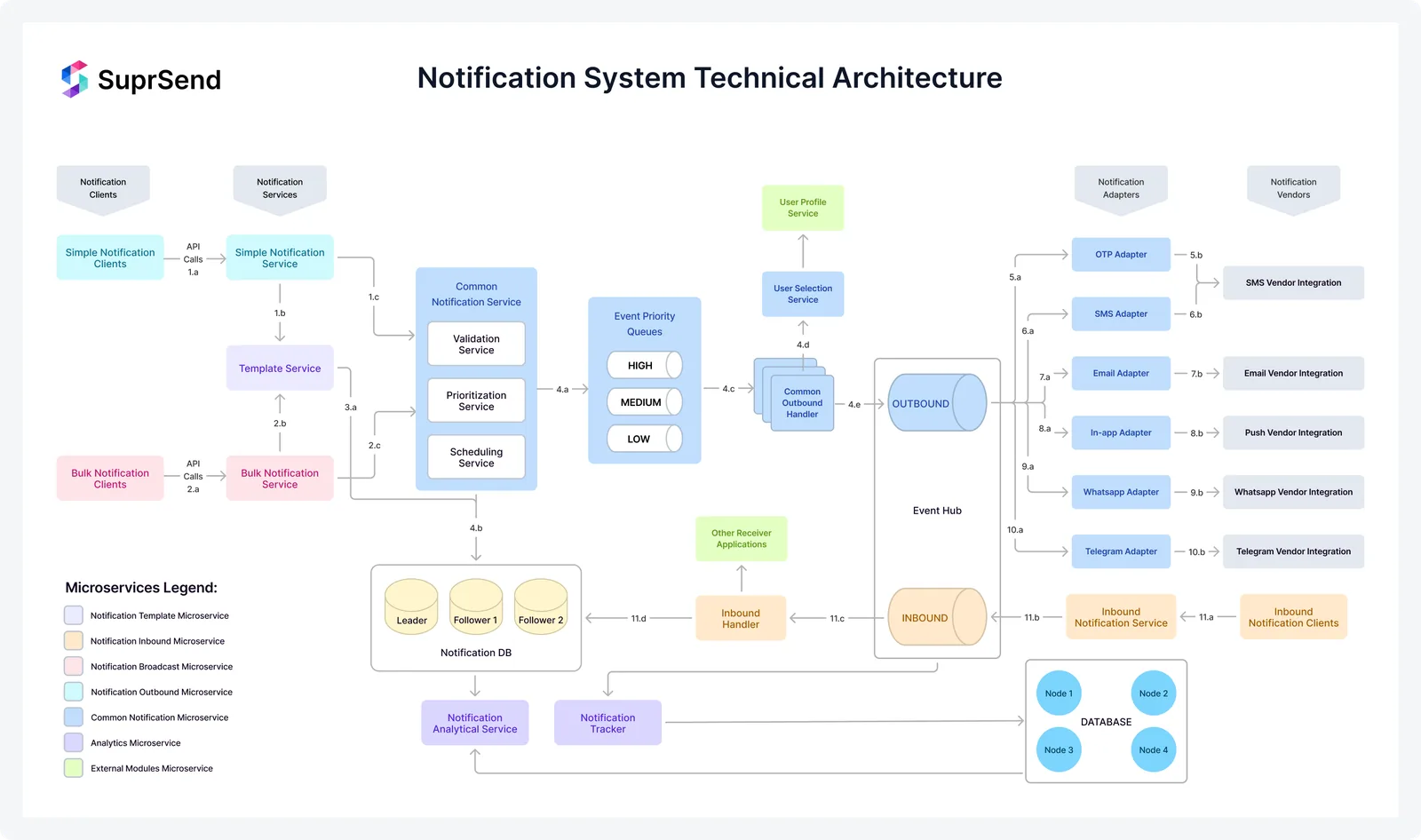
SuprSend was built to solve the notification mess that most growing teams inevitably face — fragmented channels, hardcoded templates, scattered business logic, and poor observability. SuprSend is the foundation you need to offer a modern, centralized notification system to all internal teams without rebuilding the basics from scratch.
Centralized by design
- Manage all channels — Email, SMS, push, in-app, chat — through a single, abstracted API
- Centralize templates with multi-language support, WYSIWYG editing, preview, and dynamic variables
- Enforce user preferences and compliance rules automatically
Workflows made for scale
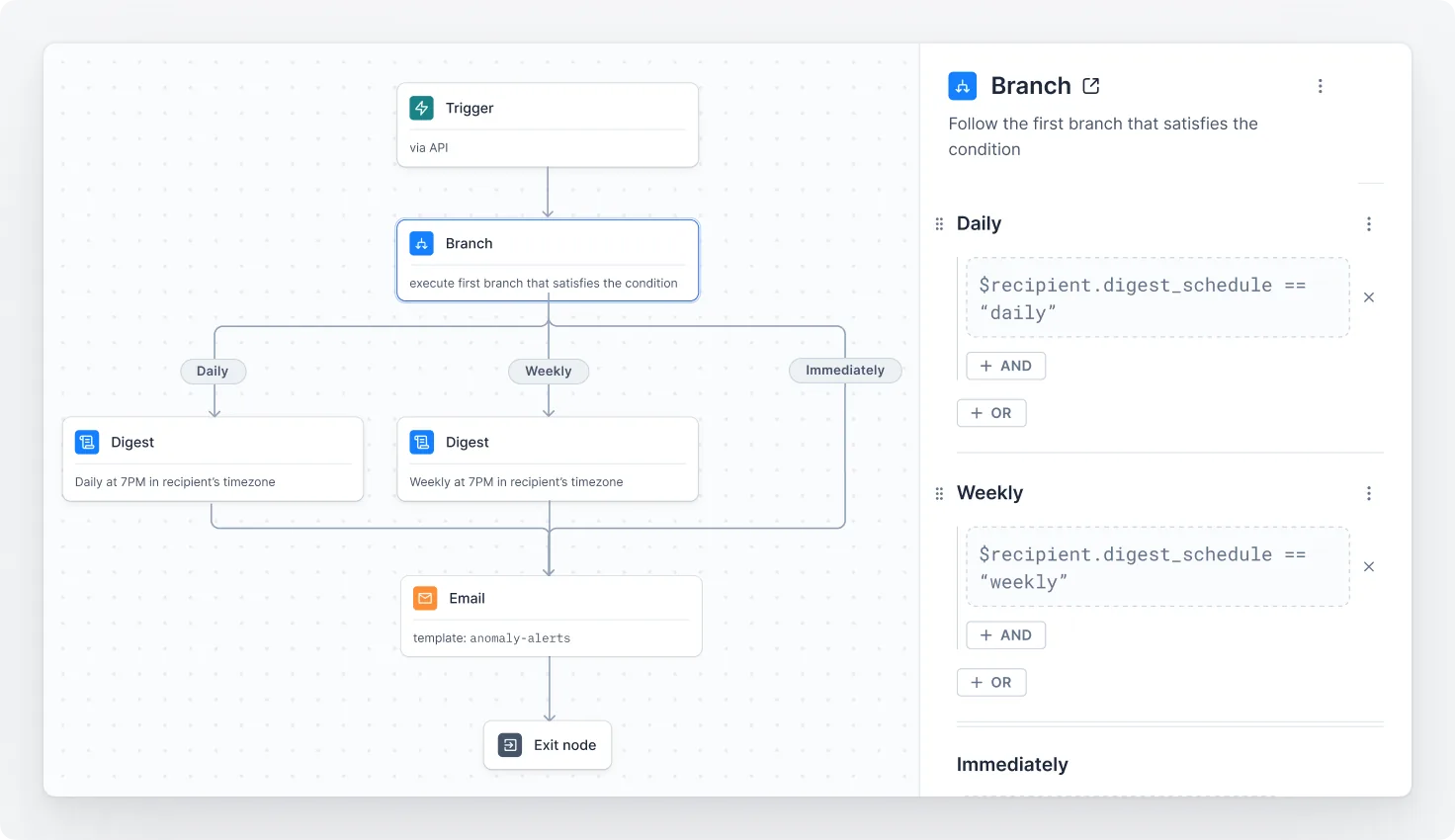
- Orchestrate multi-step journeys across channels with programmable workflows
- Trigger digests, batching, and time zone–aware scheduling out-of-the-box
- Built-in support for retries, fallbacks, rate limits, and prioritization
Built for developers
SuprSend is built to empower developers, not slow them down:
- Integrate quickly with well-documented APIs and SDKs
- Use CLI tools for local testing and automation
- Separate staging and production environments for safe rollouts
- RBAC to delegate access — without losing control
Observability
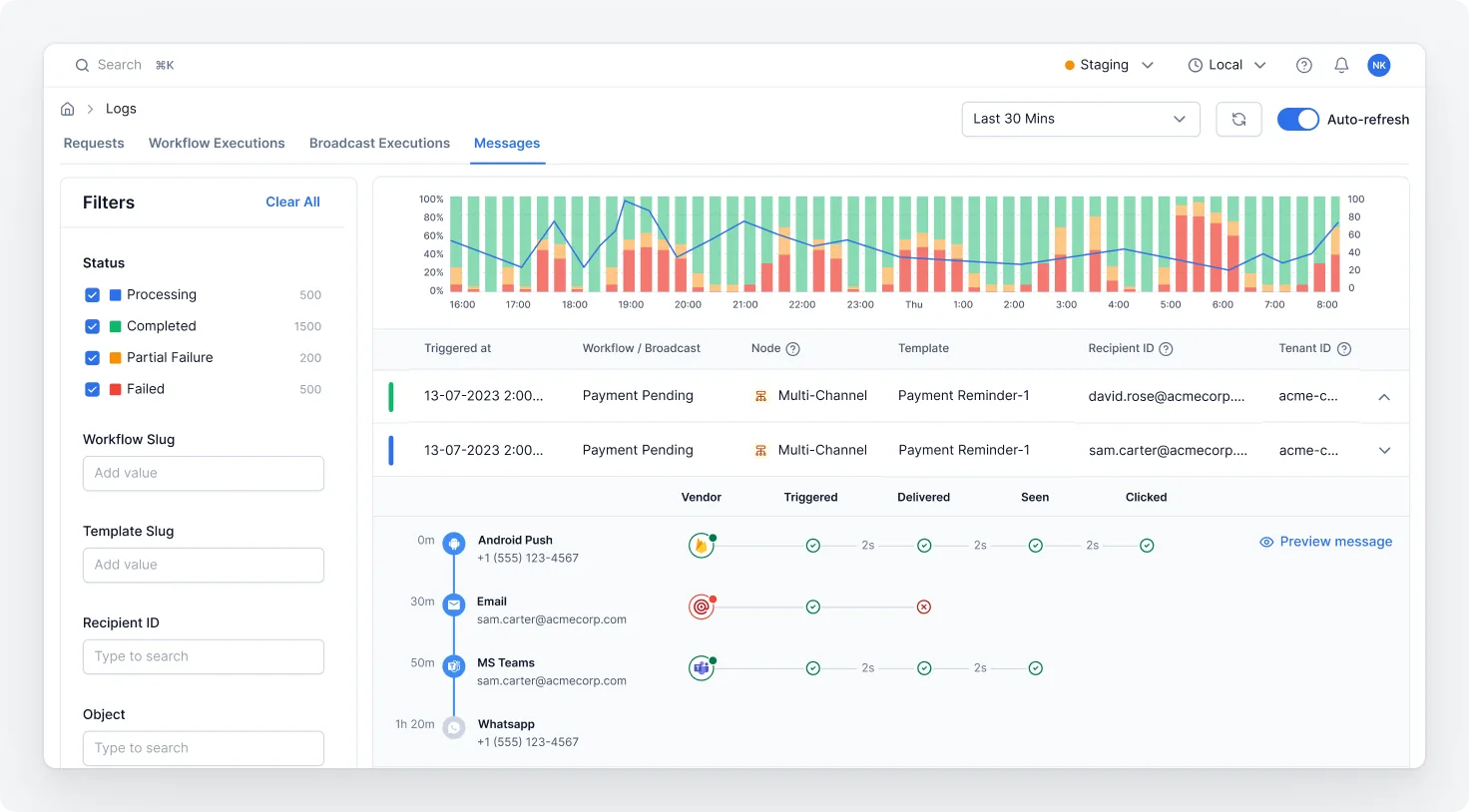
- Real-time logs for every send, delivery, interaction and failure — across all vendors and channels
Final Thoughts
Notifications are no longer an afterthought. They’re the voice of your product. If that voice is fragmented or inconsistent, users notice.
Modern teams need a notification system that’s:
- Unified across channels
- Shared across teams
- Scalable across products
And you don’t need to be a Big Tech company to get this right.
Ready to Centralize?
- Start building for free — Send your first notification with SuprSend in minutes
- Book a demo — See how SuprSend fits into your stack