MCP server notifications represent a fundamental shift in how developers interact with notification infrastructure. Instead of switching between a code editor, a notification platform dashboard, and API documentation, developers can now manage their entire notification stack through natural language commands inside AI-powered code editors like Claude Desktop, Cursor, and Windsurf.
MCP - the Model Context Protocol - is an open standard developed by Anthropic that lets AI assistants interact with external tools and services. When a notification platform exposes an MCP server, it gives AI assistants direct access to notification management capabilities: creating users, triggering workflows, inspecting delivery logs, and managing templates, all from a conversational interface.
What MCP Means for Notifications
Traditionally, managing notifications involves three separate surfaces: your codebase (for triggering notifications via API), the platform dashboard (for configuring workflows and templates), and documentation (for looking up API parameters and payload formats). MCP collapses these into one.
With an MCP-connected notification platform, a developer can type: “Create a new user with email john@example.com and subscribe them to the onboarding workflow” - and the AI assistant executes the correct API calls against the notification platform. No dashboard navigation, no API reference lookup, no switching contexts.
This isn’t just a convenience feature. It changes the feedback loop for notification development from minutes to seconds.
How MCP Server Notifications Work
An MCP server is a lightweight service that exposes a set of “tools” - functions that an AI assistant can call. Each tool maps to a notification platform capability.
For example, SuprSend’s MCP server exposes 23 tools covering the full notification lifecycle:
| Tool Category | What It Does | Example Command |
|---|---|---|
| User Management | Create, update, delete users and their channel preferences | “Add push token for user_123” |
| Workflow Triggers | Trigger notification workflows with dynamic data | “Send welcome email to john@example.com” |
| Template Management | List, inspect, and modify notification templates | “Show me the password reset email template” |
| Delivery Logs | Query delivery status and debug failed notifications | “Why didn’t user_456 receive the invoice notification?” |
| Tenant Management | Manage multi-tenant notification configurations | “Create a new tenant for Acme Corp with custom branding” |
| List Management | Create and manage subscriber lists for broadcasts | “Add all premium users to the product-updates list” |
The AI assistant receives the developer’s natural language request, determines which MCP tool to call, constructs the correct parameters, executes the call, and returns the result - all in the conversational flow.
Real-World MCP Notification Workflows
Workflow 1: Setting Up a New Notification from Scratch
Without MCP: Open docs → find API endpoint → construct JSON payload → test in Postman → check dashboard for delivery status → iterate. Time: 30-60 minutes.
With MCP: “Create a workflow called order-confirmation that sends an email with the order ID and total amount, then sends a push notification if the email isn’t opened within 1 hour.” Time: 2-5 minutes.
Workflow 2: Debugging a Delivery Failure
Without MCP: Log into dashboard → find the user → search notification logs → identify the failed step → check vendor response. Time: 10-20 minutes.
With MCP: “Why didn’t user_789 receive the payment confirmation notification yesterday?” The AI queries delivery logs, identifies the failure point, and explains it. Time: 30 seconds.
Workflow 3: Multi-Tenant Setup
Without MCP: Dashboard → create tenant → configure branding → set up vendor routing → assign templates. Multiple pages, multiple forms. Time: 15-30 minutes.
With MCP: “Set up a new tenant called HealthFirst with their logo URL, configure SendGrid with their API key for email, and assign the healthcare-onboarding workflow template.” Time: 2-3 minutes.
MCP vs CLI vs Dashboard: When to Use Each
| Interface | Best For | Limitations |
|---|---|---|
| MCP Server | Developers in flow state, rapid prototyping, debugging, multi-step operations | Requires AI editor setup, less visual for complex workflows |
| CLI | CI/CD pipelines, scripting, staging↔production sync | Requires memorizing commands, no conversational context |
| Dashboard | Non-technical users, visual workflow building, analytics review | Context switching, slower iteration for developers |
| API | Production integration, programmatic control | Requires docs reference, manual payload construction |
MCP doesn’t replace other interfaces - it adds a conversational layer that’s fastest for developer-centric tasks. Product managers and marketers will still prefer the dashboard for visual workflow editing and template design.
Setting Up MCP for Your Notification Platform
Setup typically takes under 10 minutes. Here’s the general process:
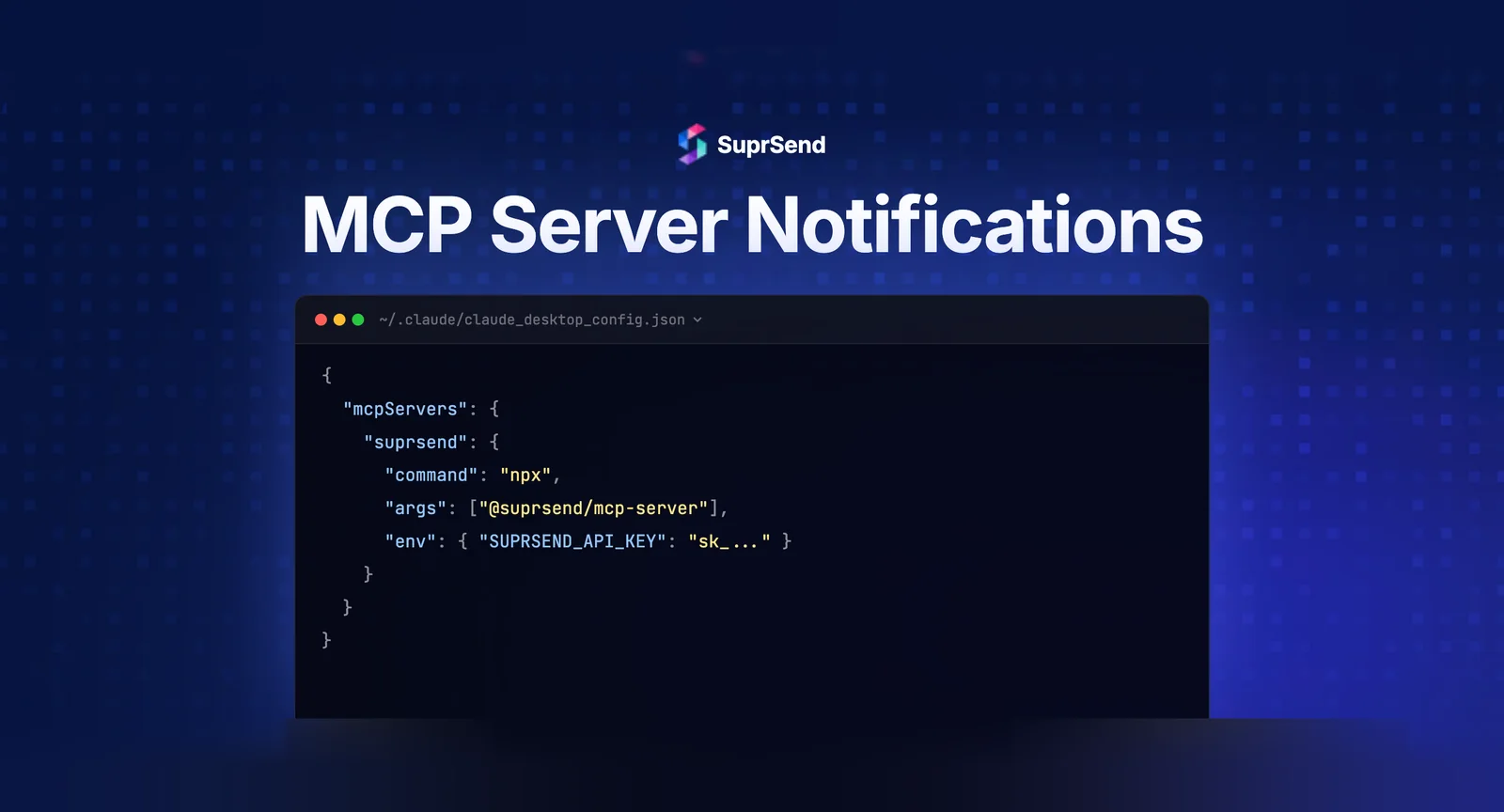
Step 1: Install the MCP server package. For SuprSend: npx @anthropic/create-mcp suprsend or configure manually in your AI editor’s settings.
Step 2: Add your notification platform API key to the MCP server configuration file (usually claude_desktop_config.json or equivalent for your editor).
Step 3: Restart your AI editor. The notification tools appear automatically in the assistant’s tool list.
Step 4: Verify by asking: “List all available notification tools.” You should see the full set of exposed capabilities.
Once connected, every conversation in your AI editor has full access to your notification infrastructure - user data, workflows, templates, delivery logs, and configuration.
The Future: MCP and AI Agent Notifications
MCP servers for notifications are just the beginning. The next evolution is AI agents that send notifications autonomously. Today, MCP tools are invoked by developers. Tomorrow, autonomous AI agents will use the same MCP tools to notify users as part of their task execution.
Imagine an AI sales agent that qualifies a lead, schedules a demo, and sends a personalized follow-up notification - all without human intervention. The notification infrastructure becomes the communication layer for AI agents, not just human-triggered product events.
Platforms that invest in MCP and Agent SDKs now will be best positioned for this shift. SuprSend already offers both an MCP server (23 tools) and an Agent SDK for programmatic AI agent notification access.
Which Notification Platforms Support MCP?
| Platform | MCP Server | Tools | Status |
|---|---|---|---|
| SuprSend | Yes | 23 tools | Production |
| Knock | Yes | Limited | Beta |
| Courier | Yes | Limited | Beta |
| Novu | Community | Varies | Community-maintained |
SuprSend currently has the most comprehensive MCP server in the notification infrastructure category, with 23 tools covering the full notification lifecycle. It’s listed on major MCP directories including Glama, mcp.so, and MCP Market.
TL;DR
MCP server notifications let developers manage their entire notification stack through natural language in AI code editors. Instead of switching between dashboards, docs, and Postman, developers can create users, trigger workflows, debug delivery, and manage templates in conversational flow. SuprSend leads the category with 23 MCP tools. Setup takes under 10 minutes. The next evolution is autonomous AI agents using MCP tools to send notifications without human intervention.
Try SuprSend’s MCP server today. Start free or book a demo.
FAQ
What is an MCP server for notifications?
An MCP (Model Context Protocol) server exposes notification platform tools to AI code editors like Claude Desktop, Cursor, and Windsurf, enabling developers to manage notifications through natural language.
How do MCP server notifications work?
The MCP server connects your notification platform to an AI assistant. Developers describe what they want in plain English and the AI calls the appropriate notification tools.
Which notification platforms have MCP servers?
SuprSend offers an MCP server with 23 tools. Knock and Courier also have MCP integrations. The category is new and expanding rapidly in 2026.
Can MCP servers replace notification dashboards?
For developer workflows, partially yes. MCP servers let developers create users, manage workflows, and debug delivery without leaving their code editor. Dashboards remain valuable for non-technical users.
How do you set up an MCP server for notifications?
Install the MCP server package, configure it in your AI editor's settings file with your API key, and restart the editor. Most setups take under 10 minutes.