
How a Reporting Service Provider Launched a Complete Notification System in Just Two Weeks

Challenge
A reporting service provider wanted a proactive notification system to alert clients about critical trade reporting issues. While their portal displayed status indicators, clients needed to be informed immediately when something went wrong — a requirement that many customers explicitly demanded as part of their platform offering. Building this system in-house would have been a complex, time-consuming project.
Solution
The company integrated with SuprSend, leveraging its out-of-the-box infrastructure designed for fast implementation. SuprSend’s built-in features like batching, objects, tenancy, multi-channel delivery, and preference management allowed the business to meet their notification system requirements.
Outcome
By integrating SuprSend, the company went live with a robust notification system in just two weeks. This fast implementation enabled them to close enterprise deals with clients who required reliable notifications as a critical part of their contract.


In financial services, notifications aren’t just a good-to-have—they are a must-have. For a reporting solution platform specializing in post-trade reporting, timely alerts ensure clients stay informed about delays in sending data to a third-party repository or errors in the data, or compliance risks. Without them, clients risk missing updates that could lead to costly penalties.
"Our notifications are not optional; they’re vital to our system. If something goes wrong, our clients need to know immediately."
The SuprSend team met with the company’s Co-founder & CTO to understand how they approached building a notification infrastructure capable of managing critical alerts effectively.
How a Reporting Solutions Provider Ensured Reliable Notifications
Previously, the licensed reporting solution platform simply had status indicators within their portal that the customer can use to check for issues. While this provided visibility, it wasn’t enough—clients needed and expected proactive, real-time alerts when something went wrong.
At the same time, the business knew that simply sending more alerts wasn’t the answer. To achieve a balance between real-time alerts and too many alerts, they needed a system with batching, preferences, and other advanced features — right from the start.
Building this in-house would have required significant development effort, so the reporting solution platform sought a better solution — one that could deliver a robust notification system without months of engineering work. That’s where SuprSend stepped in.
Their product manager set a bold goal: implement a fully functional notification system that handles all complex use cases—within a single sprint. Here’s how they pulled it off and the key features that made it possible.
Multi-channel notifications to reach customers where they are
Since critical alerts are essential and not optional. The financial services platform needed to ensure their customers received timely updates no matter where they were. To maximize visibility and prompt action without delay, they deliver notifications across multiple channels, including Email, Inbox, Slack, and Microsoft Teams.
Implementing this multi-channel strategy was seamless with SuprSend. The business could easily add their preferred vendors without additional complexity, ensuring their alerts reached the right people at the right time.
Using objects for entity level triggers
Most of the company’s notifications were triggered by entity-based events like submission failures or eligibility check failures.To ensure the right people received these alerts, they needed a way to automatically route notifications based on roles within a company. They leveraged SuprSend’s object-level targeting to streamline delivery. When a notification is triggered at the object level, alerts are automatically sent to both:
- The object’s designated channels (e.g., a Slack channel for a specific team or entity).
- The individual subscribers linked to that object
Using batching to prevent notification overload
The reporting solutions provider processes over 30 million trades per day from a single customer, with each trade carrying the potential for failure. If every issue triggered a separate alert, clients would be overwhelmed.
SuprSend's batching feature along with the ‘Flush first item immediately’ setting solved for this. The first trigger is immediately sent as a notification, while subsequent triggers are grouped into a batch. However, to ensure that notifications aren’t delayed unnecessarily, timers are set. Thus, the combination of batching and timely delivery ensured the s notifications met their SLA requirements without spamming clients.
Smarter data mapping with objects and tenants
Suprsend’s Objects & Tenants capabilities helped the trade reporting solution provider simplify recipient management.
- Clients were mapped as objects.
- Subscribers (team members) were linked to those objects.
This ensured notifications automatically reached the right people without resolving recipients in their code, anytime a trigger came in.
The reporting solution platform currently operates at a one-level depth (Clients → Subscribers) but can easily expand this to manage parent companies and subsidiaries. This flexibility means they can scale their notification logic without additional development effort.
To manage preferences at the admin level, they also used tenants, empowering client admins to define who receives what notifications and through which channels.
Embedded unified inbox & granular preferences—all within the sprint
Effective notifications aren't just about sending messages—they’re about sending the right messages to the right people. With a high volume of critical updates, ensuring clients could manage what they receive was essential to avoid alert fatigue. And this was easy to configure within SuprSend.
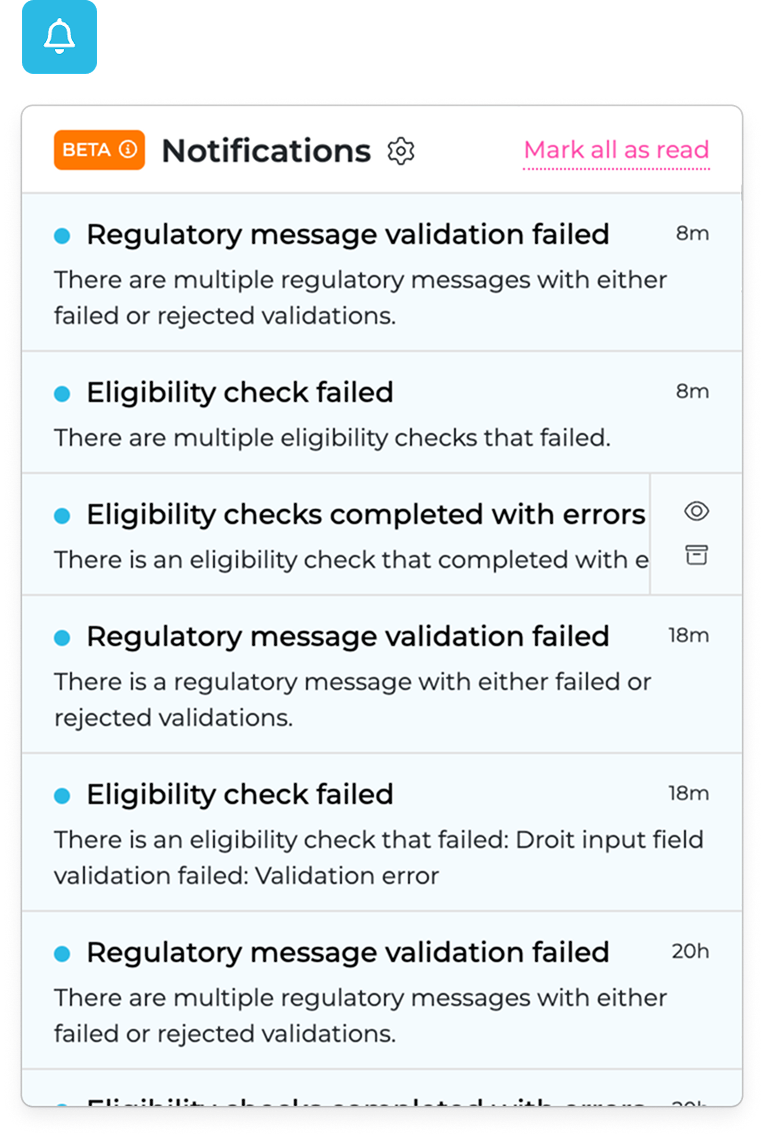
The fintech company implemented a three-level preference management system using SuprSend:
1. Platform-Level Categories: They first defined preference categories for all events within its platform, making it easier to offer granular control from the outset.
2. Admin-Level Preferences: Each of their customers has designated admins who manage preferences for their organization. Admins select the relevant categories for their teams, ensuring that they only receive notifications that matter to them.
3. User-Level Preferences: Within the boundaries set by their admin, individual users can further tailor their preferences.
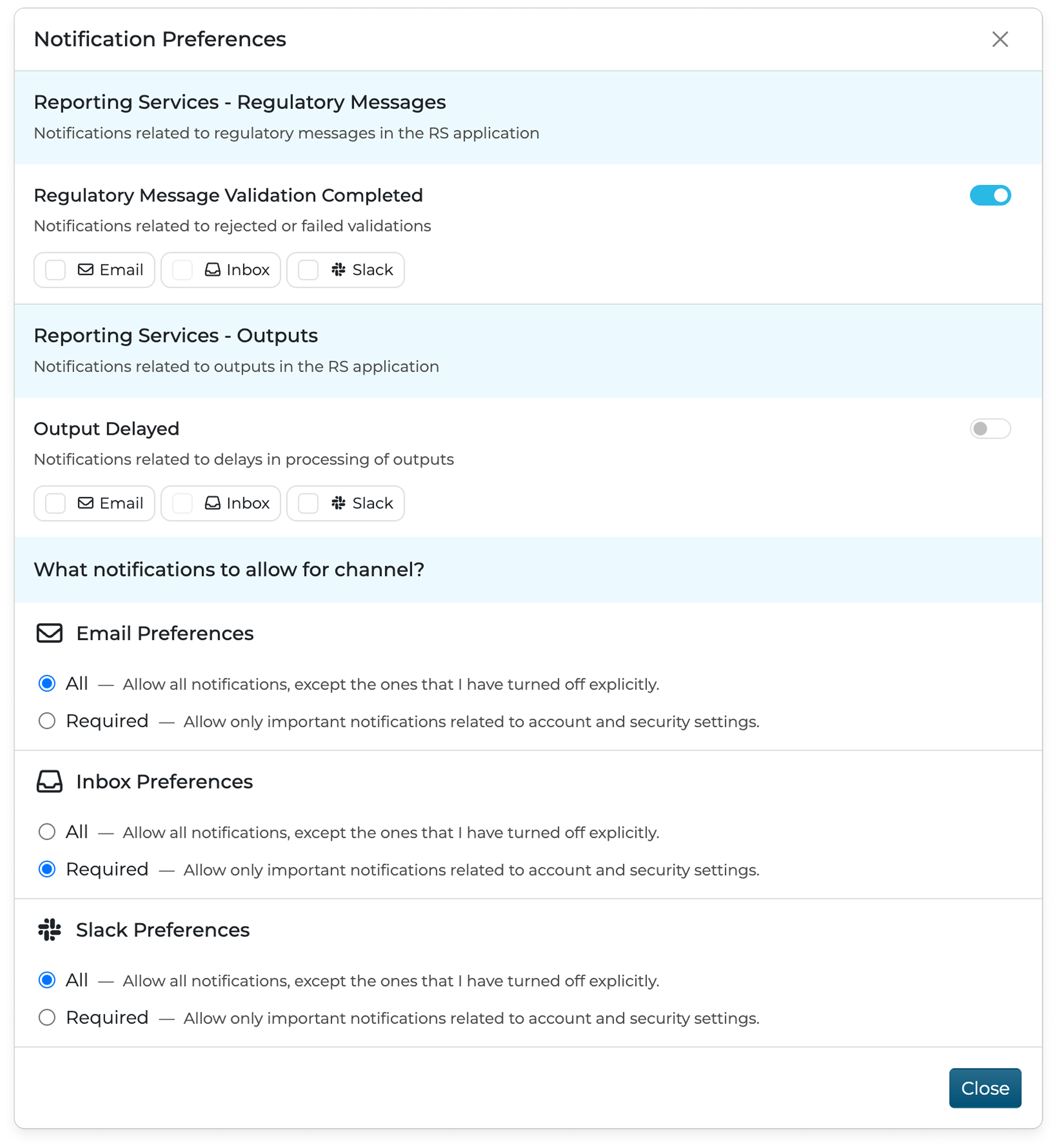
With SuprSend’s readily available Angular components and SDKs, the company embedded both Inbox and Preference Management directly into their platform— all within a single sprint. Additionally, the business had users belonging to multiple tenants. With SuprSend, these users could view notifications from all their tenants in one unified inbox, eliminating the hassle of switching between different accounts to track critical updates.
Streamlining logic with flexible workflows
The business kept their integration with SuprSend simple. They adopted an event-driven architecture, where all failed trade events were streamed directly to SuprSend. From there, SuprSend managed the entire notification setup — including recipients, channels, preferences, and subscriptions.
This approach delivered two key benefits:
- By keeping notification logic out of their codebase, they could easily make changes without involving engineers or deploying new code.
- With SuprSend handling the complexity, they accelerated their deployment, saving significant development effort.
Based on the event payload, the workflow dynamically overrides the recipient and specifies which object should receive the notification.
This flexible setup meant that the business didn’t have to build complex logic in-house.
Business Impact
Faster integration with minimal effort
The company’s architecture is event streaming-based, powered by Kafka with microservices handling stream processing. They introduced a microservice that listens to events across their system and sends API calls to SuprSend.
On the frontend, they built Angular components to implement Suprsend’s inbox feature.
“Integrating the backend took just one week, and syncing our customer data took another—our entire notification setup was live in a single sprint.”
Unlocking new business opportunities
SuprSend didn’t just improve operations—it helped them win new business.
An enterprise client required robust notification capabilities as part of their deal. By integrating with SuprSend, the company met this requirement and closed the deal.
"Suprsend played a key role in helping us win a high-value client. Having this functionality in place was essential."
Why They Chose SuprSend Over Building In-House
The business weighed the pros and cons of building their own solution.
They found that:
- Channel integrations can get deceptively complex and time-consuming to build.
- Preferences management was better handled out-of-the-box.
- SuprSend’s workflow editor simplified logic and provided functionality that they hadn’t anticipated but found invaluable.
“Our most valuable resource as a company is time. Suprsend let us deploy notifications quickly without dedicating months of development time."
After evaluating competitors like Courier, Novu, and Fyno, Suprsend stood out for its:
- Cost Efficiency: The pricing model scaled with them rather than incurring high upfront costs.
- Feature Set: SuprSend’s inbox, preferences management, and API flexibility addressed their notification requirements.
- SDK Support and Speed: SuprSend's Angular support, fast turnaround reassured the business that SuprSend was the right choice.
"We looked at alternatives... but everything we needed was just there at SuprSend."
The Unexpected Difference: Outstanding Support
One standout aspect of working with Suprsend was the exceptional support.
“Having direct communication through Slack and Zoom was incredibly helpful. We didn’t expect that level of support, but it made a significant difference."
By choosing Suprsend, the reporting service provider saved months of development time, simplified their notification logic, and ensured their clients stayed informed — all while unlocking new business opportunities.