Every startup sends notifications from day one. Account confirmations. Password resets. Payment receipts. The question isn’t whether to build notification infrastructure - it’s how much infrastructure to build at each stage, without over-engineering or accumulating technical debt that slows you down later.
Stripe’s Developer Coefficient report found that roughly 30% of engineering time goes to maintenance rather than building new product. For early-stage startups, a disproportionate share of that burden falls on infrastructure that should never have been built in-house - notifications, authentication, payments.. This guide maps out exactly what notification infrastructure to ship at each funding stage - from pre-seed to Series B - so you invest the right amount at the right time.
Why Notification Infrastructure Matters for Startups
Notifications are one of the few product features that touch every user, every day. They drive activation (welcome emails), retention (activity digests), and revenue (payment reminders). A broken notification - a late email, a missing push notification, or an SMS that never arrives - directly impacts the metrics startups live or die by.
But here’s the trap: notification infrastructure has compounding complexity. What starts as a single SendGrid API call becomes 30-50 notification types across 3-5 channels within 18 months. Teams that don’t plan for this growth end up with notification logic scattered across their codebase, no centralized preferences, no observability, and no way to modify notifications without a deploy.
The goal at every stage is the same: ship the notification experience your users expect without diverting more engineering time than necessary from your core product.
Pre-Seed Stage: MVP Notifications
Team size: 1-3 engineers. Monthly notifications: Under 5,000. Budget: $0.
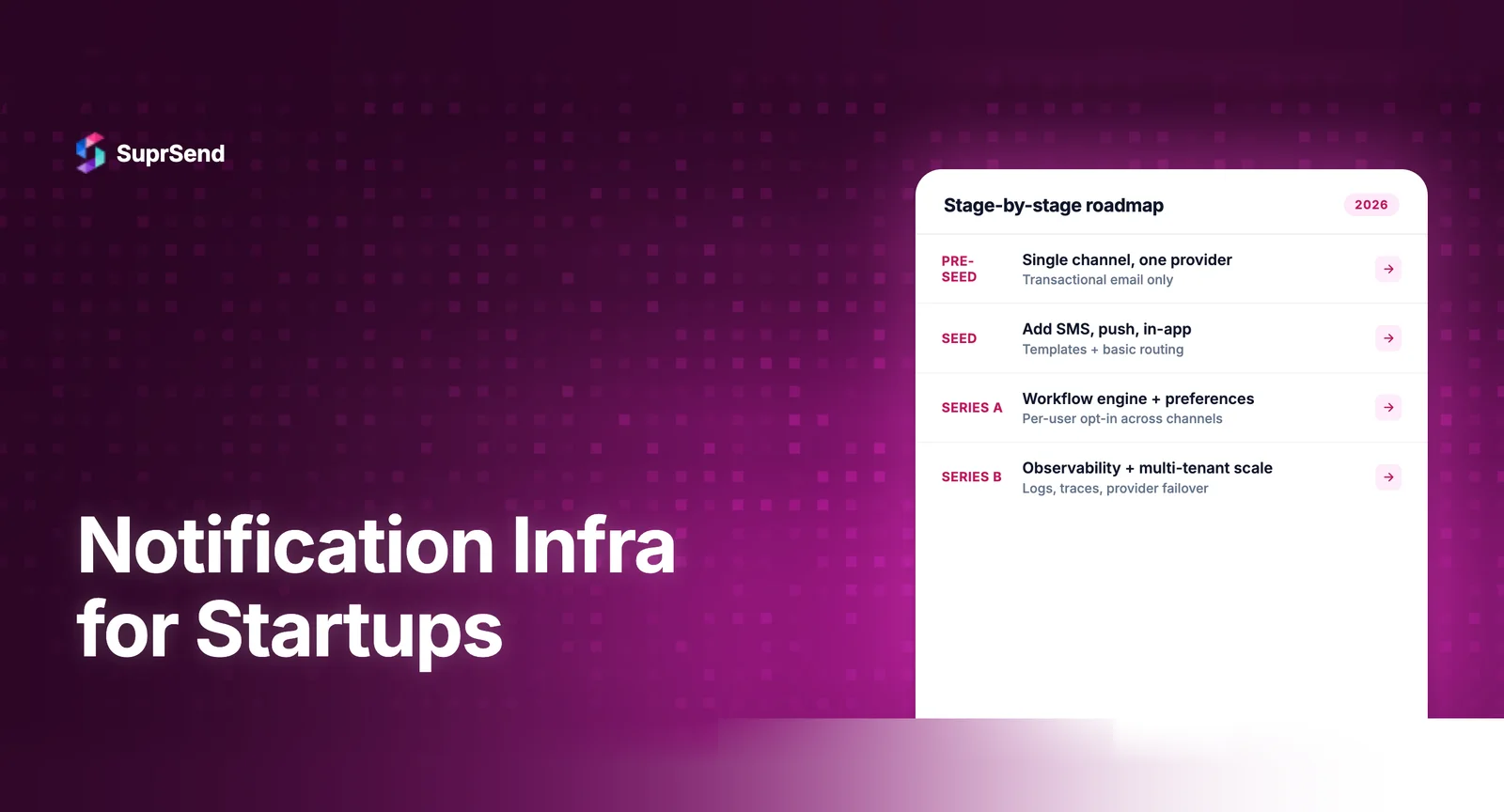
What to ship: Transactional email only. Account verification, password resets, and one or two product-triggered emails (new comment, invitation accepted). That’s it. No push notifications, no SMS, no in-app inbox. Keep the notification surface area minimal.
How to implement: Use a notification platform’s free tier. SuprSend offers 10K notifications per month free. Novu is open-source. Both give you a single API for email delivery, templates you can modify without code changes, and basic delivery tracking. The integration takes 1-2 hours.
What NOT to do: Don’t integrate directly with SendGrid’s API from your backend code. It seems simpler now, but within 3 months you’ll need a second channel, template versioning, or delivery logging - and you’ll be rebuilding. Don’t build a custom email template system. Don’t set up your own SMTP server.
Architecture:
| Component | Implementation |
|---|---|
| API Integration | Platform SDK (single API call per event) |
| Templates | Platform’s visual editor |
| Delivery | Email only (via platform’s SendGrid/SES integration) |
| Tracking | Platform’s built-in delivery logs |
Seed Stage: Adding Channels and Workflows
Team size: 3-10 engineers. Monthly notifications: 5,000-50,000. Budget: $0-$150/month.
What to ship: Email remains primary. Add in-app notifications (a notification bell/inbox in your product) if you have daily active users. Add basic workflows: welcome sequence with a 24-hour delay, digest emails for collaborative features (3 new comments since your last visit). Set up user preferences for notification categories.
How to implement: If you started on a notification platform, activate additional channels. Drop in the platform’s in-app inbox SDK - SuprSend’s React component takes less than 30 minutes to integrate. Build your first workflow in the platform’s visual builder: event trigger → delay → check preferences → send to appropriate channel.
Key milestone: At this stage, product managers should be able to modify notification templates and workflow timing without engineering involvement. If every notification change requires a code deploy, you’re already accumulating the wrong kind of technical debt.
What NOT to do: Don’t add SMS unless you have a specific use case that demands it (OTPs, time-critical alerts). SMS costs 10-100x more than email per message. Don’t add push notifications until you have a mobile app with meaningful adoption. Don’t build a custom preference center - use the platform’s pre-built components.
Series A: Scaling and Sophistication
Team size: 10-50 engineers. Monthly notifications: 50,000-500,000. Budget: $150-$500/month.
What to ship: Multi-channel delivery with intelligent routing. Push notifications for mobile users. Batching/digest for high-frequency events. Channel fallback logic (try push first, fall back to email if push fails). Notification analytics beyond delivery tracking - engagement rates, click-through rates per notification type.
How to implement: Your notification platform handles most of this if you chose well at seed stage. Set up channel routing rules: for each notification type, define the channel priority (in-app → push → email). Configure batching: aggregate 5 similar notifications into a single digest. Enable timezone-aware delivery for time-sensitive notifications.
Key milestone: At Series A, notification infrastructure should be invisible to the engineering team. Workflows, templates, and routing should be configurable through the platform’s dashboard or CLI without custom code. Engineering involvement should be limited to adding new event triggers in the application.
What to watch for: This is where in-house notification systems start breaking. The team that hardcoded SendGrid calls at pre-seed now has notification logic in 15 different files, no unified preferences, and no way to tell why a user didn’t receive a notification. If your system is in-house and showing these symptoms, this is the optimal migration point - before the next growth phase makes it even harder.
Series B: Enterprise-Grade Infrastructure
Team size: 50-250 engineers. Monthly notifications: 500,000-5,000,000+. Budget: $500-$2,000+/month.
What to ship: Multi-tenancy (per-customer branding on notifications). WhatsApp and Slack channels for B2B products. Advanced observability with step-by-step per-notification logs. Compliance certifications (SOC 2, GDPR, HIPAA if healthcare). Notification-as-code for CI/CD-driven configuration management. AI-agent integration if your product uses AI workflows.
How to implement: At this stage, you’re leveraging the full feature set of your notification platform. Multi-tenancy should be a first-class capability - pass a tenant_id in the API call, and the platform handles per-tenant branding, templates, and preferences automatically. Set up observability dashboards that customer support teams can use to debug delivery issues without engineering escalation.
What to watch for: The biggest risk at Series B is vendor lock-in. Ensure your notification platform provides data export capabilities, webhook-based event forwarding, and clear API contracts that allow migration if needed. Also watch for pricing cliffs - some platforms offer attractive free tiers but charge significantly more at scale.
Notification Infrastructure Investment by Stage
| Stage | Channels | Monthly Volume | Platform Cost | Engineering Time |
|---|---|---|---|---|
| Pre-Seed | Email only | Under 5K | $0 (free tier) | 1-2 hours setup |
| Seed | Email + In-App | 5K-50K | $0-$150 | 1-2 days setup |
| Series A | Email + In-App + Push | 50K-500K | $150-$500 | 3-5 days (migration if needed) |
| Series B | All channels | 500K-5M+ | $500-$2,000+ | 1-2 weeks (multi-tenancy setup) |
Where SuprSend Fits for Startups
SuprSend is designed to grow with startups across all four stages. The free tier (10K notifications/month, all channels, in-app inbox) covers pre-seed through early seed. The Essentials plan ($110/month) adds timezone delivery and i18n for seed-stage growth. Business ($275/month) introduces batching, preferences, and Objects for Series A complexity. Enterprise provides the multi-tenancy, compliance, and audit trail features Series B companies need.
The integration surface is intentionally small at every stage. A single API call triggers a notification. The SDK handles channel routing, template rendering, and preference checking behind the scenes. Product teams use the visual workflow builder without engineering tickets. The in-app inbox SDK drops into React, Vue, Angular, Flutter, Android, and iOS in under 30 minutes.
This graduated approach means startups don’t pay for (or configure) enterprise features they don’t need yet, while knowing the platform supports them when they do.
Common Startup Notification Mistakes
Over-engineering at pre-seed. Building a custom notification microservice when you’re sending 500 emails a month. Use a platform’s free tier. Invest engineering time in your core product.
Under-investing at Series A. Still using the same SendGrid hardcoding from pre-seed while managing 30 notification types across 3 channels. This is when technical debt compounds into engineering velocity problems.
Ignoring preferences until users complain. Notification preferences aren’t optional - they’re expected. Users who can’t control their notification experience unsubscribe, churn, or leave negative reviews. Build preference management into your notification infrastructure at seed stage.
Treating notifications as an engineering-only concern. Product managers, customer success, and marketing teams all need to interact with notification content and timing. Choose infrastructure that provides non-technical interfaces from the start.
FAQ
When should a startup invest in notification infrastructure?
From day one. Even a basic product needs email confirmations and password resets. The question isn't whether to invest, but how much. At pre-seed, use a platform's free tier. As you grow, the platform scales with you without re-architecture.
Should startups build notifications in-house or buy a platform?
Buy. Building production-grade notification infrastructure takes 3-6 engineering months. For a startup with limited engineering bandwidth, that time is better spent on core product features. Free tiers from platforms like SuprSend and Novu make the cost argument straightforward.
How much does notification infrastructure cost for a startup?
Most platforms offer free tiers (SuprSend: 10K notifications/month, Novu: open-source). Paid plans start at $100-275/month for 50K notifications. The real cost isn't the platform - it's the delivery providers (SendGrid, Twilio) underneath.
What channels should a startup support first?
Start with email for transactional notifications. Add in-app notifications when you have daily active users. Add push when you have a mobile app with meaningful adoption. SMS only for high-urgency, time-sensitive notifications like OTPs.
Can a solo developer set up notification infrastructure?
Yes. Modern notification platforms are designed for self-serve integration. A solo developer can go from zero to sending multi-channel notifications in under a day using SuprSend's API and pre-built SDK components.
When does notification infrastructure become a scaling bottleneck?
Typically at Series A/B when you're adding channels, increasing notification volume, and customers start requesting notification preferences. In-house systems break under this complexity if they weren't designed for scale from the beginning.
TL;DR: Match your notification infrastructure investment to your funding stage. Pre-seed: email via free tier (1-2 hours setup). Seed: add in-app inbox and basic workflows ($0-150/month). Series A: multi-channel routing, batching, analytics ($150-500/month). Series B: multi-tenancy, compliance, notification-as-code ($500-2,000+/month). Use a platform that scales with you rather than building in-house.
Starting from scratch or ready to upgrade? Start building for free with SuprSend, or book a demo to see what your notification infrastructure should look like at your current stage.