CPaaS (Communications Platform as a Service) and notification infrastructure are frequently confused, compared, and sometimes treated as interchangeable. They’re not. They operate at different layers of the product stack, solve different problems, and serve different buyers. Understanding the distinction matters because choosing one when you need the other leads to either over-engineering or under-building your notification system.
The CPaaS market is projected to reach $45.3 billion by 2027, growing at a CAGR of 29.4% - making it one of the fastest-growing infrastructure categories in enterprise software. The notification infrastructure software segment sits at $3.3 billion today and is on track to double by 2032. Both are growing because they solve real problems - but they solve different real problems. This guide clarifies the distinction, explains when you need each, and shows how they work together in a modern notification stack.
What Is CPaaS?
CPaaS is a cloud-based platform that provides APIs for embedding communication capabilities - SMS, voice calls, video conferencing, and messaging - into applications. CPaaS providers handle the telecom infrastructure: carrier connectivity, message routing, number provisioning, and delivery optimization.
The key players include Twilio, Vonage, MessageBird, Plivo, and Sinch. These platforms give developers programmable access to communication channels without building telecom infrastructure from scratch.
What CPaaS does well: Delivering a single message through a single channel. You call an API, pass a phone number and message body, and the platform handles carrier routing, delivery optimization, and compliance. CPaaS is infrastructure for communication channels.
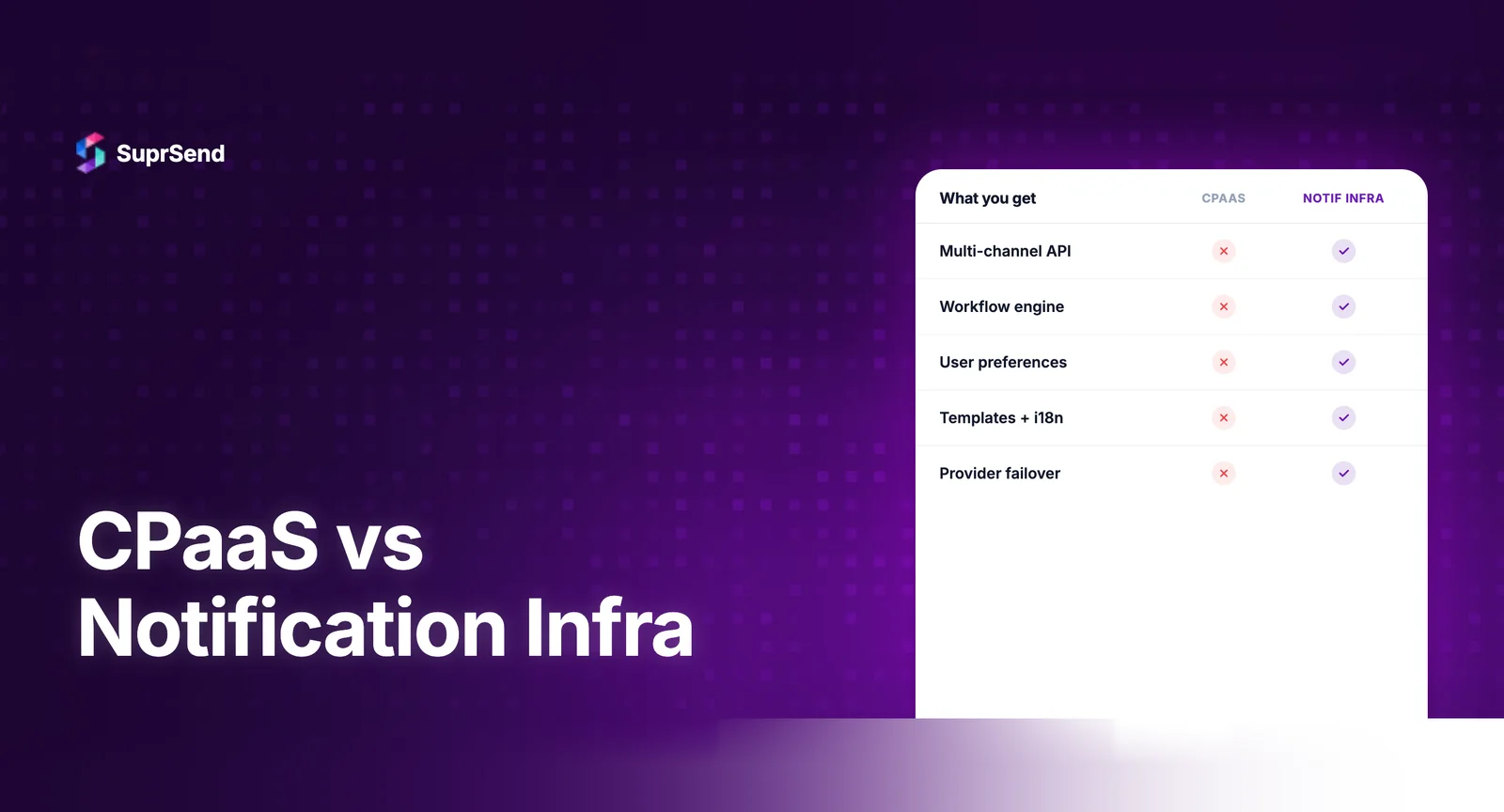
What CPaaS doesn’t do: Orchestrate multi-channel notifications. Manage notification workflows (delays, batching, branching). Handle user notification preferences. Provide template management with versioning. Offer notification-specific analytics (open rates, engagement per notification type). Route across channels based on user behavior or availability.
What Is Notification Infrastructure?
Notification infrastructure is an orchestration layer that sits above communication channels (including CPaaS) and manages the complete lifecycle of product notifications: event processing, workflow orchestration, template rendering, channel routing, user preference management, delivery tracking, and analytics.
Notification infrastructure platforms include SuprSend, Knock, Novu, Courier, and Fyno. These platforms don’t replace CPaaS -they use CPaaS providers as downstream delivery channels.
What notification infrastructure does well: Managing the logic between “an event happened in your product” and “the right user received the right notification through the right channel at the right time.” This logic includes workflows, preferences, batching, channel routing, template management, and observability.
What notification infrastructure doesn’t do: Provide telecom connectivity. Handle carrier routing. Manage phone number provisioning. Process voice calls or video conferencing. These are CPaaS capabilities.
CPaaS vs Notification Infrastructure
| Dimension | CPaaS | Notification Infrastructure |
|---|---|---|
| Primary function | Channel delivery (SMS, voice, video) | Notification orchestration (workflows, routing, preferences) |
| Stack position | Delivery layer (bottom) | Orchestration layer (middle) |
| Input | “Send this SMS to this number” | “This event happened — notify the right users” |
| Multi-channel | Multiple APIs (one per channel) | Single API (routes across all channels) |
| Workflows | Not included | Core feature (delays, batching, branching) |
| User preferences | Not included | Core feature (category, channel, frequency controls) |
| Templates | Basic (per-channel) | Advanced (cross-channel, versioning, i18n) |
| Analytics | Delivery metrics (sent, delivered) | Engagement metrics (opened, clicked, per notification type) |
| Target buyer | Developers needing channel APIs | Product + engineering teams needing notification management |
| Pricing model | Per-message (SMS: $0.0075+, email: $0.001+) | Per-notification ($0.002–$0.01, includes orchestration) |
| Examples | Twilio, Vonage, MessageBird, Plivo | SuprSend, Knock, Novu, Courier |
The Architectural Relationship
CPaaS and notification infrastructure aren’t alternatives - they’re complementary layers in the notification stack. Here’s how they fit together:
Layer 1: Application (your product). An event occurs: user signs up, payment fails, someone comments. Your application triggers a notification by calling the notification infrastructure API.
Layer 2: Notification Infrastructure (orchestration). The platform processes the event through a workflow. It renders the template, checks user preferences, applies batching rules, selects the appropriate channels, and determines timing. This is where the notification logic lives.
Layer 3: CPaaS / Delivery Providers (channel delivery). After orchestration, the notification infrastructure routes the message to the appropriate delivery provider: Twilio for SMS, SendGrid for email, FCM for push, the platform’s own SDK for in-app. The delivery provider handles the actual transmission.
This separation of concerns is why the confusion exists. When someone says “we use Twilio for notifications,” they’re describing the delivery layer. The orchestration layer - the logic that determines what gets sent, to whom, through which channel, and when - is either built in-house or handled by a notification infrastructure platform.
When CPaaS Alone Is Enough
CPaaS without notification infrastructure works when your notification needs are simple:
Single channel, single use case. You send SMS-only OTP codes. No workflows, no preferences, no multi-channel routing. Just “send this code to this number.” Twilio’s API handles this perfectly without an orchestration layer.
Communication-first products. Your product’s core value is communication itself - video conferencing, voice calls, business messaging. CPaaS provides the infrastructure for these features directly. Notification infrastructure isn’t relevant here.
Marketing campaigns via single channel. You send bulk SMS campaigns or transactional emails through a single provider. If there’s no cross-channel logic, no user-level preference management, and no workflow orchestration, CPaaS direct integration may suffice.
When You Need Notification Infrastructure
Once you move beyond single-channel, single-use-case notifications, you need an orchestration layer:
Multi-channel delivery. Users should receive notifications through their preferred channel - email for some, push for others, in-app for active users. This routing logic doesn’t belong in your application code, and CPaaS doesn’t provide it.
Workflow orchestration. You need delays (“send a reminder 24 hours later if unread”), batching (“aggregate 5 comments into 1 digest”), conditional branching (“if user is premium, send via SMS; otherwise, email only”), or channel fallback (“try push first, email if push fails”).
User preferences. Users expect to control their notification experience: which categories they receive, through which channels, at what frequency. Building and maintaining a preference center that integrates with delivery logic is a notification infrastructure problem, not a CPaaS problem.
Template management. You need versioned templates across channels, with variable substitution, i18n support, and a visual editor that non-engineers can use. CPaaS provides basic message construction; notification infrastructure provides full template lifecycle management.
Observability. When a user reports they didn’t receive a notification, you need step-by-step logs showing every decision the system made - from event trigger through workflow processing to delivery attempt. CPaaS provides delivery receipts; notification infrastructure provides end-to-end audit trails.
How SuprSend Uses CPaaS Under the Hood
SuprSend is a notification infrastructure platform that uses CPaaS providers as downstream delivery channels. When you trigger a notification through SuprSend’s API, the platform:
1. Processes the event through your configured workflow.
2. Checks user preferences to determine which channels are opted-in.
3. Renders templates for each selected channel.
4. Routes to the configured CPaaS provider: SendGrid or AWS SES for email, Twilio or Gupshup for SMS, FCM or APNs for push, SuprSend’s own SDK for in-app.
5. Tracks delivery across all channels in unified logs.
This architecture means you bring your own CPaaS accounts (Twilio, SendGrid, etc.) and SuprSend orchestrates across them. You can also configure multiple providers per channel with automatic failover - if SendGrid goes down, email routes to Mailgun without code changes.
The benefit: you get CPaaS-level delivery with notification infrastructure-level orchestration. The notification infrastructure doesn’t replace your CPaaS providers; it makes them more effective by adding the logic layer they don’t include.
The Cost Equation
A common misconception is that notification infrastructure is an additional cost on top of CPaaS. In practice, notification infrastructure often reduces total notification costs:
Preference management reduces unnecessary messages. If 30% of users opt out of a notification category, you’re not paying CPaaS delivery costs for those messages. Without preference management, every user gets every notification.
Smart routing reduces channel costs. SMS costs 10-100x more than email per message. A notification infrastructure platform that routes to in-app first (essentially free), falls back to push (free), and only uses SMS for critical, time-sensitive notifications can dramatically reduce CPaaS spend.
Batching reduces message volume. Sending 1 digest notification instead of 5 individual notifications reduces CPaaS costs by 80% for high-frequency events. This batching logic is a notification infrastructure feature, not a CPaaS feature.
| Cost Component | CPaaS Only | CPaaS + Notification Infrastructure |
|---|---|---|
| SMS delivery | $0.0075/message × all users | $0.0075/message × opted-in users only |
| Email delivery | $0.001/message × all users | $0.001/message × after preference + routing checks |
| In-app delivery | Not available (requires custom build) | Included in platform (near-zero marginal cost) |
| Orchestration | Custom code (engineering time) | Platform handles ($0.002–$0.01/notification) |
| Preference management | Custom build (engineering time) | Included in platform |
FAQ
What is the main difference between CPaaS and notification infrastructure?
CPaaS provides communication channel APIs (SMS, voice, video). Notification infrastructure sits above those channels and adds orchestration: workflows, templates, preferences, and multi-channel routing. CPaaS is a delivery layer; notification infrastructure is an orchestration layer.
Can I use CPaaS instead of notification infrastructure?
Only if your needs are simple: single channel, no workflows, no preferences. For multi-channel product notifications with routing logic, batching, and user preferences, you need notification infrastructure. You'll likely use CPaaS providers underneath as delivery channels.
Do notification infrastructure platforms replace CPaaS?
No. Notification infrastructure platforms use CPaaS providers as delivery channels. SuprSend routes SMS through Twilio, email through SendGrid, push through FCM. The platform adds the orchestration layer that CPaaS doesn't include.
Is Twilio a CPaaS or notification infrastructure?
Twilio is a CPaaS. It provides APIs for SMS, voice, email (via SendGrid), and video. It does not provide workflow orchestration, template management with versioning, user preference centers, or multi-channel routing logic. Those are notification infrastructure features.
When do I need both CPaaS and notification infrastructure?
Almost always, when building product notifications at scale. You need CPaaS for channel delivery (SMS via Twilio, email via SendGrid) and notification infrastructure for orchestration (workflows, preferences, routing, templates). Most production notification systems use both layers.
Which is more expensive: CPaaS or notification infrastructure?
CPaaS costs are per-message (SMS: $0.0075+, email: $0.001+). Notification infrastructure costs are per-notification ($0.002-$0.01). You pay both, but notification infrastructure often reduces total CPaaS costs by preventing unnecessary messages through preference management and smart routing.
TL;DR: CPaaS and notification infrastructure are complementary, not competing categories. CPaaS provides channel delivery APIs (SMS, voice, video). Notification infrastructure provides orchestration (workflows, routing, preferences, templates) and uses CPaaS providers as downstream delivery channels. Most production notification systems need both: notification infrastructure for the logic layer, CPaaS for the delivery layer. Notification infrastructure often reduces total costs by preventing unnecessary messages through preference management and smart channel routing.
Ready to add the orchestration layer to your notification stack? Start building for free with SuprSend, or book a demo to see how the platform orchestrates across your existing CPaaS providers.